












Earlier this month, Apple wrapped up WWDC 26, the annual opportunity to announce new and exciting product changes, and this year’s updates are notably broad in scope for UA professionals and mobile app developers specifically, covering new creative placement options, changes to how assets are managed and published, shifts in how the App Store surfaces apps to users, and a meaningful expansion of subscription tooling.
Some of these updates are live now, others roll out this fall. But for all of them, the time to start preparing is right now. We’ve covered the eight updates with the most direct impact on visibility, conversion, and subscription performance, and what your team should have in motion before each one goes live:
What’s inside?
- Creative assets: product page headers and search results go visual
- Asset Library and product page preview in App Store Connect: creative operations finally catch up
- Using creative assets across Apple Ads, custom product pages, and deep-linked journeys
- Personalized Collections: discovery becomes more contextual
- Apple Intelligence and App Intents: preparing for intent-led discovery
- Subscription updates: new tools across the subscriber lifecycle
| Update / capability | Availability according to Apple |
| New creative asset placements | Coming fall 2026 |
| Asset Library | Coming fall 2026 |
| Product page preview in App Store Connect | Coming fall 2026 |
| Personalized Collections | Available in select countries or regions for limited apps; expanding over time |
| Apple Intelligence / App Intents | Developer capabilities available through Apple Intelligence / App Intents frameworks |
| Retention Messaging | Coming fall 2026 |
| Monthly subscriptions with 12-month commitment | Now available on supported OS versions, except US and Singapore |
| Subscription Bundles and Suites | More request details coming later summer 2026 |
New creative asset placements: product page headers and search results go visual
What it is
Apple is expanding where developers can use marketing images and videos across the App Store, beyond traditional screenshots and app previews. Apple refers to these images and videos as creative assets. They can appear in new App Store placements, including product page headers and search results.
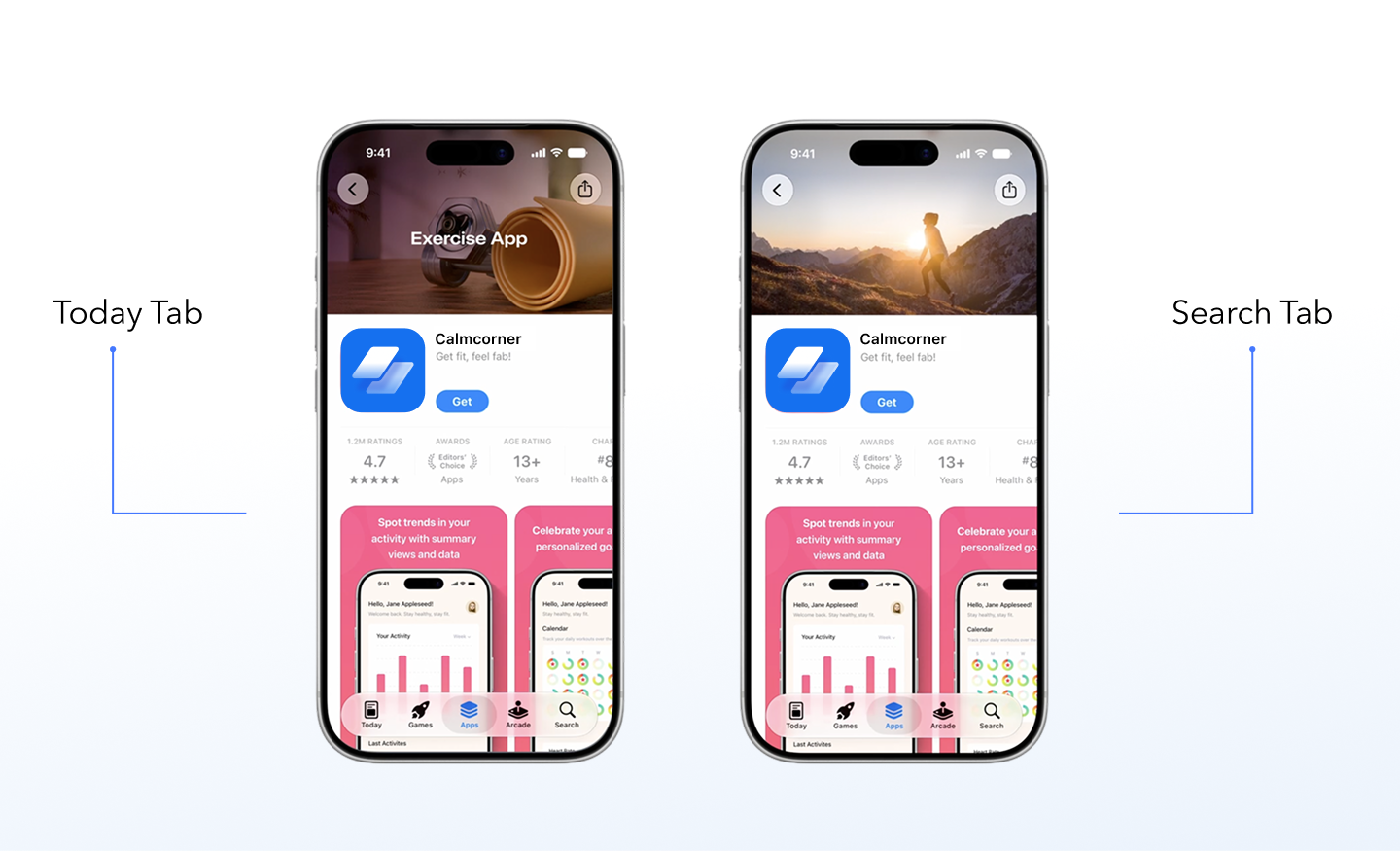
The product page header appears above the app’s screenshots and icon. It can be an static image or a video. In search results, developers can use a dedicated image or video asset instead of relying only on the default screenshot strip.

These assets can be submitted for App Review independently of an app version update. Your creative calendar no longer waits for a new build.

Why it matters
In our view, this is the most significant structural change to product pages on the App Store in years. For a long time, ASO relied heavily on screenshots and UI-focused creatives. Now apps can use emotional, brand-driven visuals directly in search. We think that apps that do not invest in strong header creatives will see lower click-through rates and installs compared to competitors who do.
The search result implication is sharp. If you have been running search results campaigns with Apple Ads, the visual gap between your ad and organic results was previously almost nonexistent. That gap is about to widen. Apps that adopt creative assets will have richer, more flexible ways to stand out on the App Store.
The same asset also works for ads on the Today tab and search results campaigns via Apple Ads. One asset, multiple surfaces.
Top tips from the MobileAction team
- Treat the product page header like a hero banner, not a screenshot. Design it at brand level: logo, brand color, lifestyle imagery, or a motion video. Think about what your best web landing page hero looks like. This is its App Store equivalent.
- Build a search-specific creative brief. Your search result asset needs to communicate your core value in a single glance. Users in search are in intent mode. Give them a clear reason to tap within the first half second.
- Test before committing. Apple says these visuals can be tested using product page optimization, so use them to validate the creative before rolling it out broadly.
- Start preparing assets now. The new creative asset placements are coming this fall, with more detailed guidance from Apple expected later this summer.
Asset Library and product page preview: a smarter way to manage your creative
What it is
Asset Library is a new centralized place in App Store Connect for managing app visual elements, including creative assets, videos, app previews, screenshots, and In-App Event media. Approved assets can be reused across custom product pages, In-App Events, and creative asset placements without re-uploading or re-submitting for review.

Assets submitted through the Asset Library go through review independently of your app version. Once approved, they are available to deploy across any placement instantly.
App Store Connect is also adding a product page preview tool alongside Asset Library. Before publishing anything, you can now see exactly how your product page will look to users: header, app name, description, screenshots, and search result creative assets, across the iPhone and iPad, in different orientations, languages, and Dark Mode.

Why it matters
Product page optimization tests that do not include alternate app icons can already be submitted for review independent of a new app version. The Asset Library brings that same flexibility to your entire creative operation: manage, update, and reuse assets across all placements without waiting on a new build. Faster updates, fewer bottlenecks, and a lot more flexibility around seasonal campaigns and time-sensitive promotions.
If you have managed App Store creative at scale across multiple countries and regions, you know how operationally intensive the current setup is. The Asset Library changes that entirely. The preview tool removes the guesswork from publishing: teams can see what users will see before anything goes live. For Apple Ads teams, assets can also be uploaded and submitted via the App Store Connect API, and the Apple Ads Platform API supports automation of ad setup flows.
Top tips from the MobileAction team
- Build a seasonal asset calendar. Map your App Store creative to your marketing calendar for the full year. Submit assets 4 to 6 weeks before each campaign window to absorb any review buffer.
- Reuse what you already have. If you have strong In-App Event visuals, audit them before commissioning new material. They can carry across to your creative asset placements.
- Use the product page preview tool before every publish. Check across languages, orientations, and Dark Mode before assets go live. It takes minutes and eliminates surprises.
- Automate via API if you manage multiple apps. Setting up Asset Library submissions via the App Store Connect API will pay off quickly in saved operational time.
Using creative assets across Apple Ads, custom product pages, and deep-linked journeys
What it is
These new images and videos are not limited to organic App Store placements. The same images and videos managed in Asset Library can be used for ads on the Today tab, ads in search results, and custom product pages. The WWDC session showed an exercise app using the same visual from its website’s yoga campaign on the custom product page header, then deep-linking users directly into the yoga offering after download.
Why it matters
Apple addressed the full customer journey in this session. A consistent visual thread from the first touchpoint (website or ad) through the App Store product page to the in-app destination is now something you can build entirely within Apple tools and platforms.
It is now possible to run the same hero asset on your website, in your campaign with Apple Ads, on your custom product page header, and in organic search results. One asset, one message, every surface. The deep-link layer is what closes the loop: users who tap a campaign-specific custom product page land directly in the content that matched what brought them there, not on a generic home screen.
Top tips from the MobileAction team
- Map your custom product pages to your web campaigns. The hero visual from a campaign landing page can become the creative asset for the corresponding custom product page. The user should see a continuous visual experience from click to download to first session.
- Use deep links from custom product pages. Do not send users to your default home screen after they download from a campaign-specific custom product page. Land them directly in the content that matched what brought them there.
- Test custom product page creative with MobileAction’s CPP tools. The SearchAds.com by MobileAction platform gives you the performance data to understand which custom product page creatives drive better downstream results, not just taps.
Personalized Collections: discovery becomes more contextual
What it is
Apple is rolling out Personalized Collections across the Apps, Games, and Search tabs: curated groupings tailored to each user’s app usage and downloads, as well as other App Store information.
Each recommendation can appear with a clear explanation of why that app is relevant to the user.
Personalized Collections and App Notes are live now in select countries and regions for a limited number of apps, with expansion to more languages, countries, and regions over time.
Why it matters
We believe that Apple Intelligence becomes a bigger part of discovery, ASO will increasingly depend on how well Apple understands your app’s purpose, features, and target audience, not just its keywords. What your metadata says, and how accurately it reflects what your app actually does, now has a direct pipeline into browse-based discovery. Generic or vague metadata gives the personalization engine nothing to work with.
Each recommendation appears with an App Note: a short explanation of why that app was suggested to that user. The only inputs you control are your keyword strategy and your product page. Invest in getting both precise.
Top tips from the MobileAction team
- Audit your metadata for specificity. Generic descriptions that could apply to any app in your category give the algorithm nothing to differentiate on. Be exact about who the app is for and what problem it solves.
- Think intent over category. Personalized Collections reward apps clearly anchored to a specific use case. Precision of positioning matters more than breadth of features.
- Monitor for organic ranking shifts. As collections roll out, watch for changes in organic keyword positions using MobileAction’s ASO Intelligence tools. These shifts will tell you which user audiences Apple is associating with your app.
Apple Intelligence and App Intents: preparing for intent-led discovery
What it is
As Apple expands Apple Intelligence and App Intents, apps that expose relevant intents can make their functionality easier for Siri and system experiences to surface. A user asking Siri to “book me a yoga class” or “start a 20-minute run” will get answers from apps that have built the relevant intents. Apps that have not built them will not surface.
Apple’s Foundation Models framework is also now available for in-app AI features. For Small Business Program apps under 2 million lifetime downloads, Private Cloud Compute access comes at zero API cost.
Why it matters
Both Google Play and the App Store are moving in the same direction: AI-assisted discovery that surfaces apps based on user intent rather than keyword matches alone. Apps that expose rich, task-based App Intents get surfaced. Apps that do not will lose share to those that do.
If your app has any transactional or task-based functionality, we suggest that App Intents are no longer an optional developer feature. They are a distribution channel.
Top tips from the MobileAction team
- Audit your App Intents coverage. Which core user actions in your app could be triggered via a Siri query? Prioritize those for implementation before iOS 27 launches this fall.
- Align your metadata and your App Intents definitions. Both are now inputs to how Siri surfaces your app. They should use consistent terminology and intent mapping.
Subscription updates: new tools across the subscriber lifecycle
What it is
WWDC 26 introduced three new subscription features that together cover the full subscriber lifecycle. Subscription Bundles and Suites let developers from different companies combine their subscriptions into a single In-App Purchase, with Suites offering packages not available as standalone products. Both are powered by StoreKit 2, with more details from Apple coming later this summer. The 12-month commitment with monthly billing is a new pricing model where users commit to a full year but pay on a monthly basis, available now on iOS, iPadOS, macOS, tvOS, and visionOS 26.4 and above, worldwide except the US and Singapore. And Retention Messaging, coming this fall, lets developers surface a tailored offer or message during the cancellation flow before the subscription lapses.
Why it matters
Each of these features targets a different stage of the subscription lifecycle. Bundles expand reach: a productivity app paired with a complementary tool could help reach users who may not have discovered it through search alone. The 12-month commitment plan helps address a long-standing pricing tension: annual plans convert worse but retain better, monthly plans convert easier but churn faster. Monthly billing with an annual commitment bridges that gap. And Retention Messaging addresses the most expensive problem in subscription economics: the cost to re-acquire a churned subscriber via paid channels can often exceed the cost of keeping them at the moment they consider leaving.
Used together, these three features give subscription apps more native App Store levers across acquisition, conversion, and retention.
Top tips from the MobileAction team
- On Bundles: Start identifying complementary partners now. Map the adjacent problems your users have and find the strongest apps in those categories. Model the LTV economics before committing to a discount.
- On the 12-month plan: Test it as your default middle tier between monthly and annual. Monitor performance especially in markets where annual has historically underperformed.
- On Retention Messaging: Start simple. A clear 30% off or a free month with a “here is what you will lose” framing is often a stronger starting point than complex flows on the first iteration. The 12-month commitment plan is a natural pairing: lower ask than annual, harder to walk away from than monthly. Prepare your offer strategy now so you are ready when the feature goes live this fall.
Bottom line
WWDC 26 is one of the most actionable years for app marketers in recent memory. Asset Library gives UA and ASO teams direct control over visuals across product page headers, search results, and Apple Ads, without requiring a new app version submission.
Personalized Collections and App Intents push discovery toward intent and context. And the subscription updates, from 12-month commitment plans to cross-developer bundles and retention tooling, give subscription apps more ways to convert, retain, and grow than ever before.
The teams that benefit most will be those that move fast, test systematically, and treat every part of the App Store journey as connected. With MobileAction, you have the competitive intelligence, keyword tools, and Apple Ads infrastructure to act on everything WWDC 26 just put on the table. And if you want to map these updates to your app’s growth strategy, our team of mobile growth experts is here to help.

Resources that you'll love


Grow your app on the App Store and Google Play Store with our solutions now