











Weather
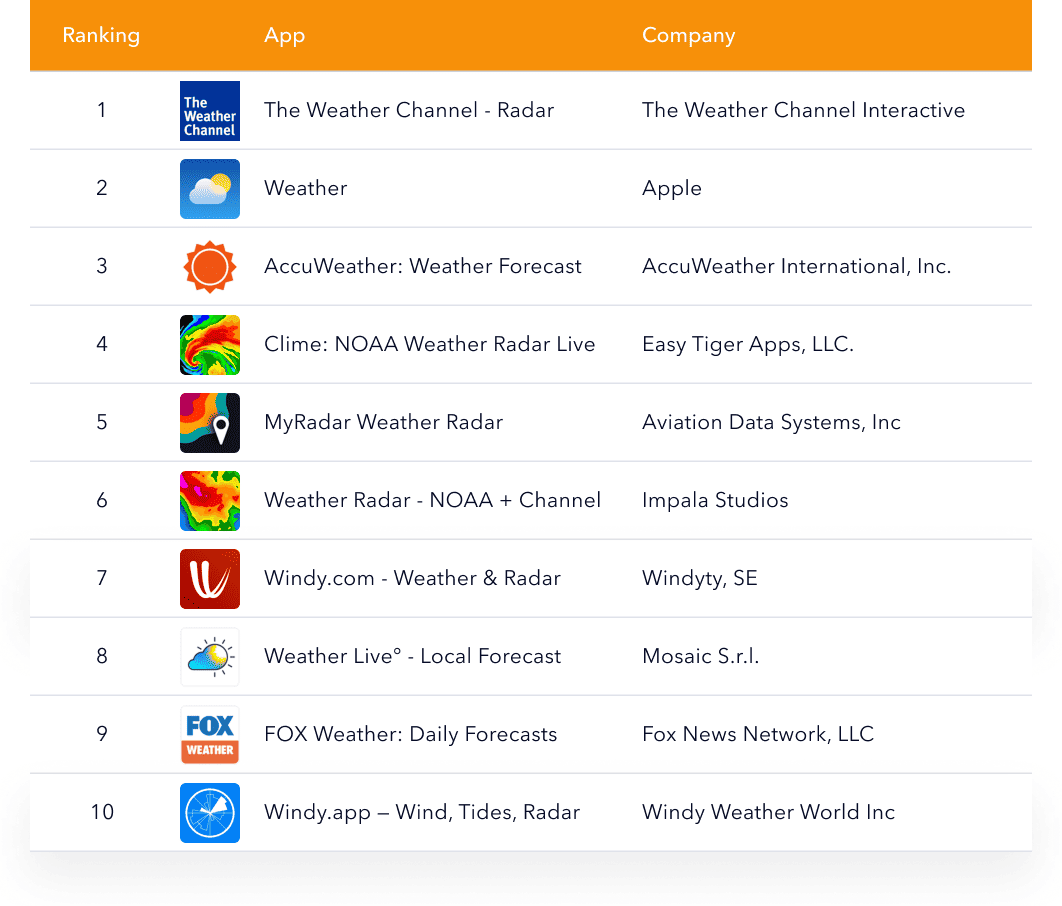
- The Weather Channel covers everyday forecasting alongside live radar and severe weather monitoring. In search, its metadata leads with high-demand terms such as “forecast,” “weather alerts,” and “UV index.”
- Apple Weather delivers a clean experience built around hourly forecasts, 10-day forecasts, maps, and notifications. Its metadata relies on plain, universal terms like “temperature,” “rain,” “snow,” “wind,” “hourly,” and “maps,” closely matching how people naturally search for weather basics.
- AccuWeather emphasizes detailed conditions, frequent updates, and severe weather alerts. In metadata, broad terms like “weather” and “forecast” are paired with specificity cues such as “alerts,” “radar,” and “local forecast,” helping it rank for both general and advanced searches.
- Clime is built around interactive maps and real-time alerts, with strong “NOAA radar” positioning. It performs well because searches for radar and NOAA usually signal urgent intent, especially during storms.
- MyRadar focuses on speed and simplicity, showing animated live weather radar with minimal setup. Many users choose it because they want to quickly see what’s coming rather than browse a full forecast. Its metadata puts “accurate weather radar” front and center.
- Weather – Local Channel combines “local weather” forecasts with radar and storm-tracking features. Its metadata leans on familiar utility language, emphasizing “local,” “weather changes,” and “storm tracking” to stay broadly discoverable.
- Windy.com weather app focused on detailed radar, satellite, and forecast maps. It ranks well because its metadata highlights clear, high-intent terms like “weather,” “radar,” “satellite,” “hurricane tracker,” and “alerts,” which match searches from users looking for precise forecasts and storm tracking.
- Weather Live presents forecasts through a customizable, visual interface designed for quick understanding. It aligns with broad “local forecast” searches while offering clear value through “alerts” and adjustable views. The app supports daily planning and weekly outlooks.
- Weather & Radar centers on “live radar,” warnings, and multi-day planning. It performs well because searches like “weather radar” and “storm radar” indicate strong intent, and the app name directly matches that behavior. Its metadata reinforces this by repeating variants such as “rain radar,” “wind radar,” and “weather warnings,” tied to practical use cases.
- Windy.app is designed for wind-based activities, combining wind forecast data with waves, tides, and radar-style views. It performs well by targeting clear niche demand while remaining visible in broader weather searches. Its metadata uses direct audience and activity terms like “surfers,” “sailors,” “fishing,” alongside core keywords such as “wind,” “tides,” and “radar,” making the use case immediately clear.
Navigation
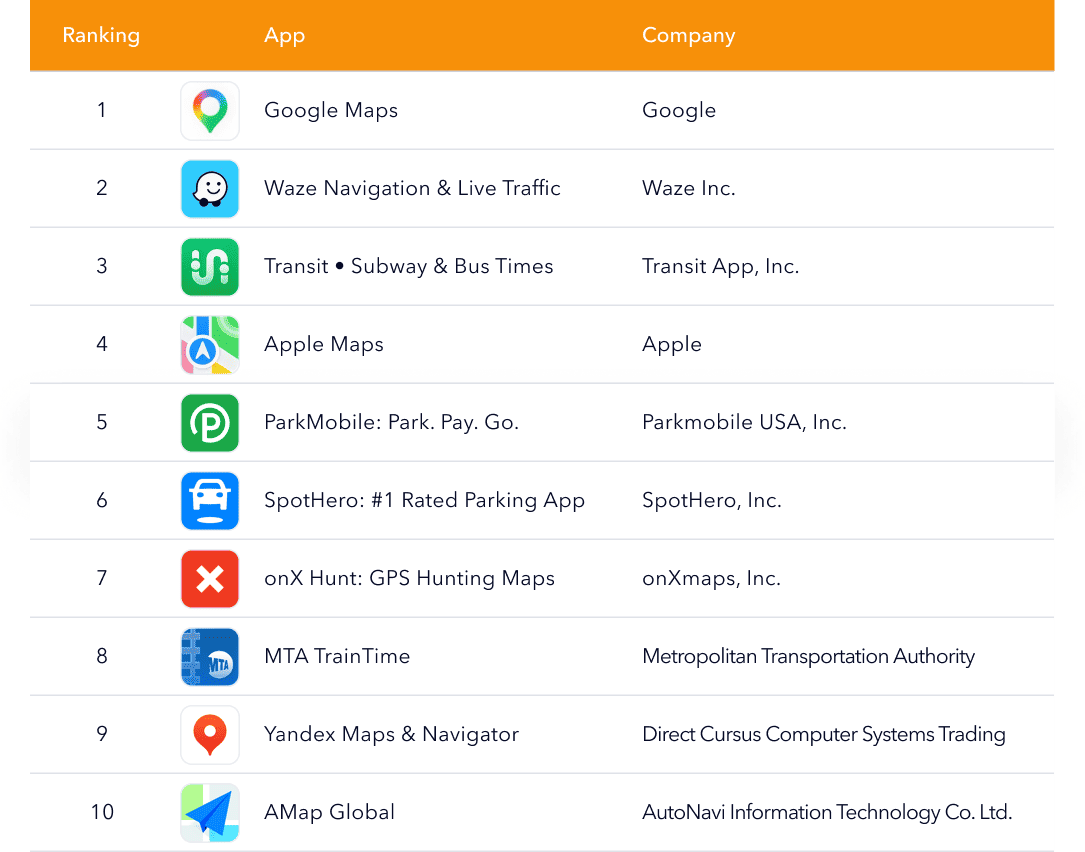
- Google Maps works as an all-purpose mapping tool for directions, real-time traffic routing, and finding places with practical details like reviews and business information. It stays strong in App Store search because it answers the widest set of “maps” and “directions” queries, driving, walking, cycling, and transit, so it fits many trip types without narrowing the promise. That broad match shows up in the language it leads with: maps, navigation, GPS, and traffic are simple category terms that keep it relevant across high-volume searches.
- Waze Navigation & Live Traffic is built for drivers who want the fastest route right now, using live conditions and community reports for hazards, slowdowns, and road changes. It performs well because “live traffic,” “avoid delays,” and ETA-driven searches are urgent and high intent, and Waze makes the benefit immediately clear for commuting and daily driving. The app’s wording stays close to how drivers search, GPS navigation, traffic, alerts, and ETAs, so the listing reads like a direct solution rather than a general maps option.
- Transit • Subway & Bus Times is a public-transport-first trip planner that helps people move around cities using subway and bus info, while also supporting other local mobility options like rideshare or bikeshare. It ranks well because commuting is repetitive and time-sensitive, and many searches are literal (“subway times,” “bus times,” “transit”) with users trying to solve the next trip fast. Its metadata leans into that everyday language, subway, bus, times, trip planning, so it matches what people type when they’re standing on a platform or planning a route across town.
- Apple Maps is Apple’s built-in mapping and navigation app. It performs well because the “maps” intent is universal, and many users default to an Apple-native option, especially when features like offline use and rich place details make comparisons easier. The way it positions itself stays broad, maps, navigates, explores, and then adds conversion cues like privacy and offline maps for users deciding between alternatives.
- ParkMobile focuses on handling parking from your phone. Search performance is strong because “pay for parking” and “parking app” queries are typically made at the moment, and that urgency tends to convert when the solution is obvious. The listing language mirrors that immediate need, park, pay, reserve, parking, so it aligns with problem-solving searches rather than general navigation browsing.
- SpotHero is geared toward booking parking ahead of time, especially in busy areas where certainty matters. It performs well because the “reserve parking” intent is clear and of high value. Its metadata keeps it direct: find parking, reserve, save, simple terms that match how people search when planning a trip and trying to lock in parking early.
- onX Hunt is a niche navigation and mapping app made for hunting, with land boundaries, detailed layers, and offline use for remote areas. It ranks well because it owns a very specific intent cluster; people looking for “hunting maps” or “GPS hunting” aren’t comparing it to general maps apps; they’re looking for field-ready features.
- MTA TrainTime serves Long Island Rail Road and Metro-North riders by combining train tracking, trip planning, and mobile ticketing in one official utility. It performs well because the searches are task-first and time-sensitive, users want schedules, live updates, and tickets without extra steps, and an all-in-one official app tends to convert quickly. The metadata stays literal and action-based (buy tickets, plan trips, track trains), matching what riders look for when they’re heading to the station.
- Yandex Maps & Navigator is a full navigation app for multiple modes. It performs well because it can compete on broad “maps” and “navigator” queries while also attracting users who specifically prefer Yandex as their default in regions where it’s a common choice.
- AMap Global is positioned as a travel-friendly navigation option. It performs well because the “travel maps” intent often becomes region-specific; people look for a dependable app for the place they’re visiting, not just a generic navigator. Its metadata combines broad discoverability terms like “map,” “navigation,” “traffic,” and “ETA” with a clear regional use case.
Books
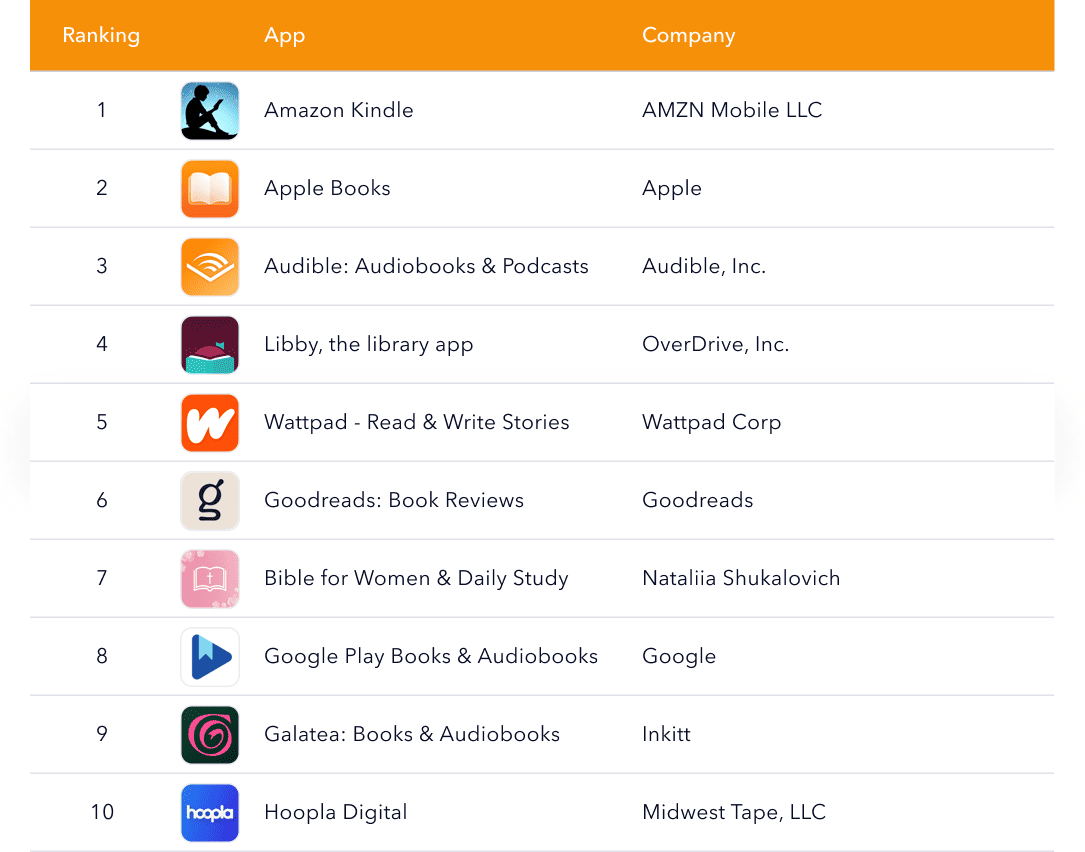
- Amazon Kindle is an ebook reader built around buying, downloading, and reading across devices. It stays highly visible because it covers the widest “ebook reader” demand and gets a big lift from brand-led searches tied to the Kindle ecosystem, which converts strongly. Users typically come for everyday ebook reading, managing a personal library, and reading on the go. The listing keeps it broad and obvious with books, ebooks, and read language anchored by the Kindle name, so the intent is clear even on generic queries.
- Apple Books is Apple’s default-style reading app for ebooks and audiobooks, designed around a clean library and a simple buy/download/read flow on iOS. It performs well on broad “books” searches largely because the experience feels trusted and straightforward for iPhone users, which helps conversion without needing niche positioning.
- Audible is primarily an audiobook listening app, with offline downloads and podcasts. Search demand for audiobooks is direct and high-intent, and Audible’s brand recognition in that niche makes it an easy choice when users are comparing options. People use it for audiobook listening, offline audio during commutes, and podcast consumption alongside books. The way it leads with audiobooks and podcasts, plus practical cues like download/offline, matches exactly what listeners look for when they want audio content quickly.
- Libby, the library app, is the “borrow instead of buy” option: users connect a library card and check out ebooks and audiobooks for free from participating libraries. It ranks well because queries like “library app” and “free ebooks” convert when the value is immediate and easy to understand. Its positioning uses very literal terms, library, borrow, ebooks, audiobooks, so it aligns with how users search when cost-free access is the priority.
- Wattpad blends reading with creation, letting users binge serialized stories and also publish their own work inside the same community. It performs well because “stories” is a broad discovery term that supports long sessions and repeat visits, and the read/write loop creates multiple entry points beyond traditional “book” searches.
- Goodreads is used less for reading and more for choosing what to read next, tracking books, rating them, and relying on reviews and recommendations. It performs well because the “book reviews” and “book tracker” intent is steady, and Goodreads is widely recognized as a decision helper before a purchase or a new read. Its listing leans on clear utility words like reviews, ratings, recommendations, and track books, matching how readers search when they want guidance.
- Bible for Women & Daily Study focuses on Bible reading as a routine, with daily study and devotional-style content framed for a specific audience. It performs well because religious keywords like Bible and daily study are high intent, and the audience cue (“for women”) can improve match quality for users looking for a tailored experience. People use it for daily Bible reading, devotional study, and building a consistent faith habit.
- Google Play Books & Audiobooks is a store-and-reader combo for ebooks and audiobooks, built around buying content and syncing across devices. It performs well because it can match broad “books” demand while also covering listening intent in the same listing, which expands reach across common search terms. Users come to read ebooks, listen to audiobooks, and browse a catalog for what to buy next.
- Galatea is a fiction app built for binge reading, often centered on serialized romance-style stories with fast progression and optional audio. The main intents are serialized fiction reading, romance discovery, and binge-style consumption. Its listing leans on wide terms like “books”, “stories”, and “audiobooks”, then uses framing that signals the type of fiction experience to the right audience.
- Hoopla Digital is another library access app, but with a broader media promise, ebooks and audiobooks alongside movies, music, and more through participating libraries. It performs well because “library” and “free” intent is highly conversion-driven, and the wider catalog can be a differentiator for users who want more than books.
