













Looking to boost your app's visibility and acquire more users? Our 2025 ASO Report is your ultimate guide to navigating the evolving app store landscape. Packed with data-driven insights, keyword trends, and top-ranking app strategies, this report will equip you with the knowledge to optimize your app's presence and achieve organic growth.
Increasing organic visibility is one of the most effective ways to grow a mobile app. Users search for apps everywhere, on Google, on the App Store, and on Google Play. If you want consistent, high-quality installs, your app needs to appear in all of the places where people search. That’s where SEO for apps comes in.
SEO for apps combines two core disciplines: optimizing your app’s web presence so it ranks in web search, and optimizing your App Store or Google Play listing so it ranks for relevant store keywords. When these two elements work together, you reach users throughout the entire discovery journey. This unified approach helps you improve visibility, acquire more organic users, and reduce dependency on paid acquisition.
In this blog post, we walk through how mobile app SEO and ASO come together to create a stronger growth engine. You’ll learn how to research keywords, optimize landing pages, structure store metadata, and build a sustainable strategy that improves rankings and conversions across platforms.

What is SEO for apps?
SEO for apps refers to the full set of strategies that make your mobile app discoverable across web search, the App Store, and Google Play. When someone searches for a problem, a feature, or an app category, you want your app to appear at the top of results. To achieve this, you need a unified approach that covers both SEO for mobile apps (your website and landing pages) and SEO for app store listings (ASO).
This matters even more today because most searches happen on Google. According to StatCounter’s November 2025 data, Google holds 89.94% of the global search engine market, while Bing has 4.22%, Yandex 2.18%, Yahoo 1.4%, DuckDuckGo 0.85%, and Baidu 0.68%. Since almost 9 out of 10 searches start on Google, your app needs strong visibility on the web, not only in app stores.
Most teams start with ASO, but users no longer discover apps only through app stores. A large share of searches happen on Google. This means your app needs a presence across every search environment.
In practice, SEO (web search optimization) and ASO (app store optimization) strengthen each other. SEO drives traffic into your store listing page, while ASO ensures those visitors convert. Together, they create a continuous source of organic installs.
SEO vs. ASO: key differences
SEO for apps focuses on improving how your app appears in web searches. The goal is to help people find your app through optimized landing pages, blog content, and other indexed web assets. You optimize page structure, metadata, content quality, and technical performance. This allows you to capture demand from users who are searching for solutions, features, or comparisons related to your app category.
ASO focuses on improving visibility inside app stores. You optimize your App Store or Google Play listing page so your app ranks for relevant keywords and converts more page views into installs. This includes metadata fields such as the app title, subtitle, short description, long description, and creative assets like screenshots and preview videos.
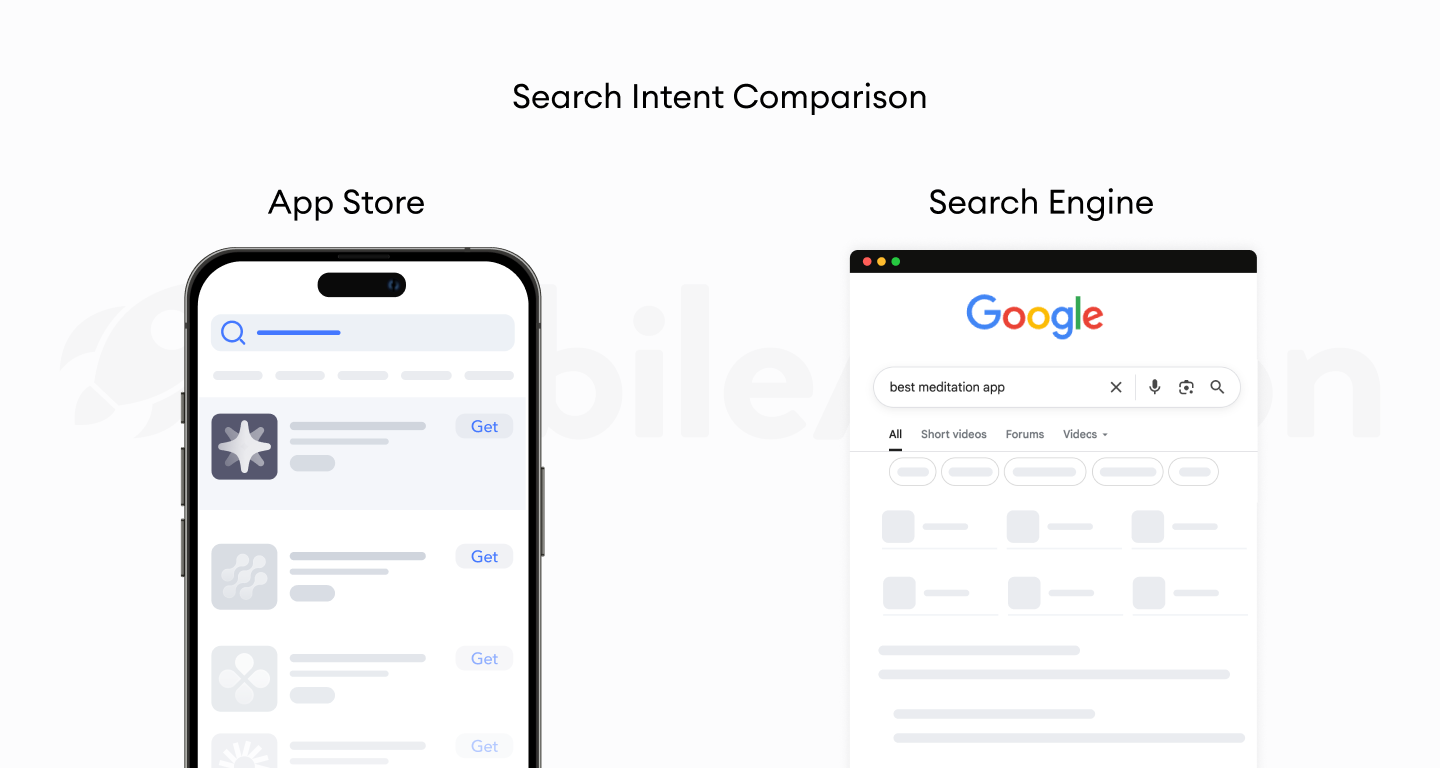
The difference is simple:
- SEO helps your app appear in web searches.
- ASO helps your app appear and convert in the App Store or Google Play.
Understanding ASO vs SEO is the first step toward building a complete SEO strategy for mobile apps.
How search visibility works across Web, App Store, and Google Play
Search visibility works differently on each platform. Understanding these differences helps you build a more targeted SEO strategy for mobile apps.
On web searches, your visibility depends on how well your app landing page is optimized, how relevant your content is to user queries, and the overall quality of your website. Google uses semantic understanding to match your page with searches like “budget planner app,” “best meditation app,” or “photo editor app for iPhone.” These queries show user intent, and Google surfaces pages that best answer that intent.

In the App Store, Apple focuses heavily on your app name, subtitle, and keyword field. Visual store assets and ratings influence your conversion rate, which indirectly affects ranking. Because Apple’s algorithm is more metadata-driven, optimizing your App Store listing, especially the title, subtitle, and keyword field, is critical.
In Google Play, ranking factors are closer to traditional SEO. Google evaluates your long description, keyword relevance, and user engagement signals. This gives you more flexibility to target category terms and functional queries directly, such as “habit tracker app” or “expense tracker app for Android.”
When your website and store listing page reinforce the same themes, it becomes easier for each platform to understand what your app does. This consistency improves relevance, strengthens rankings, and helps your app appear for more valuable searches across Google, the App Store, and Google Play.
How users search for apps on Google vs. App Stores
Users search differently depending on where they start.
On Google, searches are broader and more problem-driven. Someone might search for “how to track expenses,” “best study planner,” or “sleep sounds for relaxation.” These queries don’t always mention the word app, but they represent early discovery opportunities. Ranking for these searches allows you to introduce your solution before a user even reaches the app stores.
In the App Store and Google Play, queries are shorter and more functional. Users search for terms like “expense tracker,” “sleep tracker,” or “habit app.” These users have clear intent and are closer to installing. This is where SEO for app store metadata becomes essential.
How to do keyword research for apps
Keyword research is the starting point of every effective SEO strategy for mobile apps. It helps you understand how people search, what they expect to find, and which terms you should target in web searches, the App Store, and Google Play. Strong keyword research ensures that your app appears for queries that match your product’s core value.
Because users search differently on Google and inside app stores, you need separate but connected keyword sets.
1. Identifying search intent for mobile app users
Search intent explains why a user is searching. When you understand intent, you know which keywords belong on your landing pages (SEO) and which belong in your store metadata (ASO).
On web searches
Users are usually learning, comparing, or trying to solve a problem. Their queries are informational, such as:
- “how to track expenses”
- “study techniques”
- “best way to build habits”
These belong on your SEO landing pages and blog posts, because users aren’t ready to install an app yet, they’re exploring solutions.
In the App Store & Google Play
Users already want an app. Queries are short and functional:
- “expense tracker”
- “habit tracker”
- “photo editor”
These should be targeted in your App Store metadata.
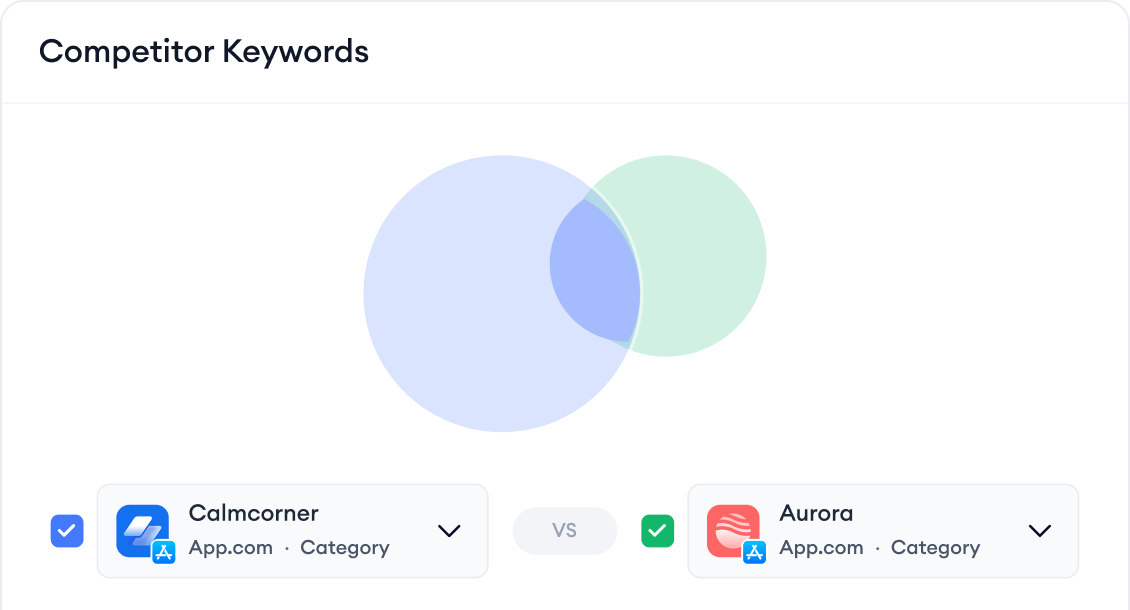
When you want to understand the exact keywords users type into the App Store and Google Play, you can use Keyword Inspector, Keyword Trends, or Competitor Keywords from MobileAction. These show you;
- What users type most often
- How competitive each keyword is
- Which keywords drive visibility for your competitors
This helps you select the right install-intent terms without guessing.
2. SEO keyword research for app landing pages
Landing pages support SEO for mobile apps by helping Google understand what your app does and which searches it should rank for. These pages attract early-stage users who are researching their problem or evaluating alternatives.
To build your app landing page keyword list, start with your app’s core value proposition. Identify the problems your app solves and the outcomes users want. Then expand into related informational keywords, comparison keywords, and long-tail variations. For example, if you have a budgeting app, relevant keywords may include: “how to manage expenses,” “budgeting tips,” and “best budgeting app for beginners.”
App landing pages rank on the web, so you must use web SEO tools, not only ASO tools.
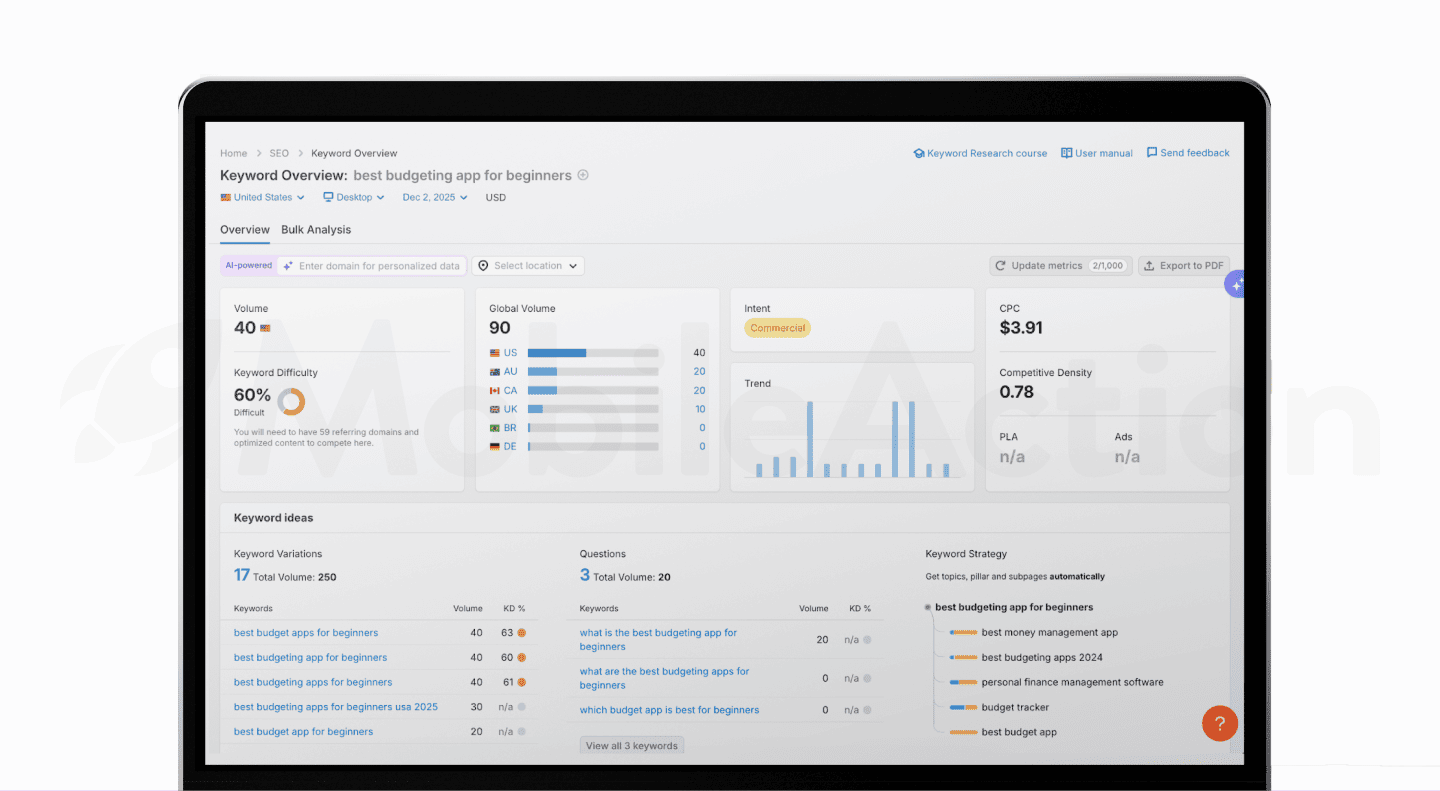
Use sources such as:
- Google Search Console (if you already have traffic)
- Google Keyword Planner
- Ahrefs / Semrush
- Google’s “People also ask”
- Google Autocomplete
- Reddit, Quora, TikTok search trends (for real-world phrasing)
These keywords shape your page title, meta description, H1 tags, and content structure. When you build the page around what real users are searching for, your landing page can rank for high-intent queries related to your app.
3. ASO keyword research for App Store & Google Play
ASO keyword research focuses on terms users type directly into the App Store and Google Play, helping your app rank for functional, category-based searches.
Start with your app’s main features. Break them down into simple, user-friendly phrases. Consider synonyms, variations, and related use cases. App store searches are short, so clear terms like “sleep tracker,” “budget planner,” or “workout timer” often perform well.
You also need to consider platform differences. If you want a deeper comparison of how keyword indexing, metadata fields, and ranking factors differ between the App Store and Google Play, you can explore our detailed blog here: App Store & Google Play: Key differences in 2025.
A well-structured keyword list helps your metadata align with real user language and increases your chances of ranking for valuable terms.
4. Mapping keywords across web pages and store metadata
Keyword mapping ensures that each keyword has a clear purpose and location. Without mapping, you risk repeating the same keyword across different assets or missing opportunities to target high-value phrases.
Start by categorizing all keywords based on intent.
- Informational keywords belong on your blog or resource pages.
- Commercial / consideration keywords belong on your landing pages and feature-focused pages.
- App store search keywords / install-intent keywords belong in your App Store and Google Play metadata.
You can use MobileAction to identify the high-intent keywords, analyze competitors, and optimize your App Store and Google Play metadata accordingly.
This framework helps you unify SEO for apps across web and store environments. It also ensures that your content is consistent. A user who searches on Google for “best study planner” and then visits your store listing should see messaging that matches what brought them there.
Strong keyword mapping allows you to connect SEO, ASO, and user intent into one coherent system. Over time, this consistency strengthens rankings across all channels.
SEO for app landing pages: How to optimize a mobile app website
Your app landing page is one of the most important assets in SEO for apps. It gives Google clear information about what your app does, which keywords it should rank for, and how users should navigate toward the App Store or Google Play. A well-optimized landing page also supports ASO by sending qualified traffic directly into your store listing page.
In this section, we explain how to structure your landing page, how to place keywords naturally, and how to improve technical performance so your page can compete for high-value queries.
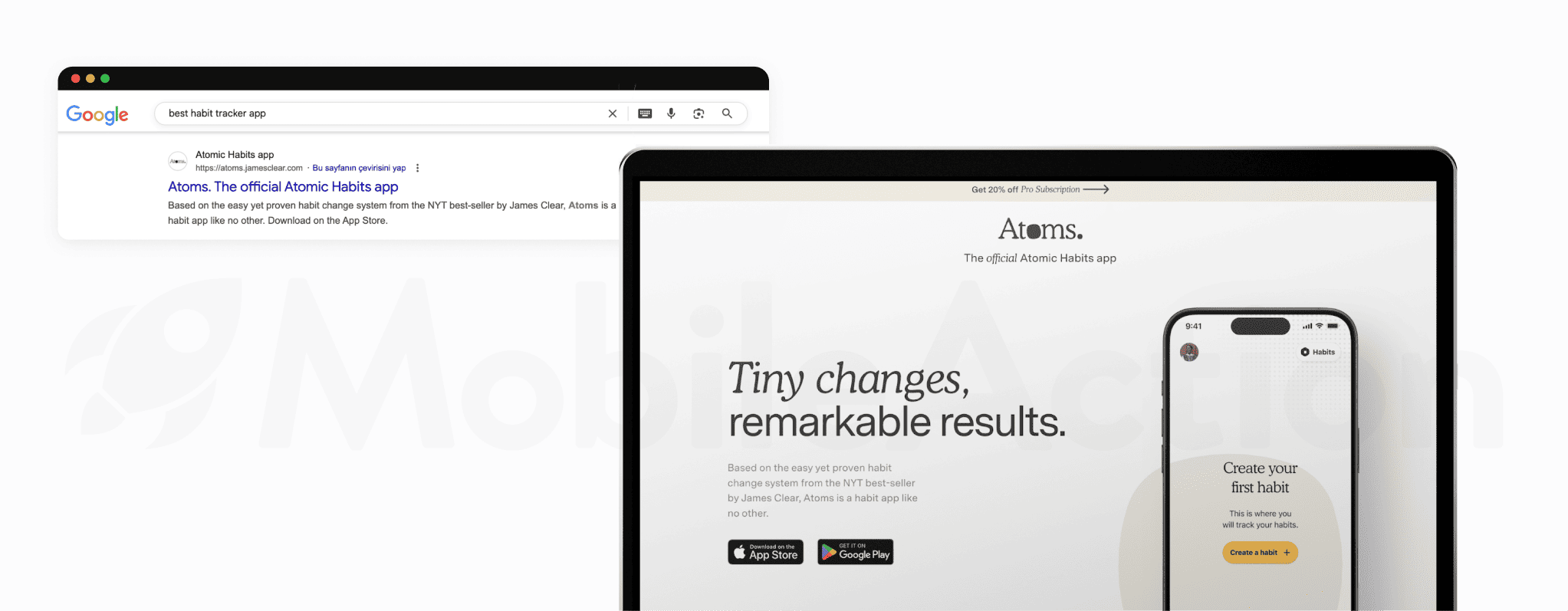
1. App landing page structure that ranks in Google
A strong landing page follows a clear structure that matches user expectations and aligns with app landing page SEO best practices. The goal is to make it easy for Google to understand the main topic and for users to understand why your app solves their problem.
A simple, effective structure includes:
- A clear headline that describes what your app does using natural language
- A short explanation of the main value proposition
- Feature sections broken into simple, scannable blocks
- Social proof such as ratings, testimonials, or case studies
- A direct path to download (App Store and Google Play buttons)
This structure performs well for both SEO and conversion. Google can parse the page easily, and users can quickly confirm whether your app fits their needs.
2. On-page optimization for app keywords (titles, H1, metadata)
On-page optimization ensures your landing page communicates relevant keyword signals to Google. This helps you rank for terms that reflect how people search for your solution. Include your primary keyword themes, such as your app’s core category, features, and benefits, in natural, readable ways.
Key elements to optimize:
- Title tag: Use a descriptive title that includes your main category keyword.
- Meta description: Summarize the app’s purpose and encourage users to learn more.
- H1: Clearly state what the app does.
- Section headings: Use secondary keywords when relevant, such as “budget tracking app,” “habit tracker for students”.
Avoid keyword stuffing. Google rewards clarity and relevance, not repetition. Your goal is to help Google understand the topic, not to overload the page with keywords.
3. App content strategies to capture high-intent searches
Effective SEO strategy for mobile apps requires content that supports both discovery and conversion. Your landing page should address the key questions users have before deciding whether to install an app.
High-intent content strategies include:
- Explaining the problem your app solves in simple terms
- Highlighting unique features and real use cases
- Comparing your app to common alternatives (without exaggeration or hype)
- Including FAQs that answer install-related questions
- Creating supporting pages or blog posts for informational queries
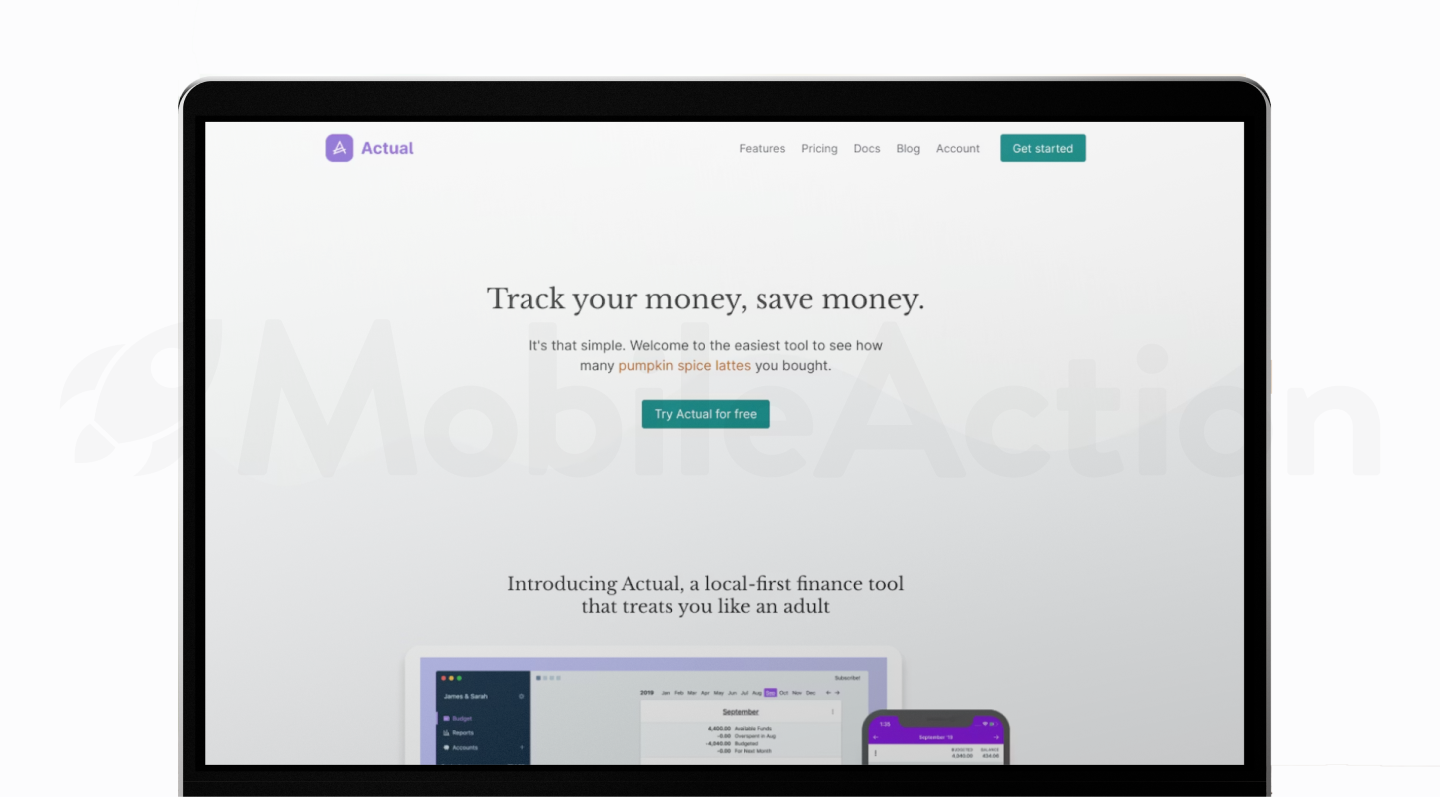
These content elements help you rank for early-stage and install-intent queries like “best budgeting app,” “habit tracker for productivity,” or “expense tracker for students.” They also support deeper exploration when users want more information before downloading.
Your landing page does not need to be long, but it should be informative, structured, and aligned with real user intent.
4. Technical SEO essentials for app websites
Strong technical optimization helps Google crawl, index, and understand your landing page. Even if your content is well written, your SEO for mobile app performance can suffer if technical elements are missing or misconfigured.
Key technical considerations include:
- Fast page loading, especially on mobile
- Clear URL structure
- Proper use of canonical tags
- Clean internal linking from your homepage and navigation
- Ensuring your landing page is indexable
- Providing alt text for images
- Using HTTPS and secure hosting
These fundamentals ensure your landing page supports your broader SEO for apps strategy. Google prioritizes pages that load quickly, provide a good mobile experience, and have a clear structure.
5. App schema markup and deep links for better search visibility
Schema markup and deep linking help Google understand your app better and improve how it appears in search results.
App schema markup lets you give Google clear, structured information about your app, its name, platform, pricing, and your App Store and Google Play URLs. This makes it easier for Google to connect your website with your store listings and improves your overall search visibility.
Deep links create a direct path from your website into your app.
- On iOS, this works through Universal Links.
- On Android, it works through App Links.
If the app is already installed, users can tap a link on your website and go straight to the right screen in the app without visiting the store page. This reduces friction and usually leads to higher engagement, which can indirectly support both SEO and ASO.
Together, structured data and deep linking strengthen your presence across web searches, the App Store, and Google Play. They give search engines clearer signals about your app and provide users with a faster, more intuitive path from web to app.
Unifying SEO and ASO: A complete mobile app SEO strategy
SEO and ASO are often managed separately, but they perform best when they support each other. Users rarely move through a single discovery path. They might start with a web search, read your landing page, compare alternatives, and only then visit the App Store or Google Play. A unified SEO strategy for mobile apps ensures that each step reinforces the next.
By aligning your landing pages, store listing metadata, and creative assets, you give users a consistent experience and help search engines understand your app more clearly. This improves rankings in web searches, strengthens SEO for app store visibility, and increases your chances of converting users into installs.
1. How web SEO influences app store performance
Web SEO supports ASO in multiple ways. When your landing pages rank for category or problem-focused queries, they drive qualified traffic to your app stores. These users have already learned about your solution, which increases their likelihood to install and engage.
Higher-quality traffic also affects store performance metrics. Apps that receive strong engagement tend to rank better for keywords related to their core features. This means that improving SEO for mobile apps indirectly strengthens your visibility inside the App Store and Google Play.
Your web content also shapes how users search for you later. When users discover your app on Google, branded search volume increases. This is one of the strongest signals for long-term store visibility and directly supports your SEO for app efforts.
2. Aligning landing page messaging with store creatives
Users expect consistency. If your landing page sets a clear value proposition, your store listing should reinforce the same message. Aligning your messaging helps users feel confident that they’re installing the right product.
A consistent experience includes:
- Matching the headline on your landing page with your app’s subtitle
- Highlighting the same primary feature set in screenshots and page sections
- Using wording that reflects the same keyword themes (for example, if your page emphasizes “budget planner,” your store listing should do the same)
Beyond your default store listing, you can use custom product pages (App Store) and custom store listings (Google Play) to extend this alignment even further. These allow you to show different versions of your store page based on user intent. For example, you can send traffic from a feature-focused landing page or a specific blog article to a store variation that highlights the exact use case or feature they were reading about.
Advanced mobile app SEO strategies
As competition grows across the App Store, Google Play, and web searches, advanced techniques help your app maintain visibility and adapt to changing algorithms. These methods go beyond basic metadata or landing page optimization. They improve how search engines interpret your content, strengthen your topical authority, and increase your presence in new search surfaces, especially AI-driven results.
These 2025 practices support both SEO for apps and long-term ASO performance. Each tactic improves your app’s relevance, ranking stability, and ability to reach users across multiple discovery paths.
1. Using Search Console data to improve app visibility
Once your landing pages begin ranking, Google Search Console becomes one of the most valuable tools for optimizing your SEO strategy for mobile apps. It shows you:
- Which queries bring users to your site
- How often your pages appear in search results
- Which keywords have high impressions but low clicks
- Where your pages underperform or drop in ranking
These insights highlight opportunities to refine your content and metadata. If Search Console reveals strong impressions for a keyword like “study routine app” or “best sleep sounds app,” you can integrate those insights into your landing pages and your store listings.
2. Building topical authority for your app category
Topical authority is increasingly important in 2025. Search engines prefer websites that demonstrate expertise and consistent coverage of a specific topic. For apps, this means publishing helpful, structured content around your core category.
For example, if you offer a habit tracker, you might build content around:
- Habit-building frameworks
- Daily planning tips
- Behavior change strategies
- Comparisons of productivity tools
This type of content positions you as a trusted resource. It also helps your landing pages rank for broad and long-tail queries related to SEO for apps, app categories, and user problems.
3. How backlinks affect app discovery and brand searches
Backlinks remain a significant factor in web searches. When authoritative sites link to your landing pages, Google views your content as more credible. This helps you rank higher for category and feature-focused keywords, supporting your overall SEO for mobile apps and app stores strategy.
Quality backlinks can also increase brand visibility. As more users encounter your app name across trusted websites, branded searches rise. Branded queries are strong ranking signals for both the App Store and Google Play because they indicate clear user demand.
Useful backlink sources include:
- Guest posts
- Category reviews
- Industry roundups
- Press coverage
- Comparison articles
4. Using AI overviews (AEO) to increase app exposure in web search
AI Overviews (AEO) play a growing role in how users discover apps. These generated summaries often highlight solutions, tools, and recommendations directly in search results. If your landing page content is clear, structured, and authoritative, Google is more likely to include your app as a recommended option.
To support AEO visibility:
- Use descriptive headings that address specific questions
- Maintain clean, factual, and concise explanations
- Provide clear definitions of features and use cases
- Answer “how-to” and “which app is best for…” queries directly
This style of content aligns with how AI systems interpret information.
How to track, measure, and improve app SEO performance
Tracking performance is essential to maintaining and improving your SEO for apps strategy. Search behavior, app categories, and store algorithms evolve over time. By monitoring data consistently, you can identify what’s working, diagnose issues early, and refine your SEO and ASO efforts based on real user behavior.
1. Core metrics: impressions, clicks, store views, installs
Measuring the impact of SEO and ASO starts with a few core metrics. These indicators show how often your app appears in search, how users engage with your listings, and how many ultimately install the app.
Across web searches and your website, focus on:
- Impressions: How often your landing pages appear for relevant queries
- Clicks: How many users visit your site from Google
- Click-through rate (CTR): Whether your content matches user expectations
Inside the App Store and Google Play, key metrics include:
- Store listing views
- Product page impressions
- Install conversion rate (CVR)
- Installs from search vs. browse traffic
Monitoring these data points helps you assess the overall health of your SEO strategy for mobile apps and identify where improvements are needed.
2. SEO and ASO dashboards: what to monitor weekly
Weekly monitoring helps you identify trends without overreacting to short-term fluctuations. A simple dashboard allows you to see whether visibility is increasing or declining across channels.
For web SEO, track:
- Total search impressions
- Top-performing landing pages
- Queries gaining or losing visibility
- CTR changes after metadata updates
For ASO, track:
- Keyword rankings in the App Store and Google Play
- Conversion rate changes after creative or metadata updates
- Category ranking shifts
- Store traffic sources (search, browse, referrals)
3. Attribution: measuring organic installs from SEO
Attribution is essential for understanding how SEO drives installs. When someone arrives through a landing page, clicks your store button, and installs your app, you need visibility into that full path.
To evaluate web-to-store performance:
- Track outbound clicks to your App Store and Google Play links
- Review install trends after publishing new content or updating metadata
- Use referral sources and UTM parameters to connect sessions to installs
4. Running experiments: Landing Page A/B Tests and store listing tests
Testing is a core part of improving SEO for apps. Both landing pages and store listings benefit from structured experiments that measure the impact of specific changes.
For landing pages, test:
- Headline variations
- CTA placement
- Value proposition clarity
- Page structure and section order
For app stores, use built-in testing tools:
- Product Page Optimization (App Store)
- Store Listing Experiments (Google Play)
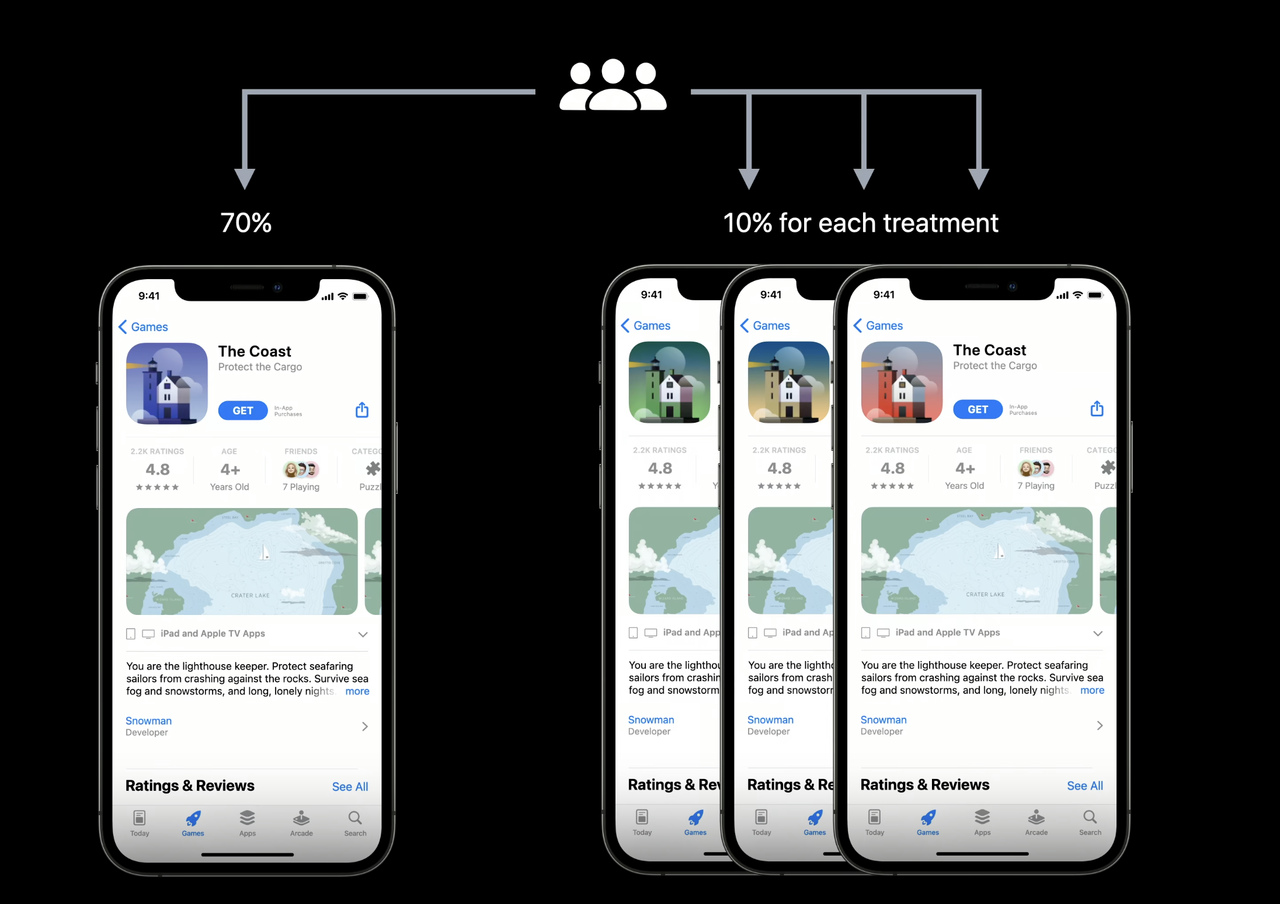
These tests allow you to evaluate changes in conversion rate and keyword performance. Strong experiments identify the messaging and visuals that resonate most with your audience, improving both SEO and ASO outcomes over time.
SEO for apps examples: Mobile app SEO strategies you can replicate
Seeing how real apps structure their landing pages and store listings can help you understand what works in practice. This section provides practical examples and shows how effective SEO for apps combines web SEO and ASO to drive organic visibility and downloads.
How top apps use SEO to drive installs
High-performing apps often use strong web landing pages as part of their growth strategy. A landing page helps you capture web search traffic, explain your value clearly, and direct users toward the App Store or Google Play.
To explore real examples, you can browse Landingfolio – a curated gallery of real mobile-app landing pages. They showcase dozens of live app landing pages across different categories. Reviewing these pages helps you understand how successful apps:
- Present their value proposition in the hero section
- Use concise feature breakdowns
- Place App Store and Google Play download buttons
- Structure SEO-friendly content while maintaining a simple visual design
These patterns directly support SEO for mobile apps, because they show how to balance clarity, keyword relevance, and conversion flow. Many top apps use this approach to rank for category-focused queries on Google while guiding users quickly into the store listing.
Common mistakes in App SEO and how to avoid them
Several common mistakes prevent apps from achieving strong search visibility. These issues often appear when teams treat SEO and ASO as separate or one-time tasks.
1. Weak or incomplete landing pages
Some apps rely only on their store listing and skip building a landing page. This limits their ability to appear in web searches. Browsing Landingfolio’s real-world examples helps you see how most successful apps present a simple yet effective page that improves both SEO and conversion.
2. Metadata that lacks clarity
Apps sometimes use generic titles, vague descriptions, or keyword stuffing. Strong pages use clear, user-friendly language that aligns with real search behavior.
3. Inconsistent messaging between landing page and store listing page
Users expect the same value proposition across both environments. When messaging differs, conversion decreases.
4. Minimal content depth
Some landing pages provide only a short sentence and download buttons. Pages that rank well for SEO for apps generally include a clear explanation of benefits, use cases, and supporting details that help Google understand relevance.
Avoiding these issues helps your app build a more stable, long-term organic presence.
Final thoughts: Keep moving forward with your app’s sEO
SEO for apps can feel like a lot at first, but every improvement you make, whether it’s updating a landing page, refining metadata, or testing new creatives, moves you closer to steady, reliable organic growth. You don’t need to get everything perfect right away. Start small, stay consistent, and let your results guide your next steps.
When SEO and ASO work together, your app becomes easier to discover, easier to understand, and easier to trust. Over time, these small wins compound into a strong foundation that supports long-term visibility and installs.
You’re already ahead by taking SEO for mobile apps seriously. Keep your strategy simple, keep iterating, and your organic growth engine will get stronger with every update.
If you want clearer insights, smarter keyword decisions, and faster optimization cycles, you can streamline everything with MobileAction’s ASO Intelligence. Sign up today and start improving your app’s visibility with data you can trust.

Frequently asked questions
How to do SEO for apps?
A practical workflow looks like this:
- Research keywords. Identify what users search in Google (informational queries) and in app stores (short, functional terms).
- Build your app landing page. Use a clear headline, structured content, fast loading, and store download buttons above the fold.
- Write optimized metadata. Include target keywords in your app name, subtitle, short description, and long description.
- Optimize screenshots & icon. Use benefit-focused captions, not just UI images.
- Track and iterate. Monitor rankings in Search Console and ASO tools, then update metadata and landing page content based on real performance.
If you follow these steps consistently, you will build a sustainable organic acquisition system.
Do apps need SEO?
Yes, almost all apps benefit from SEO. Here’s why:
- 40% of users start on Google, not app stores.
- If you don’t have a landing page, you cannot appear for early-intent searches.
- SEO increases branded search inside app stores, making it easier to rank.
- SEO lowers long-term paid UA costs by adding non-paid traffic.
If your app solves a real problem, SEO ensures the people searching for that problem can find you.

Content Marketing Specialist
Resources that you'll love




Grow your app on the App Store and Google Play Store with our solutions now