











The iOS keyword field is a hidden App Store metadata field that helps Apple determine which search terms your app may be eligible to rank for. It is limited to 100 characters, so every keyword choice needs to be intentional.
Because App Store search plays a major role in app discovery, optimizing this field can directly support your app’s visibility. According to Apple Ads, 70% of App Store visitors use search to discover apps, and nearly 65% of downloads happen directly after a search.
In this guide, we’ll explain how to optimize your iOS keyword field, choose relevant keywords, avoid common mistakes, and adapt your keyword strategy to recent changes around custom product pages in 2026.
What is the iOS keyword field?
The iOS keyword field is a hidden metadata field in App Store Connect where you can add keywords that describe your app’s features, use cases, and category.

Unlike your app name, subtitle, screenshots, or description, the keyword field is not visible on your App Store product page. It is used by Apple to help determine where your app appears in App Store search results.
Apple explains that keywords help determine where your app displays in search results and recommends choosing words your audience may use to find an app like yours. Apple also recommends being specific when describing your app’s features and functionality.
The keyword field is available for iOS apps on the App Store. Google Play does not have the same hidden keyword field, so Android keyword optimization works differently and relies more heavily on visible metadata such as the title, short description, and long description.
Why the iOS keyword field still matters
The keyword field does not work alone. Apple considers multiple signals when deciding where your app appears in search results, including your app name, subtitle, keywords, category, ratings, reviews, and user engagement signals.
Still, the keyword field gives you a dedicated place to add relevant search terms that may not fit naturally into your app name or subtitle.
Think of your iOS metadata as three connected layers:
| Metadata field | Main role |
| App name | Your strongest brand and/or core keyword placement |
| Subtitle | A short value proposition with important descriptive terms |
| Keyword field | Hidden supporting terms, synonyms, use cases, and secondary keywords |
The keyword field is especially useful when your app name is mostly brand-focused. For example, if your app name is a short brand name, the keyword field gives you extra room to tell Apple that your app is also related to words like budget, expense, invoice, planner, or receipt.
iOS keyword field rules you need to know
The iOS keyword field is limited to 100 characters total. Terms should be separated by commas with no spaces after the commas. Apple also says not to repeat words already included in your app name, subtitle, or category.
Here are the main rules to follow:
| Rule | What it means | Example |
| Use up to 100 characters | You have very limited space | Keep only high-value terms |
| Separate terms with commas | Use commas between keywords | budget,expense,tracker |
| Avoid spaces after commas | Spaces waste character space | Use budget,expense, not budget, expense |
| Avoid duplicate words | Do not repeat terms from your app name, subtitle, or category | If “budget” is in your subtitle, do not repeat it in the keyword field |
| Avoid generic words | Terms like “app” or “game” are usually too broad | Use feature-specific terms instead |
| Avoid filler words | Words like “the,” “and,” or “to” usually add no value | Use concise terms |
| Avoid special characters | Symbols usually do not help search matching | Avoid #, @, ! unless part of your brand |
| Avoid competitor names | Do not use competing app names or unauthorized trademarked terms | Use generic category terms instead |
Improper keyword use is a common reason for App Store rejection. Apple specifically warns against unauthorized trademarked terms, celebrity names, protected phrases, irrelevant terms, competing app names, and inappropriate or offensive terms.
How to choose the right keywords for your iOS keyword field
A strong iOS keyword field starts before you open App Store Connect. You need to build a keyword list, evaluate it, and decide which terms deserve space in your limited 100-character field.
Here is a practical process.
1. Start with what your app actually does
List your app’s main features and use cases.
For example, if you have a budgeting app, your starting list might include:
budget,expense,spending,bill,receipt,saving,debt,cash,wallet,finance
If you have a meditation app, your list might include:
sleep,calm,breathing,anxiety,relax,stress,mindfulness,focus
Do not start with only the highest-volume category terms. Start with relevance. A keyword with high volume but poor relevance may bring low-quality traffic and weak conversion.
2. Think in user intent, not just app features
Users do not always search the way teams describe their products internally.
A product team may say “personal finance management.” A user may search for “budget planner,” “expense tracker,” “bill reminder,” or “save money.”
Try to separate your keywords into intent groups:
| Intent type | Example keywords |
| Feature-based | tracker,planner,reminder,scanner |
| Problem-based | debt,bills,spending,stress |
| Outcome-based | saving,focus,calm,fitness |
| Category-based | finance,health,education,travel |
| Audience-based | student,parent,runner,freelance |
The best keyword field usually includes a mix of these, depending on your app’s maturity and current ranking potential.
3. Check keyword volume, difficulty, and relevance
Keyword selection should not be based only on instinct.
Before adding a keyword to your iOS keyword field, evaluate:
| Metric | Why it matters |
| Search volume | Shows whether people actually search for the term |
| Difficulty or competition | Shows how hard it may be to rank |
| Relevance | Shows whether the keyword matches your app |
| Current ranking | Shows whether you already have visibility |
| Competitor ranking | Shows which terms competitors are winning |
| Conversion potential | Shows whether the term is likely to bring qualified users |
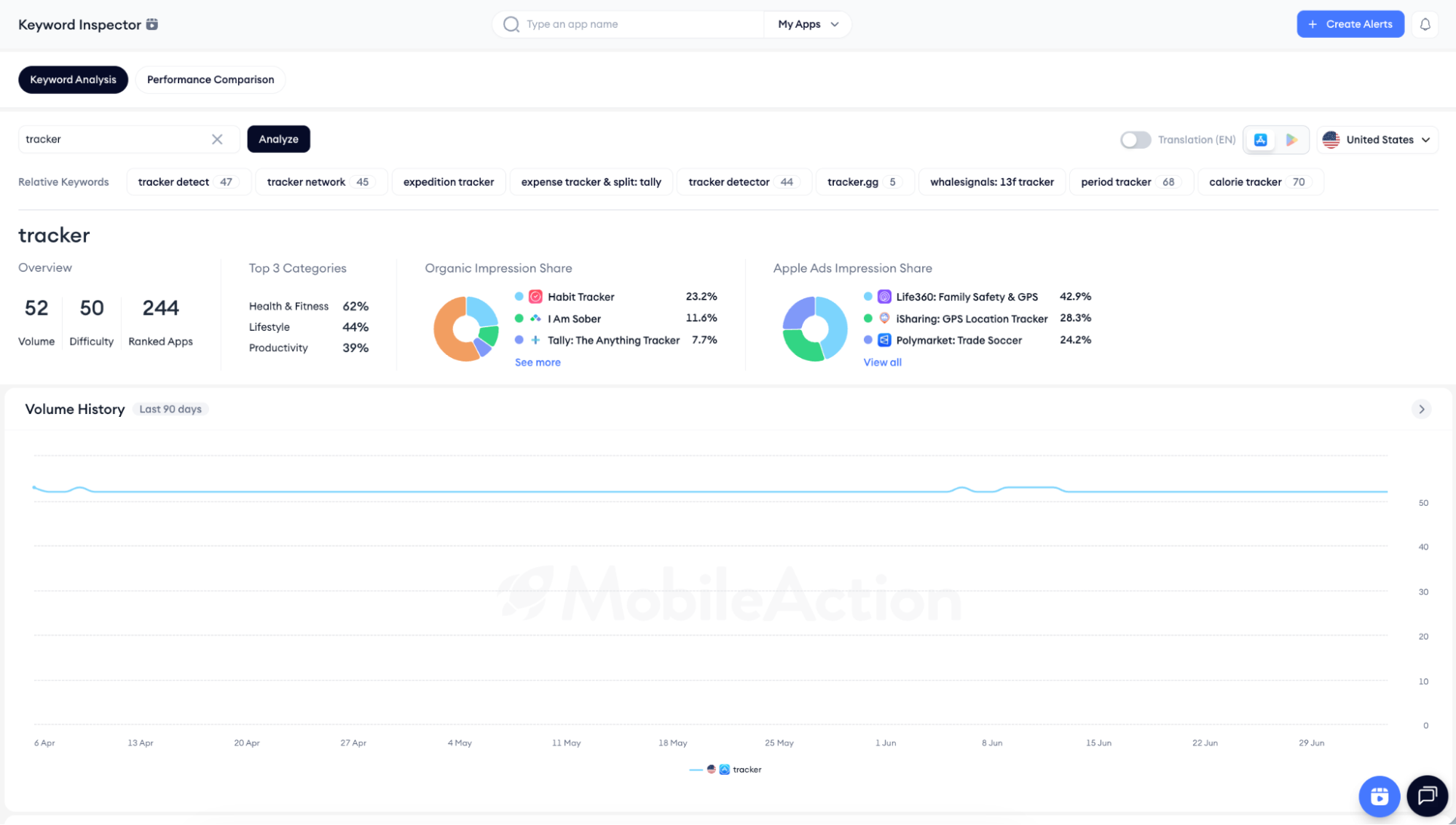
With MobileAction’s Keyword Inspector, you can analyze keyword metrics such as search volume, difficulty, relevance, and current ranking in one place, which helps make keyword selection more data-driven.
4. Prioritize realistic keyword opportunities
A common mistake is filling the keyword field with the most popular keywords in the category.
For example, a new fitness app may want to rank for fitness, workout, or weight loss. These keywords may be relevant, but they are also highly competitive.
A better approach is to balance broad and specific terms.
Instead of only targeting:
fitness,workout,health
You might test more specific terms such as:
hiit,stretching,timer,home,training,abs,plan
How to structure your 100-character iOS keyword field
The keyword field is not a sentence. It is not a description. It is not the place to repeat your full long-tail phrases.
Apple allows spaces within keyword phrases, but because the field is limited to 100 characters, you should usually avoid unnecessary spaces and long phrases unless there is a clear reason to include them.
Let’s look at an example.
Weak keyword field example
budget app,expense tracker,money saving app,finance planner
This looks relevant, but it wastes space.
Problems:
- It uses the word “app.”
- It includes spaces.
- It repeats concepts in long phrases.
- It uses too much of the 100-character limit on combinations.
Stronger keyword field example
budget,expense,spending,bill,receipt,saving,debt,cash,wallet,finance
This version is cleaner and more flexible. It keeps the terms short, specific, and separated.
You can then use your app name and subtitle to support the most important combinations.
For example:
| Field | Example |
| App name | Finly: Budget Planner |
| Subtitle | Track expenses and bills |
| Keyword field | receipt,saving,debt,cash,wallet,finance,spending |
In this setup, the app name and subtitle carry the most important visible terms, while the keyword field supports related searches without unnecessary duplication.
How to use iOS keyword field with app name and subtitle
Your iOS keyword field should not be planned separately from your app name and subtitle.
Apple says the app name plays a critical role in how users discover your app on the App Store. The app name can be up to 30 characters long. Apple also says the subtitle can be up to 30 characters and should summarize the app in a concise phrase.
That means your most important keywords should usually be considered for your app name or subtitle first, as long as they fit naturally and do not hurt your brand.
Use this framework:
| Metadata field | Best use |
| App name | Brand name + strongest core keyword, if natural |
| Subtitle | Main value proposition + high-intent keyword |
| Keyword field | Secondary terms, synonyms, use cases, and supporting keywords |
For example, a running app could structure metadata like this:
| Field | Example |
| App name | Runly: Running Tracker |
| Subtitle | GPS routes and pace plans |
| Keyword field | marathon,5k,jogging,training,split,distance,coach |
This avoids repetition and gives each field a clear role.
How localization changes iOS keyword field optimization
App localization is not just translation. Apple recommends localizing your app description, keywords, app previews, and screenshots for each market where your app is available. Apple also notes that you can tailor your keywords to reflect the values of each market.
That matters because users in different countries may search differently, even when they are looking for the same type of app.
For example, a fitness app may need different keyword strategies for:
- United States
- United Kingdom
- Germany
- France
- Japan
- Turkey
- Brazil
The search intent may be similar, but the language, wording, slang, and competitive landscape can change.
A localized keyword field should be built from local search behavior, not direct translation.
Before localizing your keyword field, check:
- Local keyword volume
- Local competitors
- Local ranking difficulty
- Singular and plural behavior
- Regional terminology
- Whether English terms are commonly used in that market
- Whether your screenshots and product page match the localized search intent
This is especially important for apps expanding into new markets. A keyword field that works in the U.S. may not work the same way in France, Japan, Brazil, or Turkey.
How custom product pages affect iOS keyword field strategy
Custom product pages have made the iOS keyword field more strategic.
Apple says you can publish up to 70 additional versions of your App Store product page. Each custom product page can highlight specific features, content, seasonal moments, or audiences with different screenshots, promotional text, and app previews.
Apple also says custom product pages can appear in relevant search results. You can assign keywords to a custom product page so that the custom product page appears in search results for selected keywords instead of your default product page. Apple recommends matching selected keywords with the intent of the custom product page and making each keyword combination unique to a single product page.
This changes how app marketers should think about keyword planning.
Before, the keyword field was mainly about discoverability.
Now, it can also support a more relevant search experience.
For example, a fitness app could use different custom product pages for different keyword intents:
| Keyword intent | Example keywords | Custom product page angle |
| Running | running,5k,marathon,jogging | Running plans and GPS tracking |
| Home workouts | home,hiit,bodyweight,training | No-equipment workouts |
| Weight loss | calorie,weight,fitness,plan | Goal-based fitness plan |
| Yoga | yoga,stretching,flexibility | Mobility and recovery |
This helps align the user’s search intent with the product page they see.
A user searching for marathon training may respond better to screenshots about running plans than to a generic fitness product page. A user searching for home workout may respond better to a page focused on bodyweight routines.
Important note
Custom product pages do not replace keyword optimization.
Apple’s App Store Connect documentation says you can assign keywords from your latest approved app version to a custom product page. The custom product page becomes searchable only after it is approved and set to visible.
In other words, your core metadata still matters. Your app needs to be relevant for the selected keywords first. The custom product page helps you show a more relevant version of your product page for those searches.
Final thoughts
The iOS keyword field should be optimized with the same level of intent as other App Store metadata fields. Since it is limited to 100 characters, each keyword should support your app’s relevance for a specific search opportunity.
A strong keyword field is relevant, concise, localized, data-backed, and consistent with your app name, subtitle, and overall metadata strategy.
In 2026, keyword field optimization is also more closely connected to conversion strategy. As custom product pages can appear in relevant App Store search results, keyword choices may influence both where your app appears and which product page users see after finding it.
To improve the performance of your iOS keyword field, start with keyword research, remove wasted characters, track metadata changes, and continue optimizing based on ranking and conversion data.
Frequently asked questions
How many characters can the iOS keyword field have?
The iOS keyword field is limited to 100 characters total. Apple recommends separating terms with commas and no spaces.
Should I use spaces in the iOS keyword field?
Avoid spaces after commas because they waste character space. Apple allows spaces within keyword phrases, but because the field is limited, you should only use phrase spaces when they are truly necessary.
Should I repeat keywords from my app name or subtitle?
No. Apple recommends not repeating words already included in your app name, subtitle, or category. Use the keyword field for additional relevant terms instead.
Can I use competitor names in the iOS keyword field?
No. Apple warns against using competing app names, unauthorized trademarked terms, and protected words or phrases in your keywords.
Does the iOS keyword field affect Google Play rankings?
No. The iOS keyword field is specific to Apple’s App Store. Google Play does not have the same hidden keyword field, so Android keyword optimization relies on different metadata fields.
Do custom product pages have their own keyword fields?
Custom product pages do not replace your main keyword field. Apple says you can assign keywords from your latest approved app version to a custom product page so that the custom page can appear in search results for those selected keywords.

Your mobile app growth partner with intelligence, automation and expertise.
Resources that you'll love




Grow your app on the App Store and Google Play Store with our solutions now