This handbook will serve as your roadmap, packed with emerging trends, valuable insights, and the best ASO tools & resources. It aims to help you stay ahead of the competition and enhance your app marketing strategy for substantial growth in 2025 and beyond.
Mobile user acquisition is the process of getting the right people to install your app or game, and then turning those installs into activation, retention, and revenue. In practice, UA is not “more downloads.” It’s a growth system that connects your channels (organic + paid) to your app lifecycle, so you can scale efficiently without buying low-quality users who churn.
This guide is built for mobile teams who need a clear, practical framework. We’ll cover how mobile UA works end-to-end, how to choose the right channels, how to structure UA campaigns and tests, and how to measure success in a way that matches real app growth.
What is mobile user acquisition?
Mobile user acquisition (mobile UA) is the process of attracting new users to a mobile app or game and guiding them through the app lifecycle, from install to activation, retention, and ultimately revenue.
Unlike generic user acquisition, mobile UA is not measured by traffic or visits. Its success depends on whether acquired users:
- Install the app
- Complete key in-app actions (activation)
- Stay active over time (retention)
- Generate value through subscriptions, in-app purchases, or ads (LTV)

Mobile UA in 2025-2026: how measurement really works
Mobile user acquisition is harder to measure than it used to be. This is not just because competition increased, but because privacy rules limit how clearly you can track users, especially on iOS.
As a result, UA is no longer about having perfect data. It is about making good decisions with incomplete data.
iOS: privacy-first attribution, not full visibility
On iOS, you should assume that you won’t see a complete, user-level journey for every campaign. Apple’s direction, outlined in Apple Developer documentation, prioritizes privacy-first attribution frameworks such as AdAttributionKit, which report performance in aggregated and delayed ways.
In practice, this means:
- You evaluate performance using cohort-level trends, not individual users
- You focus on whether acquired users activate, retain, and monetize, even if attribution is imperfect
- Attribution data is a decision input, not a source of absolute truth
Android: moving toward aggregated attribution as well
Android is also changing how attribution works. Through initiatives like the Attribution Reporting API under Privacy Sandbox, measurement is becoming more privacy-focused and more aggregated.
For UA teams, the outcome is similar on both platforms: you rely less on exact tracking and more on clear patterns and trends.
What this means before you go deeper into mobile UA
Before learning how mobile user acquisition works step by step, it’s important to understand a few basics:
- Installs alone do not show success
- Some results appear late or in summarized form
- No single tool shows the full picture
This is normal. Modern mobile UA works when you define what a good user looks like, compare multiple data sources, and validate decisions through trends and testing instead of perfect attribution.
How mobile user acquisition works (the mobile UA funnel)
Mobile UA works best when you treat it as a lifecycle, not a single event. The install is just the handoff point between marketing and product experience. What happens after install determines whether acquisition is sustainable.
Awareness, install, activation, retention, revenue
At a high level, mobile user acquisition follows this progression:
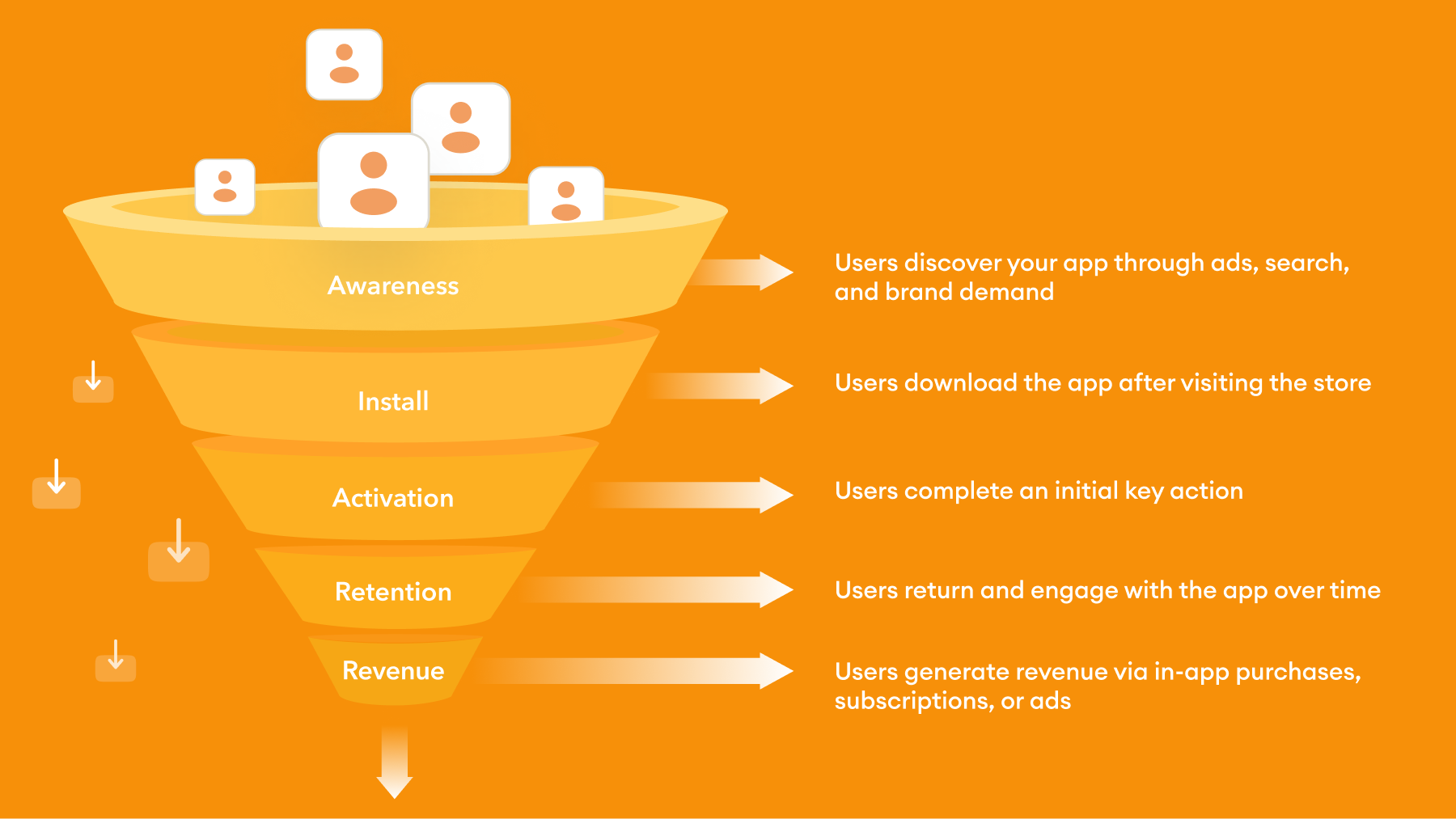
- Awareness: Potential users discover your app through ads, app store search, or brand-driven demand.
- Install: Users decide to download the app after visiting the store listing.
- Activation: Users complete the first meaningful action that shows initial value (for example, account creation or first key feature use).
- Retention: Users return and continue using the app over time.
- Revenue: Users generate value through subscriptions, in-app purchases, or ads, contributing to lifetime value.
The key point is simple: each stage depends on the previous one. If installs increase but activation stays low, you don’t have a scaling problem, you have an app onboarding and user quality problem. If activation is strong but app retention is weak, you likely need to improve early product value and re-engagement.
Organic user acquisition for mobile apps
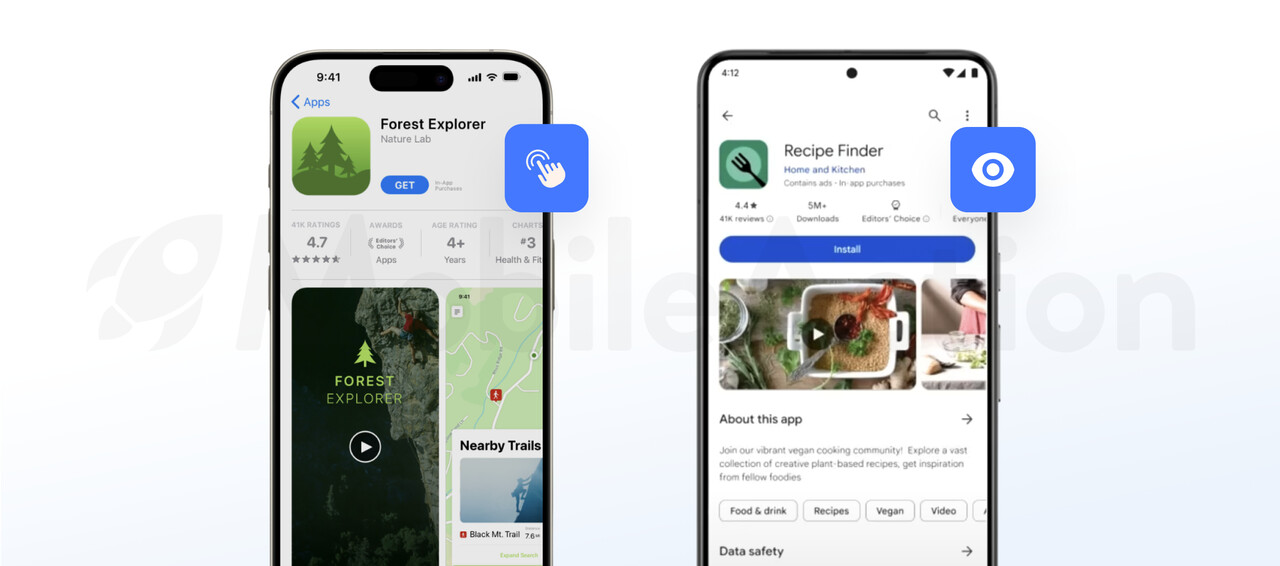
Organic user acquisition focuses on helping users discover your app inside the app stores, where most install decisions actually happen. For mobile apps, organic app growth is less about websites and more about visibility, relevance, and conversion within the App Store and Google Play.
App store optimization (ASO) as a core organic UA channel
App store optimization (ASO) is the foundation of organic user acquisition for mobile apps. It determines whether your app appears in store search results and whether users choose to install it once they see it.
ASO has two main roles in organic UA:
- Discovery – helping users find your app through relevant keywords and categories
- Conversion – convincing users to install once they land on your store page
From a UA perspective, ASO supports both discovery through keywords and categories, and conversion through store page optimization, directly improving acquisition efficiency.
Key ASO elements include metadata, keyword targeting, visuals such as the app icon and screenshots, ratings and reviews, and localization by market. To go deeper into these areas, you can check our guides:
- App icon guide
- App localization guide
- Google Play Store screenshot sizes and guidelines
- App Store screenshot sizes and guidelines
A strong ASO strategy helps you attract users who are actively searching for a solution your app provides, which often leads to higher-quality installs and better retention.
How users discover apps organically
Users can find your app in an app store without seeing an ad. This is called organic discovery. It usually happens in four simple ways:
- Search – Users type what they need into the search bar, such as a problem or feature.
This is the most important organic source because you can influence it by:
- Choosing the right keywords
- Clearly explaining what your app does on the store page
- Browse – Some users don’t search. They scroll through categories, charts, or app lists.
Apps with good installs, ratings, and regular updates are more likely to appear here.
- Featuring – The app store sometimes highlights apps in special sections.
Well-designed, high-quality apps with happy users are more likely to be featured.
- Brand search – Users search for your app by name because they already know it.
Organic user acquisition works best when users can quickly understand what your app does and see that it matches what they are looking for.
Improving install conversion on app store pages
Getting visibility is only half of organic user acquisition. Once users reach your store page, conversion becomes the deciding factor.
Install conversion rate reflects how well your store page answers three questions for the user:
- What does this app do?
- Is it relevant to my needs?
- Can I trust it?
To improve conversion:
- Make your value proposition clear in the first screenshots
- Show real product usage, not generic visuals
- Align screenshots and copy with the keywords users searched
- Address common user concerns through visuals and short text
- Actively manage reviews and ratings
Even small improvements in store conversion rates can have a large impact on organic growth, because they compound across all discovery sources.
Paid user acquisition for mobile apps
Paid user acquisition helps you drive installs by promoting your app through advertising platforms and networks. Unlike organic acquisition, paid UA gives you speed, control, and predictable volume, but it also requires strong measurement and discipline to stay profitable.
Why apps use paid user acquisition
First, paid UA allows you to scale faster than organic channels alone. Organic growth compounds over time, but it can be slow, especially for new apps or competitive categories.
Second, paid UA is a powerful learning tool. By testing different creatives, messages, and audiences, you can quickly understand who responds to your app, which value propositions resonate and which markets or segments perform best.
Third, paid acquisition supports key moments such as app pre-launches, major feature releases, market expansions and seasonal demand spikes.
When used correctly, paid UA complements organic growth rather than replacing it.
When an app is ready for paid user acquisition
Paid user acquisition is most effective once your app’s post-install behavior is predictable and measurable. Before investing in paid traffic, you should be confident in what happens after a user installs.
Your app is generally ready for paid UA when:
- Onboarding is stable and repeatable, meaning most new users can complete the initial setup and reach the first meaningful action without confusion or heavy drop-off.
- Activation is clearly defined and consistently achieved, so you know what a successful install looks like in the first session or first day.
- Early retention is measurable across cohorts, allowing you to compare user quality by channel, campaign, or creative, even if retention is still improving.
- Analytics and attribution are in place, connecting installs to post-install events such as activation, engagement, or early revenue.
- Performance can be evaluated beyond cost per install (CPI), enabling optimization based on user quality rather than install volume alone.
Paid UA channels for mobile apps
Paid user acquisition channels determine where your ads appear and how users reach your app store page. Each channel has different strengths, limitations, and use cases. Choosing the right mix is less about being everywhere and more about matching channels to your goals and app type.
Apple Ads and Google App Campaigns
Apple Ads and Google App Campaigns are often the starting point for paid mobile user acquisition. Apple Ads targets high-intent users directly inside the App Store, while Google App Campaigns distribute ads automatically across Google’s ecosystem.
These channels work well because they capture users who are already searching for apps, targeting is closely aligned with app store behavior and the path from ad to install is short and familiar to users.
Apple Ads focuses on users searching or browsing within the App Store, making it especially effective for:
- Category-based searches
- Competitor keyword targeting
- Brand protection
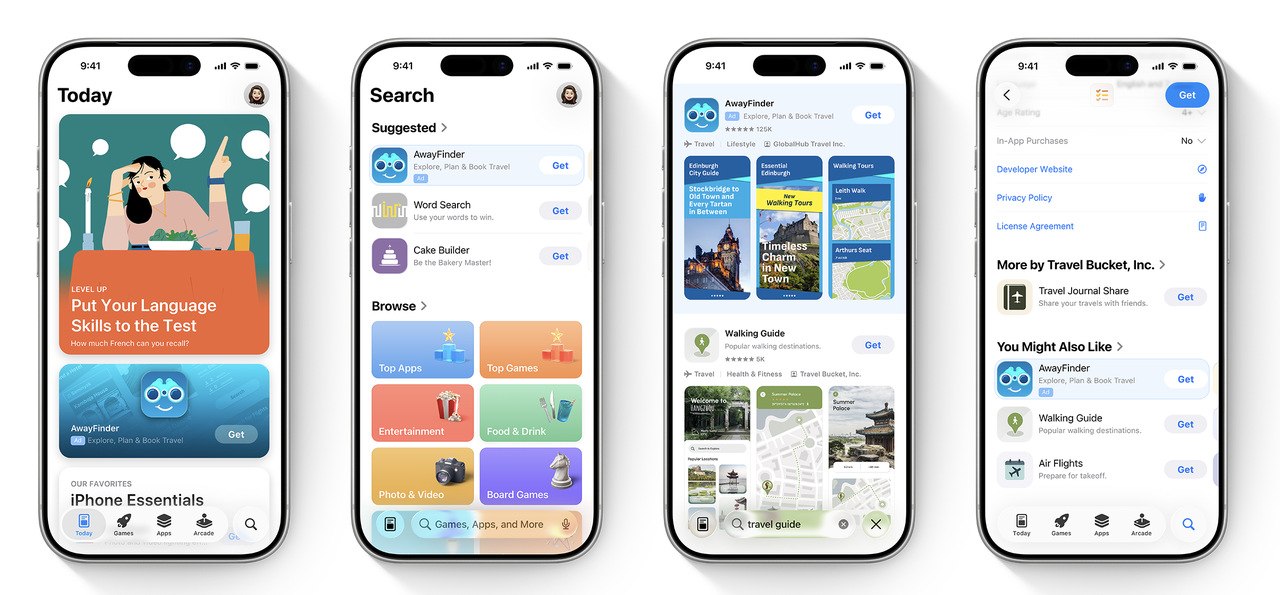
Google App Campaigns distribute ads across Google Search, Play Store, YouTube, and the Display Network, using automation to optimize delivery based on conversion signals.
These channels are often used to:
- Scale installs efficiently once keyword and conversion data is available
- Support launches and expansions
- Complement organic visibility in search results

Paid social platforms
Paid social platforms are discovery-driven acquisition channels. Unlike app store search, users are not actively looking for an app — you are introducing the product into their feed and creating demand through messaging and creative.
Common platforms include Meta (Facebook & Instagram), TikTok, Snapchat, Reddit, X, etc. While each platform has different formats and audience behaviors, they share a similar strategic role in mobile user acquisition.
Paid social is typically used when you want to:
-
Create demand for apps users don’t yet know they need
-
Reach audiences defined by interests, behaviors, or life context
-
Test positioning, value propositions, and creative angles at scale
-
Support launches, rebrands, or feature-driven growth moments
Because intent is lower than app store search, success depends less on targeting precision and more on how clearly the ad communicates value within seconds. The strongest paid social campaigns answer three questions immediately: What is this app? Who is it for? Why should I care right now?
Creative quality plays an outsized role. Short-form video, UGC-style ads, and product-in-context demonstrations generally outperform polished brand ads, especially for consumer apps. Messaging that mirrors the language users already use, problems, frustrations, aspirations, tends to convert better than feature-heavy explanations.
From a performance perspective, paid social often drives higher install volume but more variable user quality. This makes it especially important to evaluate results beyond CPI. Retention, activation, and downstream value are what determine whether paid social can scale sustainably or should remain a testing and awareness layer in your channel mix.
Ad networks and in-app placements
Ad networks and in-app placements distribute your ads across a wide range of other mobile apps and games. Instead of showing ads in social feeds or search results, these ads appear inside apps while users are actively using them.
Common ad formats include:
- banners
- interstitials
- video ads
- playable ads (for games)
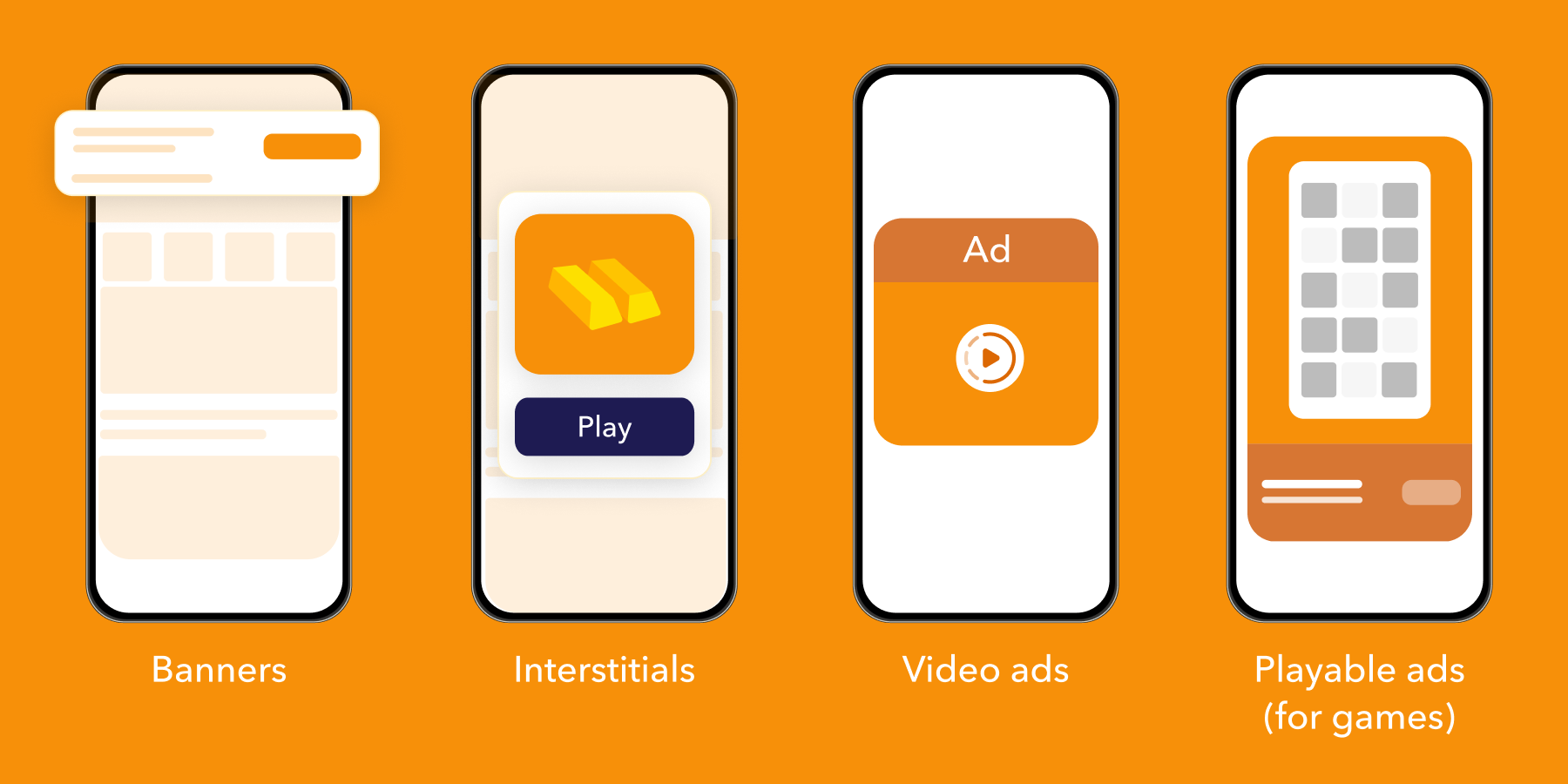
These channels are often used to reach large audiences at scale, especially when you need volume quickly. They are also useful for testing performance in new geographies and for reaching users during moments of high mobile engagement, such as gaming or content consumption.
However, performance can vary significantly. Results depend on where the ad appears, how relevant and clear the creative is, how much control you have over targeting, and how well fraud and attribution are handled.
User acquisition strategy for mobile apps
A good mobile user acquisition strategy isn’t “run ads until CPI looks nice.” It’s a repeatable system for turning budget into profitable growth, with clear decisions on what you optimize for, where you spend, what you test next, and when you scale or stop.
We’ll walk through how strong UA teams actually run this in practice.
1) Start with the business outcome (not installs)
Before touching channels or creatives, define one thing clearly; what a good user actually means for your app. Installs alone don’t answer that. They only tell you someone downloaded the app, not whether the product delivered real value.
Value moment
This is the first action that proves the user experienced value, not just an app open.
For some apps, it’s completing onboarding and taking the first key action.
For others, it’s starting a free trial, making a first purchase, finishing a match or level, or booking a first session.
Primary success metric
This is the metric you’ll judge campaigns on once enough data accumulates. Not CPI. Not raw install volume.
Depending on the business, this might be trial starts, subscription starts, Day 7 retained users, or revenue generated within 7, 14, or 30 days.
Early vs. quality signals
Not all signals arrive at the same time. Early signals appear quickly and help you learn direction, such as installs, onboarding completion, registration, or tutorial completion.
Quality signals take longer but show whether growth is real, retention, paying users, revenue, and eventually LTV or payback.
Practical rule: If the team doesn’t agree on the value moment, you’ll argue about performance forever.
2) Set your “decision window” and guardrails
UA gets messy when teams expect answers too soon (or wait too long and waste budget). Pick a window that matches your business.
- If your app monetizes quickly (games with IAP, ecommerce): you can make calls in 3–14 days
- If monetization is slower (subscription, fintech, education): expect 14–45 days for stronger confidence
Once that window is defined, you need guardrails to avoid scaling the wrong traffic.
Start with a minimum quality threshold. This could be something like onboarding completion rate or Day 1 retention, a basic signal that users aren’t bouncing immediately.
Next, set a cost threshold tied to a meaningful action. Instead of watching CPI, focus on CPA for the action that actually matters, whether that’s a trial start, registration, or first purchase.
Finally, add a stability check. Performance should hold across multiple days, not spike once and disappear the next. One good day doesn’t mean you’ve found a winner.
These guardrails are what keep “random good days” from fooling you, and stop short-term noise from turning into long-term mistakes.
3) Make measurement realistic (especially on iOS)
In 2025-2026, measurement is rarely perfect, especially on iOS. Strong UA teams don’t chase perfect attribution. They build measurements that’s good enough to make decisions with confidence.
What that looks like in practice:
- You define one source of truth for spend and performance (your MMP + network dashboards used consistently).
- You evaluate campaigns using trends and cohorts, not single-user stories.
- You separate directional signals (early) from confirmation signals (later).
For iOS specifically, accept that some paths will be blurry. Your job is to create a setup where you can still answer:
- “Is this bringing the right users?”
- “Is the cost reasonable for the value we get?”
- “Is it scaling without collapsing quality?”
If your measurement can’t answer those, the problem isn’t the channel or the creative. The strategy simply isn’t ready yet.
4) Choose channels based on intent, scale, and creative fit
Channel selection is not “what’s popular.” It’s matching your product to the environment.
A practical way to think about channels is by the role they play.
High-intent capture
These are users already looking for a solution. Search ads on the App Store or Google Play, and Google App Campaigns with strong intent signals, usually fall here. They’re best for efficiency, predictable demand, and clean conversion flows. The limitation is scale, if category demand is small, these channels cap out quickly.
Discovery and social
This is where you create demand rather than capture it. Platforms like Meta, TikTok, Snap, or YouTube are built for scale and creative-led growth, helping you reach new audiences. The risk isn’t volume, but volatility. Creative fatigue and shallow optimization can cause quality to swing fast.
Network and inventory expansion
Programmatic networks and partners are typically used for incremental scale once you know what “good” performance looks like. Without strong guardrails, however, quality can dilute before you notice.
✴️ Pro tip: Most teams make the same mistake; trying too many channels at once. Start with one or two core channels you can operate well, learn deeply, and control. Expansion only works when the foundation is solid, running six channels in parallel usually teaches you nothing.
5) Build a test roadmap (so you’re not guessing every Monday)
Testing works best when it’s structured enough to create learning, but simple enough to run consistently.
The key is to separate stability from experimentation. You keep a set of always-on campaigns that already meet your targets and protect baseline performance. Alongside that, you run growth tests focused on incremental changes, new creatives, audience segments, placements, or bidding models, where the goal is to improve efficiency or unlock more scale. Exploration comes last and stays limited to higher-risk bets like new channels, new geographies, or new value propositions.
And keep your testing questions tight:
- “Can this creative angle improve trial starts at the same cost?”
- “Can this audience segment retain better by Day 7?”
- “Does this offer improve conversion without killing payback?”
One good question beats ten random experiments.
6) Treat creative like a performance system, not “content”
Most UA performance swings come from creative, not bidding.
That’s why creative should be managed as a system. Start by defining a small set of core angles, usually three to five, such as a pain point, an aspiration, proof, comparison, or a clear offer.
Performance comes from fast variation, not constant reinvention. Test different hooks, first seconds, formats, and CTAs, then reuse winning creatives across channels with small edits.
What strong teams do differently:
- They evaluate creative by audience and placement, not just overall results
- They refresh creatives before performance drops
- They keep a creative library so learnings accumulate
If creative is treated as content, results stay unstable. If it’s treated as a system, performance becomes predictable.
7) Optimize for quality in layers (not one magic metric)
Quality optimization works best when you look at it in layers, not through a single metric.
Layer 1: Delivery health
Before judging performance, make sure campaigns are even readable. Spend should be consistent, CPIs or CPAs stable enough to evaluate, and there should be no tracking or store listing issues distorting the picture.
Layer 2: Conversion health
Next, look at how users move from click to install, and from install to your value moment. If conversion is weak here, the problem is rarely the channel. It’s usually the store page, onboarding flow, offer clarity, or a mismatch between creative promise and product reality.
Layer 3: User quality
Finally, zoom out to cohort behavior. Retention, payer rate, and revenue trends show whether growth is actually sustainable. If these drop when you scale, you’re likely buying easy installs that don’t stick.
A common mistake is optimizing purely for CPI because it’s fast and visible. That usually leads to scaling the cheapest users, not the best ones.
8) Scaling rules (how to grow without breaking performance)
Scaling isn’t “raise budget.” It’s controlling what changes when spend increases.
Good scaling looks like:
- Scale in steps, not jumps (because algorithms need time to adapt)
- Keep winners stable while you expand around them
- Expand one dimension at a time: budget or geo or audience breadth or placements
When scaling hurts performance, the fix is usually one of these:
- Creative doesn’t match broader audiences → refresh angles
- Onboarding can’t convert higher volume → fix flow + speed + clarity
- You expanded to low-quality inventory → tighten placements/partners
- Your success event is too shallow → shift optimization deeper
Scaling is basically “protect quality while adding volume.”
9) Make lifecycle part of UA
A strategy that ends at install is incomplete. UA teams win when they work with product/CRM, even lightly.
At minimum, align on:
- The first-week experience that improves retention (onboarding, habit loop, personalization)
- Paywall/offer timing (subscription) or purchase moments (IAP/ecom)
- Basic lifecycle messaging (push/email/in-app) that supports the value moment
Simple truth: if retention is poor, UA becomes expensive no matter how good your ads are.
10) Build an operating cadence your team can actually run
Strategy only works if it turns into habits. Without a clear cadence, even good plans fade fast.
A lightweight rhythm that works in practice usually looks like this:
Daily (around 15 minutes). Focus on basics only. Spend pacing, obvious anomalies, and the campaigns that are moving meaningfully, up or down. No deep analysis, just control.
Weekly (60–90 minutes). This is where learning happens. Review what worked and why, what didn’t and why, what you’re testing next, how creatives are performing, and where budgets need to shift.
Monthly. Zoom out. Review channel mix, cohort quality, and overall performance trends. Decide where to expand, where to pull back, and just as importantly, what to stop doing.
Reporting should always support decisions, not documentation:
- what’s working and why
- what’s not working and what will change
- what’s being tested next, with clear success criteria

Mobile game user acquisition: what’s different?
While many principles of mobile user acquisition apply to both apps and games, mobile games have distinct dynamics that affect how acquisition strategies are designed and evaluated. Understanding these differences helps you avoid applying app-focused assumptions to game growth.
Creative-led growth
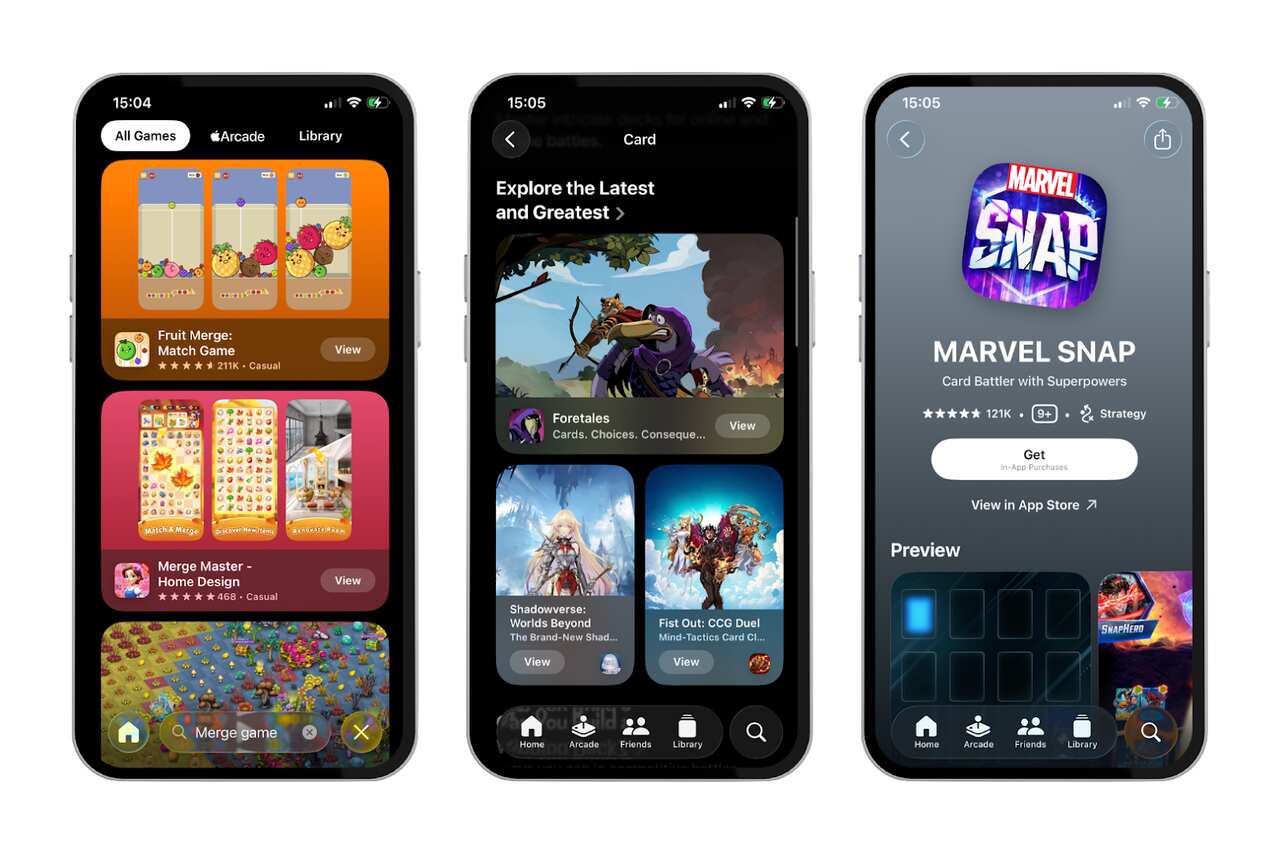
For mobile games, creatives play a much larger role in acquisition performance. Most users want to see the gameplay before they install.
Successful game UA creatives typically:
- Show real, in-game footage
- Communicate the core mechanic within seconds
- Match player expectations for the genre
Because of this, game UA teams often spend more time testing and iterating on creatives than on targeting options.
Viral loops and in-game mechanics
Games have more opportunities to build acquisition directly into the product experience.
Common examples include:
- Rewards for inviting friends
- Sharing achievements or progress
- Competitive elements like leaderboards
These mechanics can reduce reliance on paid channels, but only when they feel natural and rewarding rather than forced.
Retention and monetization sensitivity
Games often experience:
- Higher early churn
- Strong dependence on day 1 and day 7 retention
- Revenue concentrated in a small percentage of users
This means acquisition decisions must be closely tied to early engagement signals. Scaling paid UA without strong early retention usually leads to rapid cost increases and poor long-term performance.
Genre-specific behavior
Different game genres attract users in different ways. For example:
- Casual games often rely heavily on paid social and video ads
- Strategy and simulation games may benefit more from search-driven discovery and community influence
Effective game UA strategies account for these genre differences rather than applying a one-size-fits-all approach.
Mobile game user acquisition works best when acquisition, product design, and monetization teams are closely aligned around player behavior.
How mobile user acquisition is measured
Measuring mobile user acquisition correctly is essential for making good decisions about channels, budgets, and scale. If you only look at surface-level metrics, it’s easy to grow installs while weakening the business underneath.
Now, we explain the core metrics used in mobile UA and how to interpret them in a practical way.
 CPA, and ROAS
Cost Per Install (CPI) shows how much you pay, on average, for one install. It’s often the first metric teams look at because it’s simple and available early.
CPI is useful for:
- Comparing efficiency across channels
- Detecting sudden cost changes
- Setting initial test benchmarks
However, CPI alone does not tell you whether users are valuable.
Cost Per Action (CPA) goes one step further by measuring the cost of a meaningful post-install event, such as:
- Account creation
- Subscription start
- First purchase
- Tutorial completion
CPA helps connect acquisition cost to actual user behavior.
Return on Ad Spend (ROAS) compares revenue generated to advertising spend. It is commonly used in:
- Subscription apps
- Games with in-app purchases
- Apps with clear monetization events
ROAS is most useful when measured over time (for example, day 7, day 30, or longer), not just immediately after install.
Retention, Churn, and Lifetime Value (LTV)
Retention shows whether users come back after installing. It is one of the strongest indicators of acquisition quality.
Common retention checkpoints include:
- Day 1 retention
- Day 7 retention
- Day 30 retention
Low retention usually signals problems with onboarding, product value, or audience targeting.
Churn is the opposite side of retention and reflects how quickly users stop using the app. High churn makes paid acquisition difficult to scale sustainably.
Lifetime Value (LTV) estimates the total value a user generates over time. This includes:
- Subscription revenue
- In-app purchases
- Ad monetization
LTV allows you to evaluate acquisition in context. An expensive channel can still be profitable if the users it brings generate strong long-term value.
Why CPI alone is misleading
Optimizing only for CPI often leads to short-term wins and long-term problems.
A low CPI can hide issues such as:
- Poor activation
- Weak retention
- Low monetization
- High uninstall rates
A higher CPI, on the other hand, may be acceptable if:
- Users activate quickly
- Retention is strong
- LTV comfortably exceeds acquisition cost
Effective mobile user acquisition measurement connects cost metrics with behavior and value. This allows you to scale what actually works, rather than what only looks efficient at first glance.
Common mobile user acquisition mistakes
Many mobile user acquisition problems are not caused by bad channels or tools, but by misaligned expectations and incomplete measurement. Recognizing common mistakes early can save time, budget, and momentum.
1. Scaling before retention is proven
One of the most frequent mistakes is increasing spend before understanding user quality.
If users install but do not activate or return, scaling paid acquisition will:
- Increase costs quickly
- Hide product issues behind volume
- Create misleading performance signals
Before scaling, you should have clear visibility into early retention and activation patterns.
2. Optimizing for CPI instead of user value
Focusing only on lowering CPI often leads to acquiring users who are easy to convert but unlikely to stay.
This can result in:
- Short sessions
- Early uninstalls
- Low lifetime value
CPI should be treated as an efficiency metric, not a success metric. It must be evaluated alongside retention, CPA, and LTV.
3. Treating channels in isolation
Another common issue is evaluating each channel separately instead of as part of a system.
In reality:
- Paid campaigns influence organic discovery
- ASO improvements affect paid performance
- Brand awareness changes user behavior across channels
Looking at channels in isolation can lead to incorrect conclusions about what is truly driving growth.
4. Ignoring creative fatigue and learning cycles
Even well-performing campaigns decline over time if creatives are not refreshed.
Signs of creative fatigue include:
- Rising CPI
- Falling CTR
- Stable targeting but declining performance
Regular creative testing is not optional in mobile UA. It is a core part of maintaining performance.
5. Underestimating measurement and attribution complexity
Without reliable tracking, it becomes difficult to:
- Compare channels fairly
- Understand post-install behavior
- Make confident budget decisions
Incomplete attribution often leads teams to optimize for what is easiest to measure rather than what matters most.
Avoiding these mistakes does not require perfection. It requires clear goals, consistent measurement, and a willingness to adjust based on real user behavior.
How MobileAction supports mobile user acquisition
MobileAction helps you make better user acquisition decisions by connecting organic and paid data instead of treating them separately.
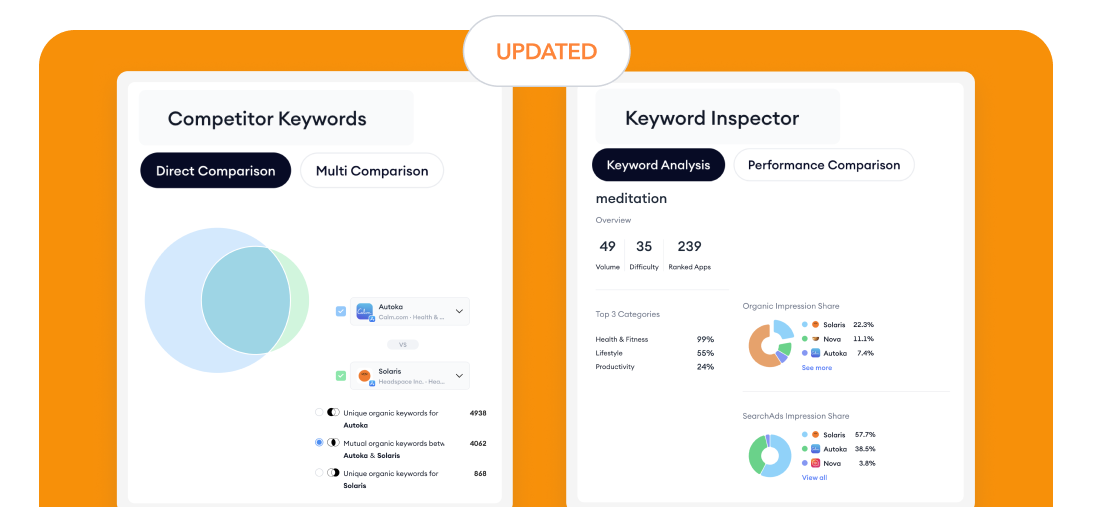
For organic UA, ASO Intelligence shows how users discover apps, which keywords drive visibility, how competitors rank, and how store page creatives and localization impact installs. This makes ASO a measurable, long-term acquisition channel rather than a one-time setup.
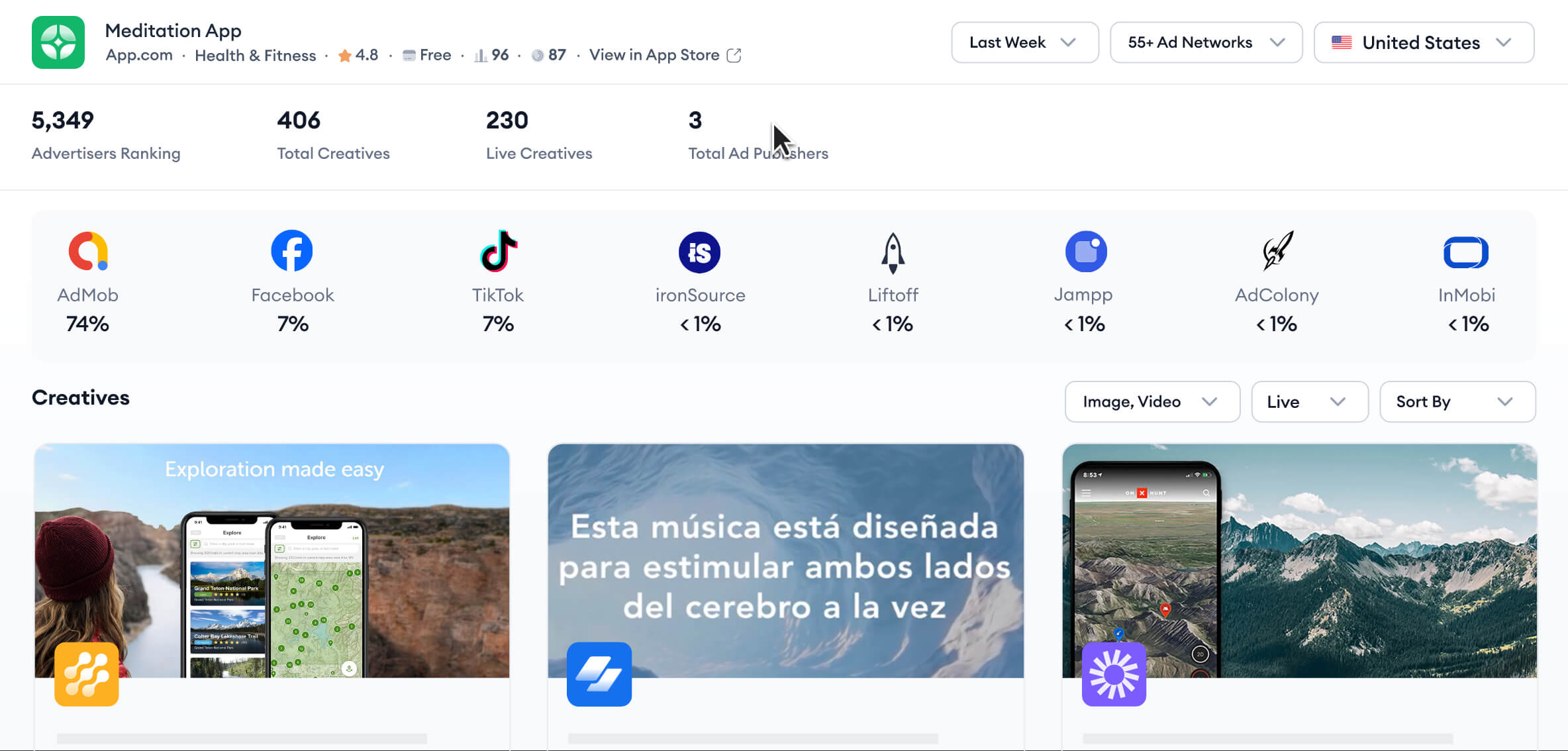
For paid UA, Ad Intelligence, and SearchAds.com, reduce guesswork before and after launch. You can see which creatives, formats, networks, and Apple Ads keywords competitors rely on, helping you plan and scale campaigns more efficiently.
For conversion optimization, CPP Intelligence helps you understand how custom product pages are aligned with different keywords or audiences and how those variations affect impressions and installs, improving efficiency without increasing spend.

Final thoughts: building sustainable mobile UA
Mobile user acquisition works best when you treat it as a system, not a set of isolated tactics. Installs matter, but what happens after the install matters more. When organic and paid efforts support each other and decisions are based on real user behavior, growth becomes more predictable and sustainable.
If you want to put these ideas into practice, the right tools can make the process clearer. To start improving organic discovery and ASO today, you can start for free with MobileAction and explore keyword visibility, competitors, and store performance at your own pace.
If you’re focused on paid growth, creative strategy, or Apple Ads optimization, book a demo with us to see how Ad Intelligence and SearchAds.com can support smarter testing, clearer insights, and more confident scaling.
Used thoughtfully, these tools help you focus less on guesswork and more on building acquisition strategies that actually hold up over time.
Frequently asked questions
What is the difference between paid and organic user acquisition?
The difference comes down to how users discover your app and how growth is sustained over time. Organic user acquisition happens inside the app stores through search, browsing, and featuring, where users are actively looking for an app or solution. These users usually install with clearer intent and tend to retain better, but growth builds gradually. Paid user acquisition relies on advertising to drive installs quickly and at scale. It gives you speed and control, but performance depends heavily on post-install behavior.
What is a good CPI for mobile UA?
There is no single “good” CPI that works for every mobile app. A CPI is good only if the users you acquire generate more value than they cost. In simple terms, CPI is acceptable when lifetime value (LTV) is higher than CPI.
CPI varies widely depending on app category, platform, country, and monetization model. As a rough reference, CPIs may range from around $0.50–$1.50 in lower-cost markets, $1.50–$3.00 for many mid-range apps, and $3.00-$6.00 or more for competitive iOS, games, or subscription apps.
The correct way to judge CPI is not by a fixed number, but by whether users activate, retain, and generate enough revenue over time to cover acquisition costs and scale sustainably.
What does UA mean in mobile gaming?
In mobile gaming, user acquisition focuses on bringing in players who engage with the game and continue playing, not just those who install. Performance is driven heavily by creative quality, early retention, and genre-specific behavior. Revenue usually comes from a small portion of players, so acquisition decisions are made based on how well early cohorts retain and monetize. In games, scaling UA before early retention is proven typically leads to rising costs and unstable performance.
Further reading
This handbook will serve as your roadmap, packed with emerging trends, valuable insights, and the best ASO tools & resources. It aims to help you stay ahead of the competition and enhance your app marketing strategy for substantial growth in 2025 and beyond.
Resources that you'll love




Grow your app on the App Store and Google Play Store with our solutions now