












This handbook will serve as your roadmap, packed with emerging trends, valuable insights, and the best ASO tools & resources. It aims to help you stay ahead of the competition and enhance your app marketing strategy for substantial growth in 2025 and beyond.
App localization is a core growth lever for global discoverability and conversion. Today, users expect apps to feel native in their language and culture. An app that is not localized risks losing visibility in app store search, underperforming in conversion rates, and failing to build trust in international markets.
As app stores become increasingly search-driven, localization plays a direct role in ASO performance, install conversion rates, and long-term user retention across regions. Successful localization requires more than translation, it means adapting metadata, creatives, keywords, pricing, and the in-app experience to local user expectations.
In this guide, we’ll break down what app localization is, how the app localization process works, and how to localize apps for both the App Store (iOS) and Google Play (Android). You’ll also learn proven app localization best practices, common mistakes to avoid, and how localization and ASO work together to drive sustainable global growth.
What is app localization?
App localization is the process of adapting a mobile app’s content, metadata, and visuals to different languages, cultures, and regions so it can rank, convert, and retain users in international markets.
It typically includes:
- Translating in-app text (UI strings, onboarding, help content)
- Localizing app metadata (title, subtitle/short description, description)
- Adapting keywords for ASO based on how people search in each locale
- Updating screenshots, previews, and other creatives to feel culturally native
- Adjusting formats and settings like currency, date/time, units, and text direction.
In short, localization is more than translation. It’s making your app feel like it was built for that market, while improving discoverability (search visibility), conversion (page-to-install), and trust (user experience).
Example (translation vs localization)
If you translate “budget tracker” into another language word-for-word, you might miss the phrase users actually search for locally. Localization means choosing the market-native term, even if it’s not a literal translation, so your listing matches real search intent.

Internationalization (i18n) vs localization (l10n)
Internationalization (i18n) and localization (l10n) are related but distinct stages of the app localization lifecycle. Understanding the difference is essential before expanding into new markets.
Internationalization (i18n) prepares your app for global markets by separating text from code, supporting different languages, formats, and layouts. It happens before localization.
Localization (l10n) adapts the app for a specific market by translating content, localizing visuals and metadata, and adjusting tone, pricing, and cultural context.
Without i18n, localization leads to broken layouts and poor UX. Without l10n, even a well-built app struggles to perform in new markets.
App Store vs Google Play app localization: what changes?
App Store (iOS) and Google Play (Android) both support localization, but they behave differently in how metadata is managed, how languages map to countries, and how discoverability works. If you treat them the same, you’ll usually end up with mismatched keywords, inconsistent creatives, and weaker conversion.
Store listing localization (metadata + creatives)
On the App Store, localization is tightly connected to language “locales” (e.g., English (US), English (UK), French (Canada)). Your title/subtitle/keyword field and screenshots can be localized per locale, and your ASO keyword strategy often needs to account for how Apple indexes language variants.
On Google Play, localization is also locale-based, but you typically work with a different metadata structure (short description + full description) and a different workflow for rolling out localized store assets. In addition, Play is more exposed to auto-translation behavior if you don’t actively localize your listing, meaning users may see machine-translated text that hurts trust and conversion.
What this means in practice:
- You should plan separate metadata workflows for App Store vs Play Store
- Keywords and messaging should be localized based on how users search in that store
- Creatives should be adapted per market, not just translated
In-app localization (strings + UX)
For both stores, in-app localization is where user trust is won or lost. But the priorities often differ by market:
- Some regions care most about complete translation quality and cultural tone
- Others care more about performance on lower-end devices, offline behavior, or compatibility
- Right-to-left (RTL) languages and complex scripts require extra care for layout, typography, and QA
At minimum, your app should handle:
- Correct text display (length expansion, truncation rules, RTL support)
- Correct formats (dates, times, currencies, decimal separators, units)
- A localized UX that doesn’t feel “patched” (mixed-language screens are a common churn trigger)
Mobile app localization process (step-by-step)
A clear process helps you focus on the right markets, avoid wasted translation work, and make localization decisions you can actually measure.
Step 1: Market selection & demand validation
The first step in the app localization process is choosing the right markets to localize for. Localization should never start with translation, it should start with validated demand.
Before investing in a new language or region, evaluate whether real growth potential exists by analyzing:
- Existing installs and impressions from foreign countries
- Page view → install conversion rates by country
- Revenue, ARPU, or monetization signals per market
- Category competitiveness and local incumbents
If users are already discovering your app but failing to convert, localization can unlock immediate gains. If there is no organic visibility or demand at all, localization alone may not justify the effort.
At this stage, it’s critical to avoid choosing markets based solely on download volume. High-download regions may still underperform due to:
- Low monetization potential
- Heavy competition
- Language overlap inefficiencies
- Cultural or regulatory barriers
The goal of market selection is to identify high-intent regions where localization can improve both discoverability and conversion, not just expand geographic reach.
Once priority markets are clearly defined, the rest of the localization process becomes far more focused, measurable, and cost-efficient.
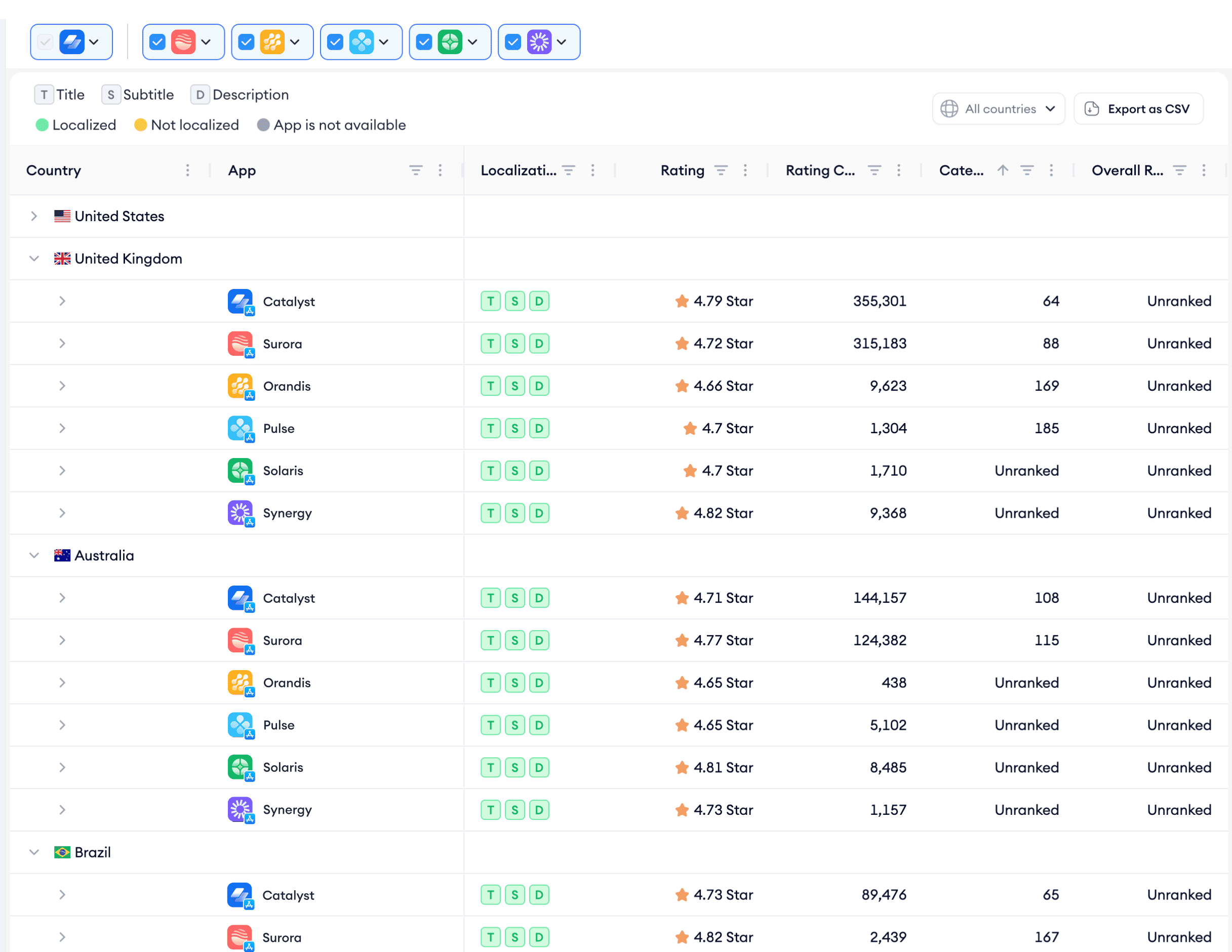
A good place to start is with a localization coverage audit. Before committing to new markets, it helps to understand where you’re already gaining traction without localized metadata. Using MobileAction’s Localization, you can quickly see whether your app’s Title, Subtitle, and Description are localized in each country or still relying on the default language. This makes it easier to spot quick wins, markets where downloads are meaningful but localization is missing, and prioritize based on real impact rather than assumptions.
Step 2: Keyword research per locale (ASO-focused)
Once you’ve identified which markets to localize for, the next critical step is localized keyword research. This part is often underestimated, but directly translating your English keywords into other languages almost always leads to missed search intent and underperformance in app store rankings.
Why? Because keyword localization isn’t about translation accuracy, it’s about relevance, scale, and practicality.
With MobileAction’s Keyword Translator, you can localize entire keyword lists into multiple languages at once, while seeing each translated term side-by-side. The tool also shows character counts for every translation, so you can instantly tell which keywords will realistically fit within App Store or Google Play metadata limits. That saves you from wasting time on overlong, awkward, or irrelevant terms.
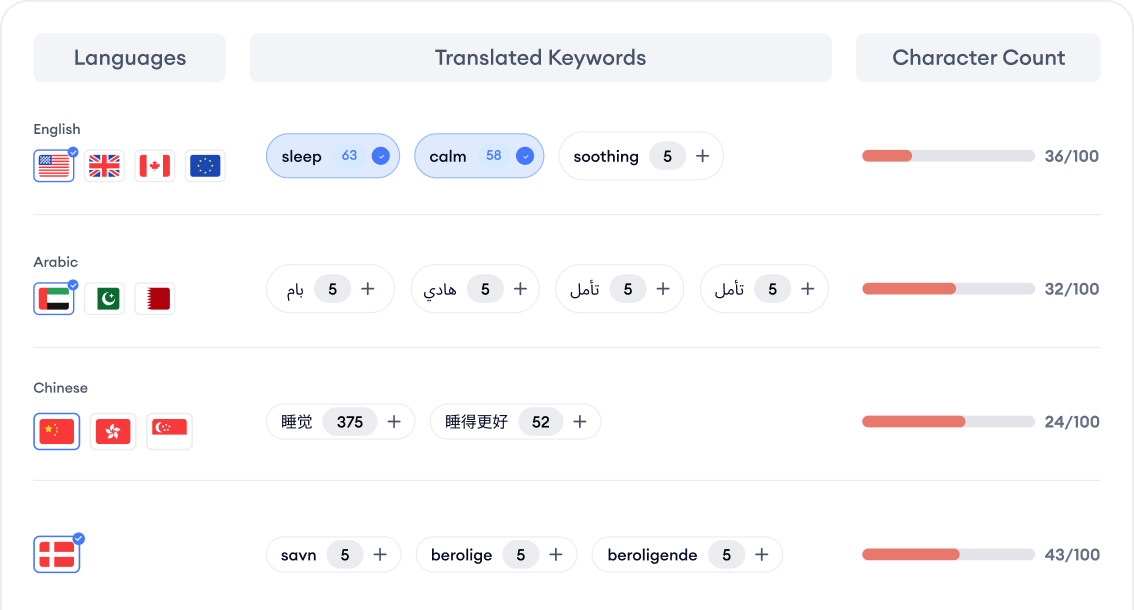
By reviewing keyword translations and character limits together, localization teams can quickly:
- Compare alternatives
- Spot unviable terms
- Prioritize keywords that reflect real search behavior
- Stay within metadata constraints across stores
It’s important to remember that each market has its own search behavior, terminology, and intent patterns. Even within the same language family, users may describe the same problem with totally different words.
For example, a well-performing keyword in English might have multiple local equivalents
- Be dominated by a different synonym with stronger search intent
- Translate into something users in that country never search at all
So instead of just translating terms, prioritize keywords with medium-to-high volume and manageable competition and queries that reflect your app’s value prop in that language.
Once you’ve nailed down your localized keyword sets, you can confidently move into the next phase: translating and adapting your app store metadata.
Step 3: Metadata translation & cultural adaptation
Once localized keywords are defined, the next step is translating and adapting your store metadata, including the app title, subtitle, short description, and long description, based on local search intent and cultural context.
This step is not about word-for-word translation. Metadata must be rewritten to balance three factors:
- Keyword relevance and indexing rules
- Character limits per store and locale
- Natural, persuasive language that matches local expectations
Each app store field serves a different purpose. For example:
- The title should communicate core value while targeting the most important localized keywords
- The subtitle or short description should reinforce differentiation and conversion
- The long description should expand on features, benefits, and trust signals in a culturally familiar tone
Cultural adaptation is especially important at this stage. Certain phrases, humor, or claims that work well in one country may feel unnatural, or even inappropriate, in another. Localization teams must consider:
- Formal vs informal language norms
- Local expressions and idioms
- Cultural sensitivity around claims, pricing, or comparisons
Well-localized metadata improves both search visibility and install intent, making it one of the highest-impact steps in the entire app localization process.
Step 4: In-app strings, formats & UX adjustments
In-app localization ensures that users can fully use and understand your app after installation. If the store listing is localized but the in-app experience is not, user trust breaks immediately, often resulting in poor reviews and churn.
This step includes translating all user-facing text, such as:
- Navigation menus and buttons
- Onboarding flows and tooltips
- Error messages and system notifications
- Settings, permissions, and help content
Beyond text, apps must adapt regional formats and UX expectations, including:
- Date, time, number, and currency formats
- Measurement units (metric vs imperial)
- Address and phone number formats
- Text direction for right-to-left languages
UX adjustments are especially important when languages expand or contract significantly in length. Interfaces must be flexible enough to prevent truncated text, overlapping UI elements and broken layouts on smaller devices.
Cultural expectations also affect UX. For example; some markets expect more explicit guidance during onboarding, others prefer minimal friction and faster access to core features.
Failing to localize the in-app experience often leads to negative feedback that directly impacts ratings, reviews, and long-term ASO performance. Proper in-app localization ensures the promise made on the store page is delivered inside the product.

Step 5: QA, linguistic review & testing
Quality assurance is a critical but often underestimated step in the app localization process. Even small linguistic or formatting errors can damage credibility and negatively affect user trust.
Localization QA goes beyond basic proofreading. It should verify that:
- All strings are translated correctly and consistently
- Terminology matches local usage and brand tone
- Text fits properly within UI components
- No fallback or untranslated strings remain
Linguistic review should ideally be handled by native speakers familiar with app usage, not just professional translators. This helps catch:
- Awkward phrasing or unnatural tone
- Misleading translations that change meaning
- Cultural mismatches in wording or examples
Functional testing is equally important. QA teams should test the localized app across; different device sizes and OS versions, various language and region settings and edge cases like long text strings or special characters.
This phase also includes reviewing localized creatives and store listings to ensure messaging consistency between the app store page and the in-app experience.
Step 6: Release strategy & phased rollout
Releasing a localized app should be a controlled, data-driven process, not a one-click global launch. A phased rollout helps minimize risk and allows teams to validate localization quality before scaling further.
A common approach is to:
- Start with one or two priority markets
- Release localized metadata and in-app content gradually
- Monitor early performance signals before expanding
Key metrics to track during rollout include install conversion rate by locale, retention and engagement in localized markets, crash reports and language-related issues and review sentiment and keyword mentions.
Phased releases also make it easier to identify localization issues early, compare localized vs non-localized performance and iterate quickly without affecting all markets.
On the App Store, phased releases can be aligned with locale activation. On Google Play, staged rollouts help control exposure across regions and device segments.
Step 7: Measurement, iteration & continuous optimization
App localization is an ongoing process, not a one-time launch. After release, teams must continuously measure performance to understand what’s working in each market.
Key metrics by locale include app store visibility, install conversion, retention, and user feedback.
These insights help teams see which localizations drive growth, where listings or creatives underperform, and whether in-app content meets local expectations.
Keyword localization for ASO: how to find localization keywords
Keyword localization is the bridge between app localization and ASO. Without localized keywords that reflect real search behavior, even well-translated store pages struggle to gain visibility.
The biggest mistake teams make is assuming that keyword localization means direct translation. In reality, keyword localization is about mapping local search intent, not words.

How localization keywords differ from translations
Users in different markets often describe the same need using:
- Different terminology
- Category-specific jargon
- Local abbreviations or colloquial phrases
As a result, a keyword that performs well in English may:
- Have multiple localized equivalents
- Carry different intent when translated literally
- Not exist at all in the target language
Effective keyword localization starts by asking:
- How do users search for this type of app in this country?
- Which words signal high install intent locally?
Localization keyword research workflow
A reliable ASO-focused keyword localization process includes:
- Identifying top-ranking apps in the target market
- Extracting their localized titles, subtitles, and descriptions
- Analyzing search volume and competition per locale
- Grouping keywords by intent, not grammar
- Selecting keywords that balance relevance, volume, and difficulty
After defining localized keyword candidates, the next step is validating how localization is actually applied in the market. MobileAction Localization Tool makes this visible by showing, country by country, whether an app’s Title (T), Subtitle (S), and Description (D) are localized or not. This allows teams to instantly identify markets where competitors fully localize metadata versus markets where localization is partial or missing.
Instead of guessing which markets are “localized enough” you can filter directly by localization status and benchmark your app against competitors. This turns localization from a qualitative discussion into a measurable ASO signal.
Where keyword localization creates ASO leverage
Strong keyword localization allows apps to:
- Rank for high-intent local queries
- Expand keyword coverage without bloating metadata
- Improve app conversion by matching user expectations
- Discover low-competition opportunities unique to each market
When keyword localization is done correctly, it doesn’t just translate ASO, it multiplies discoverability across regions.
Apple App Store localization (iOS)
App Store localization is one of the most powerful levers for expanding keyword coverage and improving discoverability on iOS. Unlike Google Play, Apple allows apps to rank for multiple locales within a single country, making localization a core ASO strategy, not just a translation task.
How App Store locales work
Each App Store storefront supports multiple locales. When you localize your app for a specific locale, Apple indexes your metadata for that language while still allowing overlap with other active locales.
In practice, this means:
- A single country can contribute keywords from multiple languages
- Localized metadata expands keyword reach without creating separate listings
- Proper locale selection can significantly increase impressions
For example, localizing for French (France) allows ranking for French keywords while still retaining visibility for English queries in the same market.
What to localize on the App Store
To fully benefit from App Store localization, every text-based and visual element should be localized consistently:
- App name (title)
- Subtitle
- Keyword field
- Long description
- Screenshots and captions
- App preview videos
Half-localized product pages often hurt conversion and trust. Users quickly noticewhen screenshots or descriptions remain in a foreign language, even if the title is localized.
Key advantages of App Store localization
Proper iOS localization enables apps to:
- Rank for more keywords per country
- Capture multiple language-based search behaviors
- Improve conversion rates with native-feeling creatives
- Compete more effectively against local apps
This is why App Store localization is often prioritized earlier than Google Play localization for ASO-driven growth strategies.
Common App Store localization mistakes
Despite its benefits, App Store localization is often underutilized or misused. Common pitfalls include:
- Translating keywords literally instead of localizing intent
- Ignoring the keyword field or duplicating terms across locales
- Localizing metadata but not creatives
- Activating too many locales without performance monitoring
Successful iOS localization requires intent-driven keyword research, consistent creative adaptation, and continuous performance analysis per locale.
Google Play localization (Android)
Google Play localization follows a different logic than the App Store and requires a language- and conversion-focused strategy. While localization still impacts discoverability, Google Play relies more heavily on user language, relevance, and behavioral signals than multi-locale keyword coverage.
How Google Play localization works
On Google Play, each app listing is primarily tied to:
- A country
- A default language for that country
Unlike the App Store, Google Play does not combine keyword indexing across multiple locales within the same market. This means localization decisions must be more selective and intent-driven.
Key characteristics:
- Metadata is indexed mainly for the active locale
- Language targeting is stricter than on iOS
- Localized listings primarily impact conversion, not keyword breadth
Because of this, poor localization quality can directly harm performance.
Auto-translation risks on Google Play
One of the biggest risks on Google Play is unchecked auto-translation.
If an app is not localized:
- Google automatically translates parts of the store listing
- The short description is always auto-translated
- Translations may be grammatically correct but semantically wrong
Common issues with auto-translation include:
- Incorrect terminology for the app category
- Awkward or misleading phrasing
- Loss of persuasive tone and trust signals
These issues often lead to lower conversion rates and negative reviews, even if the app itself is solid.
Google Play localization best practices
To mitigate these risks and improve performance:
- Manually localize metadata for priority markets
- Review auto-translated content even if full localization is not planned
- Ensure short descriptions are accurate and intent-aligned
- Localize creatives alongside text for consistency
For emerging markets with non-English-speaking users, proper localization is especially critical. Many of these regions drive high install volume, but conversion and retention depend heavily on language clarity and cultural relevance.
Common Google Play localization mistakes
Teams often struggle with:
- Relying fully on auto-translations
- Localizing text but not screenshots
- Ignoring language-specific conversion signals
- Expanding to too many locales without validation
On Google Play, accuracy beats breadth. A smaller number of well-localized listings will almost always outperform a wide but shallow localization approach.
App localization best practices
Successful app localization requires more than translation. It demands a structured approach that balances ASO, user experience, and cultural relevance. Below are proven best practices that consistently drive better visibility, conversion, and retention across markets.
What to do (best practices)
- Start with market validation, not language count. Prioritize markets with proven demand, conversion gaps, or monetization potential.
- Localize keywords based on intent, not literal meaning. Always research how users search locally.
- Adapt metadata. Rewrite titles and descriptions to fit local tone, character limits, and persuasion norms while preserving keyword value.
- Localize creatives alongside text. Screenshots and captions should reflect local language, priorities, and cultural expectations to maximize conversion.
- Ensure in-app and store localization are consistent. A localized store page paired with a partially localized app experience leads to poor reviews and early churn.
- Use native speakers for linguistic review. Native reviewers catch unnatural phrasing, tone mismatches, and cultural issues that automated tools miss.
- Test localization in phases. Roll out localization gradually, monitor performance, and iterate before expanding to additional markets.
- Track performance by locale, not globally. Measure impressions, conversion rates, retention, and reviews separately for each localized market.
- Revisit localization regularly. Language trends, seasonality, and competitors evolve. Localization should be optimized continuously, not frozen after launch.
- Align localization with ASO strategy. Keyword research, metadata updates, and creative testing should be coordinated across both localization and ASO workflows.
What to avoid (common mistakes)
- Avoid relying on auto-translation. Especially on Google Play, auto-translated metadata often harms conversion and trust.
- Avoid half-localized product pages. Mixed-language screenshots or descriptions signal low quality and reduce install intent.
- Avoid over-localizing too early. Expanding to too many languages without data increases costs and complexity with limited returns.
- Avoid duplicating keywords across locales. Especially on the App Store, duplicate keyword usage wastes valuable indexing space.
- Avoid ignoring user feedback in reviews. Local reviews often reveal language issues, feature gaps, or cultural mismatches that need correction.
App localization checklist
Use this checklist to validate whether your app is truly ready for international growth. It covers the full localization lifecycle, from strategy to execution and optimization.
| Area | Checklist item | Status |
| Strategy | Target markets selected based on demand and conversion data | ⬜ |
| Strategy | App is fully internationalized (i18n-ready) | ⬜ |
| Strategy | Localization goals defined (ASO, conversion, revenue) | ⬜ |
| Keywords | Local keyword research completed per market | ⬜ |
| Keywords | Keywords mapped by intent, not direct translation | ⬜ |
| Keywords | Keyword difficulty and volume evaluated per locale | ⬜ |
| Metadata | App title localized and intent-aligned | ⬜ |
| Metadata | Subtitle / short description localized | ⬜ |
| Metadata | Long description rewritten for local tone | ⬜ |
| Creatives | Screenshot texts translated and adapted | ⬜ |
| Creatives | Visuals reflect local culture and priorities | ⬜ |
| Creatives | App preview videos localized (if applicable) | ⬜ |
| In-app | All user-facing strings localized | ⬜ |
| In-app | Date, time, number, and currency formats adapted | ⬜ |
| In-app | RTL language support tested (if applicable) | ⬜ |
| QA | Linguistic review completed by native speakers | ⬜ |
| QA | UI layout tested for text expansion | ⬜ |
| QA | No fallback or untranslated strings remain | ⬜ |
| Release | Localization released in phases | ⬜ |
| Release | Conversion and retention tracked per locale | ⬜ |
| Optimization | Metadata and creatives iterated post-launch | ⬜ |
| Optimization | Reviews monitored for localization feedback | ⬜ |
How to use this checklist
This checklist is not meant to be completed once. It should be revisited:
- Before entering each new market
- After major app updates
- During seasonal or campaign-based localization
- When conversion or ratings drop in specific regions
Teams that treat this checklist as a living document tend to achieve more consistent global growth and avoid costly localization mistakes.
Conclusion
App localization is not a one-time translation task. It’s an ongoing growth strategy that combines ASO, conversion optimization, and user experience across markets. Apps that succeed globally focus on intent-based keyword localization, consistent metadata and creative adaptation, and continuous measurement by locale.
MobileAction’s Keyword Translator and Localization help you structure this process by making localized keyword selection and localization coverage visible and scalable, without replacing strategic decision-making.
If you’re planning to expand into new markets, start with one priority region, localize based on real search behavior, and iterate with performance data. Sign up today and start building a repeatable app localization workflow.
Frequently asked questions
How long does app localization take?
The timeline depends on scope and language count.
- Minimum viable localization (MVL): 1-3 weeks
- Full app localization: 4-8+ weeks
Ongoing optimization continues after release as performance data becomes available.
What is the difference between minimum viable localization and full localization?
Minimum viable localization focuses on essential elements like metadata and key UI strings to test demand quickly.
Full localization adapts all in-app content, creatives, formats, and cultural elements to deliver a fully native experience.
MVL is ideal for early expansion, while full localization is better for long-term growth in priority markets.
How many languages should I localize first?
Most apps should start with 1-3 high-potential markets rather than localizing many languages at once. Priority should be based on demand, competition, monetization potential, and language overlap, not download volume alone.
Do I need to localize both the app and the store listing?
Yes. Localizing only the store listing without localizing the in-app experience creates a mismatch that harms trust, retention, and ratings. Sustainable results require consistency across both.
Further reading
This handbook will serve as your roadmap, packed with emerging trends, valuable insights, and the best ASO tools & resources. It aims to help you stay ahead of the competition and enhance your app marketing strategy for substantial growth in 2025 and beyond.
Resources that you'll love


Grow your app on the App Store and Google Play Store with our solutions now