













Looking to boost your app's visibility and acquire more users? Our 2025 ASO Report is your ultimate guide to navigating the evolving app store landscape. Packed with data-driven insights, keyword trends, and top-ranking app strategies, this report will equip you with the knowledge to optimize your app's presence and achieve organic growth.
Apple just rolled out its next growth lever on the App Store: custom product pages, previously exclusive to Apple Ads campaigns, can now appear in organic search results.
The news came as a pleasant surprise for the mobile app community as this was among the updates announced at WWDC 2025 very recently but many people were expecting this update towards the fall.
For years, custom product pages were a powerhouse inside Apple Ads. And, they were conversion-focused assets. Now they can influence every user who types a query into the App Store search bar, which makes them discovery assets as well in the top-of-funnel.
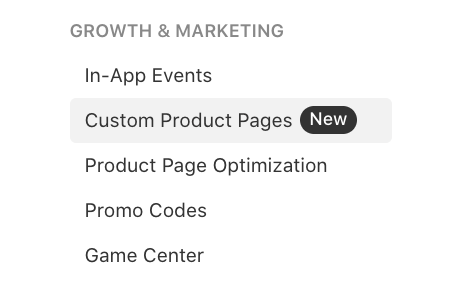
With custom product pages, you can unify your messaging across paid and organic, increase conversions by improving visual relevance on organic, and create journeys for the users.
This is one of the biggest organic growth opportunities on the App Store in the last few years, and if you own user acquisition, ASO, or growth for an app, this is the right time to get ahead of the curve.
In this piece, we’ll talk about why it’s a crucial update, what things you can implement, monitor, and measure starting today, and give you some ideas to help you get started with custom product pages for your app.
Why this matters right now
Per MobileAction data, ~70% of apps using Apple Ads are not utilizing custom product pages.
Still, our 2025 Apple Ads Benchmark Report reveals the power of custom product pages. In 2024 alone:
- 6.56 billion impressions were generated across custom product pages in 2024, while default product pages generated 2.08 billion impressions
- Conversion rates through custom product pages improved by 32% (from 42.13% to 55.87%)
- Cost per acquisition decreased from $4.83 to $4.58 despite rising costs.
Most telling? In 2024, taps decreased from 120M to 93M while installs increased from 50.9M to 52.4M compared to 2023. Note that we saw decreases in installs through default product pages in the same time period.
This proves custom product pages are attracting high-intent users who actually convert. Now, app developers and marketers are about to enjoy the same lift, for free, via organic search on the App Store. We also believe that this will significantly improve the adoption of the feature among app publishers.
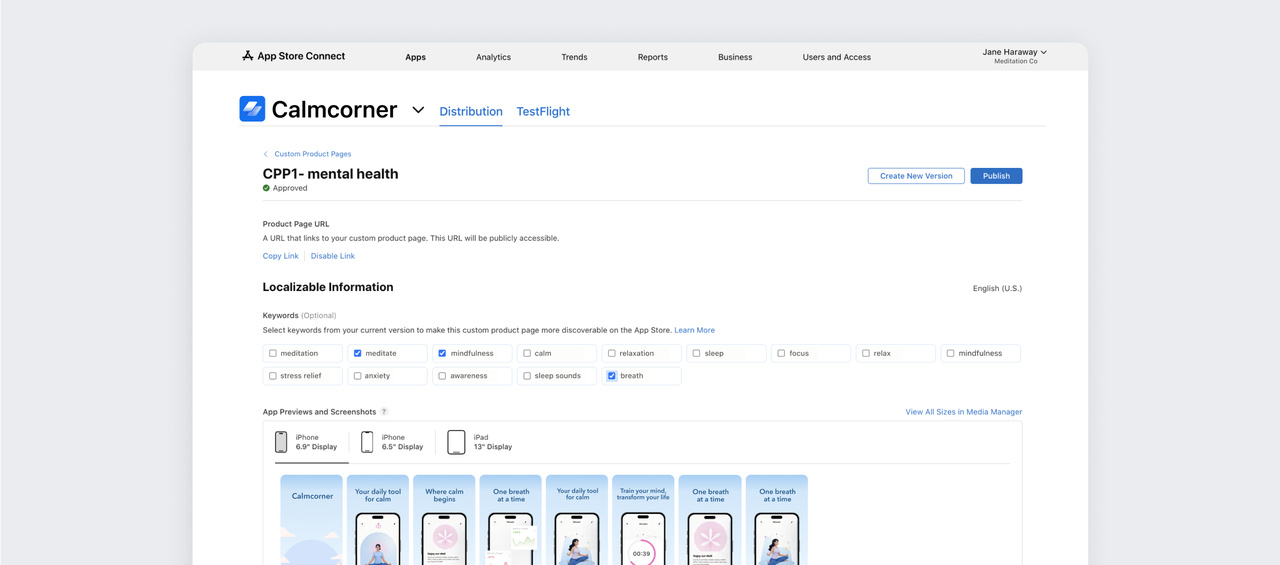
The release on the App Store Connect focuses on keywords already in your App Store Connect keywords field (not title or subtitle). You can create mini funnels with custom product pages, each optimized for a specific user intent. Rather than forcing all visitors through a one-size-fits-all experience, you can create custom product pages with tailored visuals, targeted messaging, and relevant feature highlights, all discoverable through organic search.
What’s even more important, you can view performance breakdowns for each custom product page, meaning your mini funnels, based on:
- App Store metrics (impressions, page views, conversion rate, and pre-orders),
- Download metrics (first-time downloads, redownloads, and total downloads),
- Sales metrics (in-app purchases, paying users, sales, and proceeds),
- Usage metrics (installations, sessions, active devices, and deletions).
So, you have more granular data on the acquisition layer, all can be leveraged through custom product pages on ASO.
What you can do right away
Here’s how to extract maximum value right away:
- Review the custom product pages specific data and category benchmarks before producing any assets, if you don’t have custom product pages ready yet. Simply read our 2025 Apple Ads Benchmark Report and 2025 ASO Report for free to view the latest insights.
- Audit your existing ad variations using custom product pages on Apple Ads for performance, creative freshness, and localization. Re-use what’s already working. The ones that have the highest conversion rates are exactly what you want appearing in organic search. All you need to do is apply them to your metadata keywords.
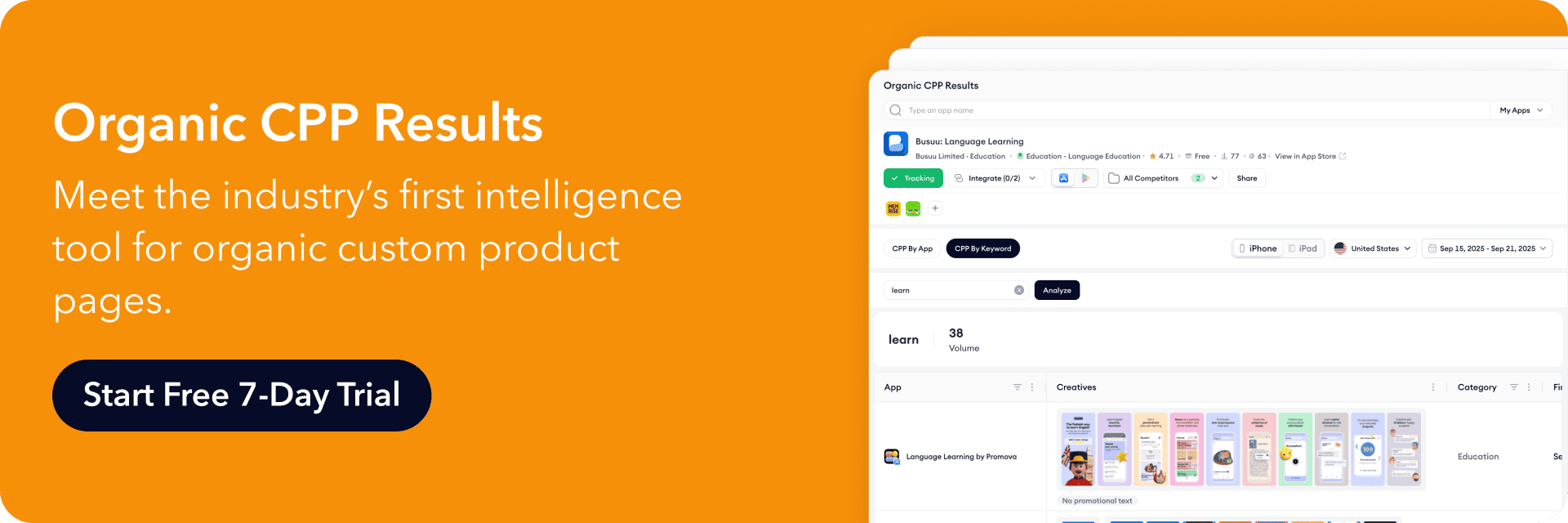
- With MobileAction’s Organic CPP Results, the only organic custom product pages data tool in the industry, you can guide every decision about how custom product pages should appear organically in App Store search. Understand which keywords matter most and how to align your creatives with them from the start by using it.
- Group your keywords by high-intent terms. They can be based on your app’s features, the main solution to a problem,or your competitors. Your keywords are pulled directly from your existing metadata and only those keywords can be assigned to custom product pages, so choose wisely.
- Identify keywords where visual storytelling provides the strongest advantage. “Budget tracker” benefits more from custom product pages than “health” because users have specific visual expectations for a keyword like that. Prioritize keywords where your app offers differentiated value. If you’re the only budgeting app with expense photo scanning, create a custom product page highlighting that feature for “expense tracker” searches.
- Assign one custom product page for a theme. Multiple keywords can be linked to the same custom product page, but a keyword should never be linked to multiple custom product pages. We also highly advise you to create one custom product page for each keyword.
- Localize screenshots, app previews, copy, and promotional text if your app is listed in different countries and you don’t have a huge brand recognition. Otherwise, you might not see the results you expect.
- Add deep links to direct the users from a custom product page to the exact place you want them to land. That way, you’ll have messaging and personalization continuity both in acquisition and engagement layers. Users will get a more relevant app experience, and you will boost user engagement and retention.
- Measure performance, track competitors, and iterate. Use the App Analytics dashboard and Metrics tab in the App Store Connect to measure performance, MobileAction’s CPP Intelligence to track your competitors who are doing ad variations using custom product pages on Apple Ads side, and MobileAction’s CPP A/B Testing tool to run A/B tests for your ad variations to read the results and iterate your current custom product page variants faster.
Industry’s only tool for organic custom product pages: Organic CPP Results
Organic CPP Results is built to answer the big question marketers are asking after WWDC25: How can I actually track what’s happening with custom product pages in organic search? This tool brings that missing visibility into focus, and turns it into data you can work on.
Here’s how teams are already using it:
Understand which keywords trigger custom product pages
Quickly see which search terms are linked to custom product pages for your app or your competitors. This tool helps you validate your metadata decisions and spot new high-value keyword opportunities.
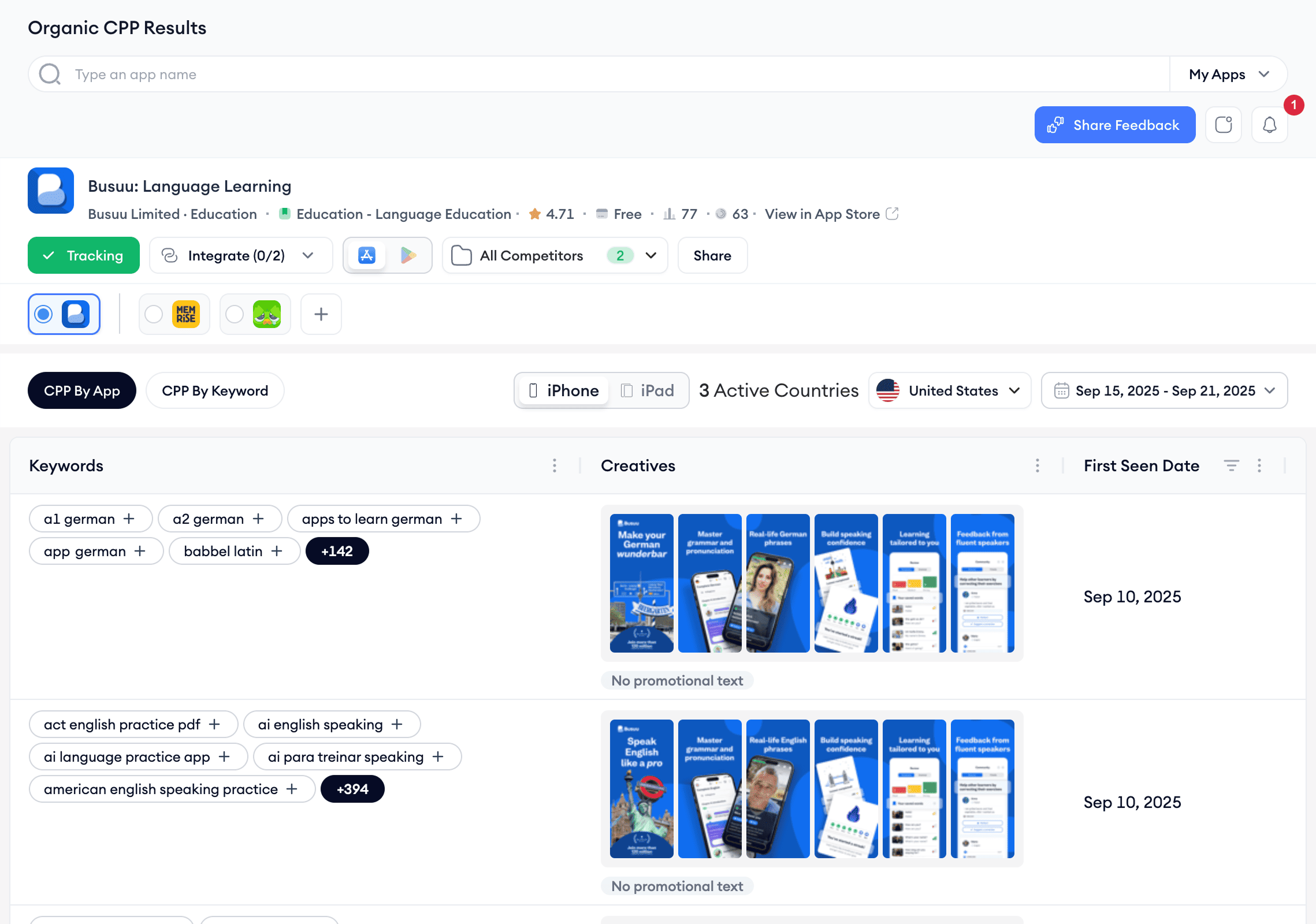
Monitor how competitors are mapping creatives to intent
See how other apps visually represent different search terms. Whether they’re highlighting seasonal themes, localized features, or feature-specific flows, you’ll get a clear picture of what others are doing, and where you can differentiate.
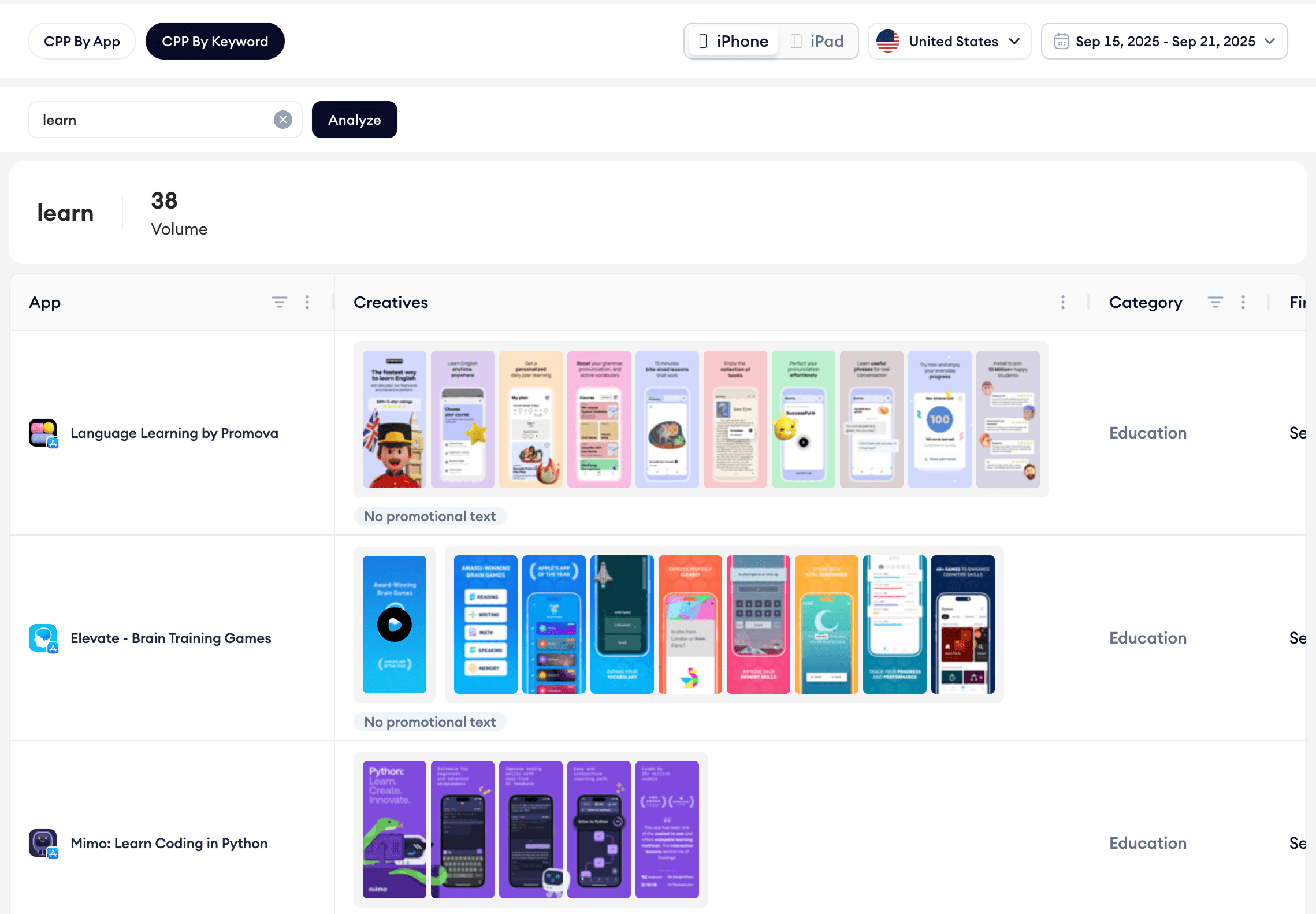
Benchmark your category
Use the CPP by Keyword view to explore how top apps in your space are showing up for priority keywords. You’ll be able to spot category trends, gaps, and creative positioning strategies that can inform your own approach.
Track changes over time
With first seen / last seen data, you can monitor how long a custom product page has been live for a keyword and when apps swap creatives or reassign keyword mappings. This filter is especially useful for seasonal campaigns or A/B testing timelines.
Build data-backed creative briefs
Before investing in new assets, explore what’s already working across the store. Use actual App Store examples to brief your creative team on what to design, from tone and feature focus to layout and localization direction.
Whether you’re launching new pages or fine-tuning existing ones, Organic CPP Results helps you make smarter decisions, backed by real data, not guesswork. It’s your starting point for building custom product pages that actually convert in organic search.
High-impact use-cases you can deploy
Highlight different use cases and features of your app
You can use custom product pages to promote different features or use cases of your mobile app. That way, you’ll create alignment between the search intent and your app screenshots, which eventually lifts your tap-through rates and conversion rates. Because users searching for specific needs may not discover all relevant features of your app if they land on a default product page showcasing everything equally.

Custom product page for “flight” keyword by Expedia (Source: MobileAction’s CPP Intelligence)

Custom product page for “hotel” keyword by Expedia (Source: MobileAction’s CPP Intelligence)

Custom product page for “car rental” keyword by Expedia (Source: MobileAction’s CPP Intelligence)
Expedia, a well-known travel booking platform, offers bookings for flights, hotels, car rentals, vacation homes, cruises and holiday packages.
In this case, Expedia creates targeted custom product pages for “flight”, “hotel” and “car rental” keywords. A user searching for “flight” sees a custom product page emphasizing price tracking and predictions tool, no change fee guarantee, promotion for double points in the app by flight bookings, and exclusive member prices for flights.”
Those searching “hotel” land on pages highlighting accommodation filters including hotels and homes, guest reviews, and last-minute hotel discounts.
Meanwhile, “car rental” searches surface pages focused on vehicle selection, pickup locations on maps, and specific sorting and filtering options while promoting stays, flights, packages, and cruises functionalities to those who search for cars to rent.
This approach ensures that each user immediately sees the most relevant features for their specific travel planning needs, significantly increasing the likelihood of conversion compared to a default product page.
Localize your App Store presence
Custom product pages give app publishers a great opportunity to localize their presence on the App Store. By creating market-specific variations, apps can adapt not just language but cultural nuances, regional preferences, and local market dynamics to resonate authentically with diverse audiences.
Global apps operating across multiple countries can leverage custom product pages to tailor their messaging, promotional offers, and visual elements to specific regional markets. This approach addresses varying consumer behaviors, local competition, and cultural expectations that default product pages often miss.
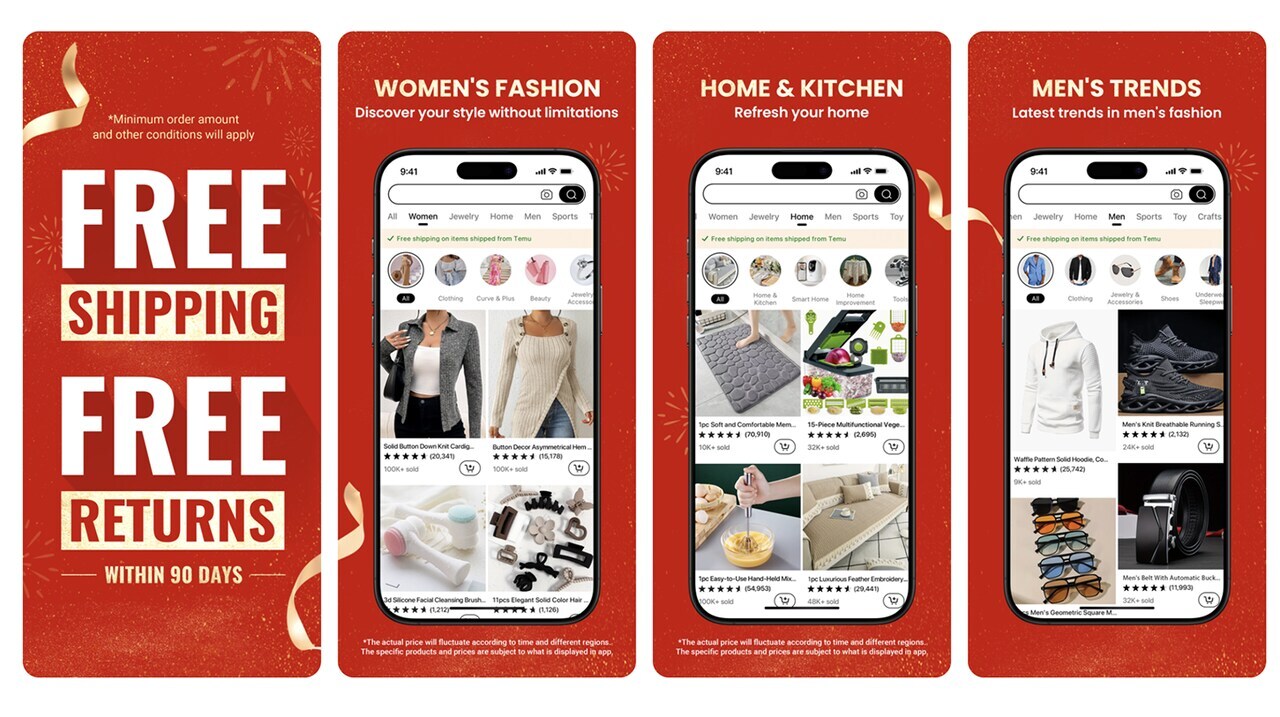
Custom product page for “English” language by Temu (Source: MobileAction’s CPP Intelligence)

Custom product page for “German” language by Temu (Source: MobileAction’s CPP Intelligence)

Custom product page for “Spanish” language by Temu (Source: MobileAction’s CPP Intelligence)
Temu exemplifies this localization strategy across its international markets. Their default English product page emphasizes its free shipping and free returns offering and broad product variety with British shopping behaviors in mind.
In their custom product pages targeting Germany and Spain, they used accurate translations of the same copy while making slight tweaks to the product images, product orders, and category orders.
Target your competitors
Custom product pages can be used to target your competitors on the App Store as well.
You can add your competitor keywords to keywords field in your metadata for different markets and create custom product page variants specifically for them.
Pro tip: Monitor each variant’s performance for three to five weeks. If you notice any high-performing variant, you can make new ad variations based on custom product pages you’ve set up in App Store Connect and start bidding against them with search results ads on the App Store. It’s also a good idea to run a product page campaign on Apple Ads targeting the same competitors.
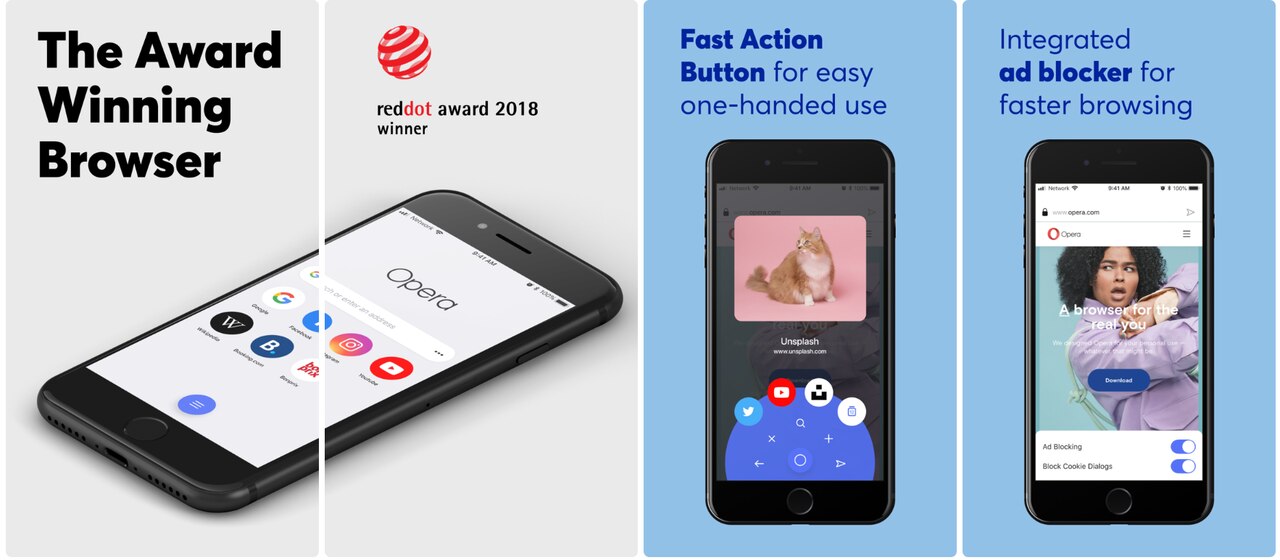
Custom product page for “opera” keyword by Opera (Source: MobileAction’s CPP Intelligence)
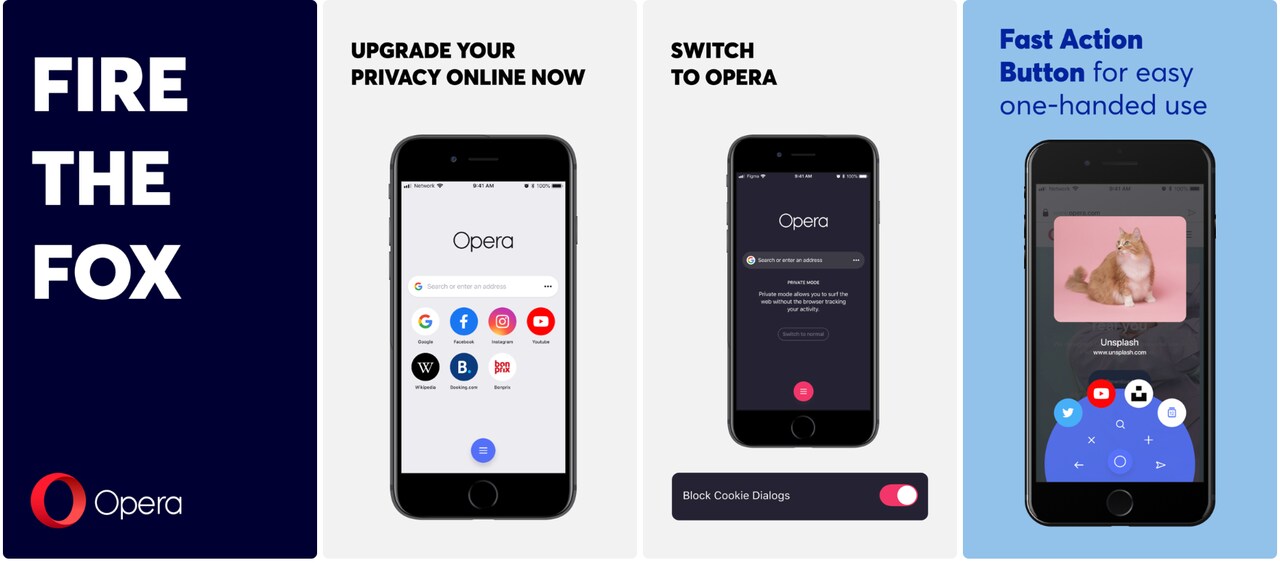
Custom product page for “microsoft edge” keyword by Opera (Source: MobileAction’s CPP Intelligence)
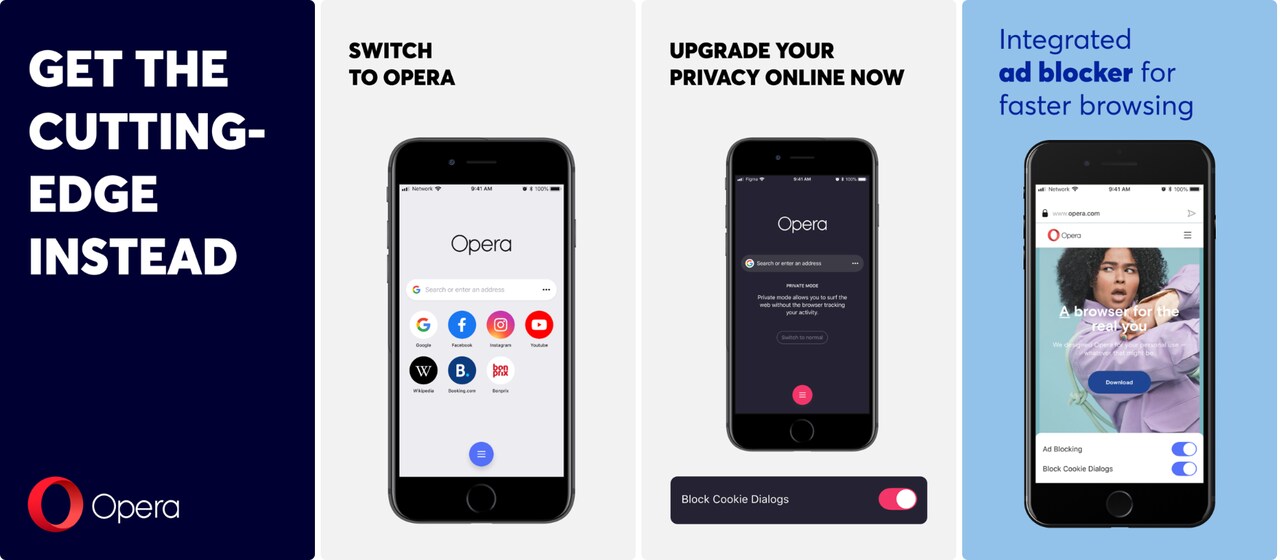
Custom product page for “mozilla firefox” keyword by Opera (Source: MobileAction’s CPP Intelligence)
Opera highlights their award winning browser, fast action button for ease of use and integrated ad blocker here in their default product page but targets “microsoft edge” and “mozilla firefox” keywords with humorous screenshot copies and puts more emphasis on their privacy-centric approach in each variant, making them one of the best examples for custom product page utilization.
Maximize seasonal events
Custom product pages are a great way to capture seasonal momentum. By aligning your app’s presentation with current events and seasonal trends, you can tap into heightened user interest and drive downloads during peak engagement periods.
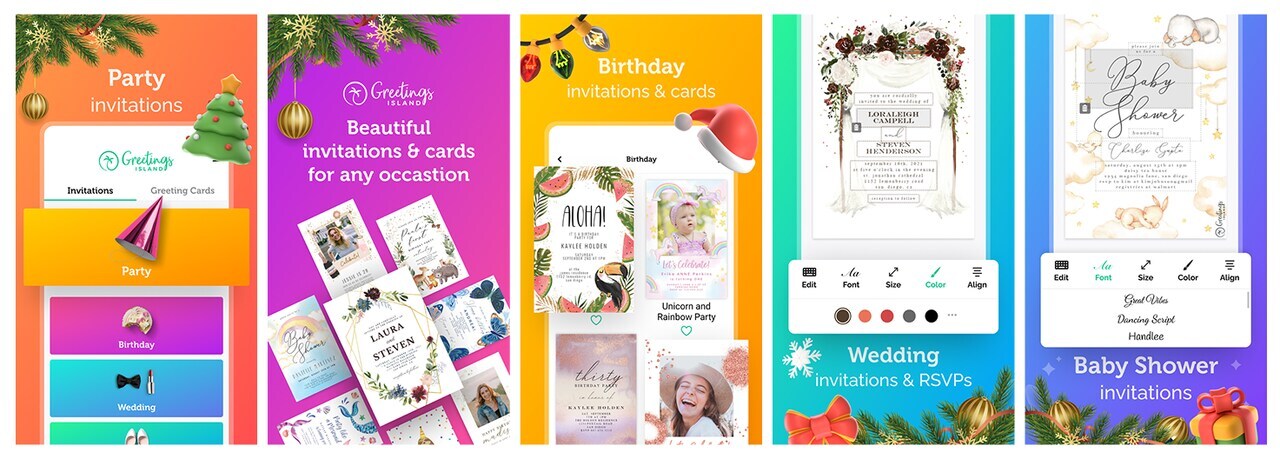
Default product page by “Greetings Island” (Source: MobileAction’s CPP Intelligence)

Custom product page by “Greetings Island” (Source: MobileAction’s CPP Intelligence)
Greetings Island demonstrates this strategy effectively by creating a custom product page for the December holiday season. In this Christmas-themed custom product page, they showcase festive card designs, invitation templates, and seasonal graphics in all screenshots, making them more appealing to users searching for holiday card creation tools.
With the back-to-school season in full swing and major sports leagues about to kick off their new seasons, now is the perfect time to create targeted seasonal custom product pages. Education apps can highlight study planning features and productivity tools, shopping apps can target students or parents with relevant product images, and fantasy sports apps can emphasize new season drafts.
Leveraging ASO and Apple Ads together
One of the biggest benefits of combining ASO with Apple Ads is the synergy they create around keyword strategies. If your app already ranks well for certain keywords organically, you will have an edge in Apple Ads auctions for those same keywords. Strong organic performance makes apps more powerful in the bidding scene on Apple Ads, as your app will be viewed as more relevant for those terms. This increases your chances of winning keyword auctions and improves your chances of stepping up in different ad placements, sometimes even with lower bids.
Conversely, success in Apple Ads helps drive more installs and signals that your app is popular for these keywords, which can also improve organic rankings over time. Your app’s authority will increase as your app and keywords become more familiar with each other.
Metadata keywords were often overlooked compared to title and subtitle for increasing relevancy in ASO. Since app publishers will be targeting more relevant keywords and working with custom product page sets for them, the expected user behavior would be increased organic tap-through rate and conversion rate for these keywords. This should lead to better and faster ranking for keywords that were previously difficult to rank for, and indirectly lower your CPIs and CPAs on the Apple Ads side.
Treat your metadata keywords in ASO as you treat broad match in Apple Ads, and create custom product pages to bring you potential gains. In the meantime, make users land on your default product page by including the generic keywords that describe your app best in your title and subtitle.
Ready to win on the organic App Store growth with custom product pages?
Yes, Apple’s WWDC25 update opened the door for custom product pages to appear organically in App Store search results. But without the right tools, it’s nearly impossible to track which apps are using this feature, which keywords are triggering it, or how different creatives are being mapped to search intent.
As an Apple Ads Partner, MobileAction offers the most expansive products to optimize your custom product pages for both paid and organic performance.
To meet this new opportunity, we built Organic CPP Results, the industry’s first and only tool that brings visibility into how custom product pages show up in organic search. You can track your own app, monitor competitors, and explore which keywords are driving organic visibility.
Whether you’re looking to uncover new keyword opportunities, benchmark creative strategies, or analyze how other apps are tailoring their custom product pages, Organic CPP Results gives you the data to move with confidence.
And that’s just one side of the coin.
MobileAction is the only platform that brings organic and paid custom product page data together. You can now manage your full custom product pages strategy, from visibility to A/B testing, across both acquisition channels.
We offer a full suite of supporting tools to help you build, test, and grow with stronger custom product pages:
- CPP Intelligence: Explore how your competitors and category leaders are using default and custom product pages in different markets, seasonal events, and for their standout features. Benchmark your performance against their impression shares and paid keywords. Gain insights by app, keyword, category, and ad network breakdowns. Measure your custom product page performance to optimize.
- CPP A/B Testing: Test multiple custom product pages by your preferred method. Track all your tests and identify winning variants. Optimize your conversion rates continuously without guesswork.
- ASO Keyword Tools: Discover unique organic keywords, analyze competitors’ gaps, and optimize your app metadata.
- Creative Monitoring: Identify visual trends and strategies, find screenshots of all competitors, and transform yours according to best practices.
- Localization Support: Find localized keywords and review localized app screenshots, previews, copies, and promotional texts. Instantly translate your keywords. Discover and evaluate any app’s performance in different markets. Optimize your app for multiple markets to ensure maximum impact globally.
- Dedicated Expertise: Connect directly with our App Store Marketing experts for performance audits, strategic advice, and recommendations tailored specifically for your app.
Don’t leave growth opportunities on the table. Schedule a call with our team today and transform your custom product pages into high-performing assets that boost both visibility and conversions on the App Store.

Resources that you'll love




Grow your app on the App Store and Google Play Store with our solutions now