






The ground under your Apple Ads reporting has shifted. In August, Apple Ads launched the Apple Ads Platform API, the API that every Apple Ads tool, including MobileAction, now builds on. If your columns, filters, and automations look slightly different, the new API is why.
Find out what Apple Ads changed, what it means for the metrics you already track, what changes in MobileAction, and why the second ad slot Apple Ads added to search results does not make ASO matter less.
What Apple Ads changed
A new API, not a new version
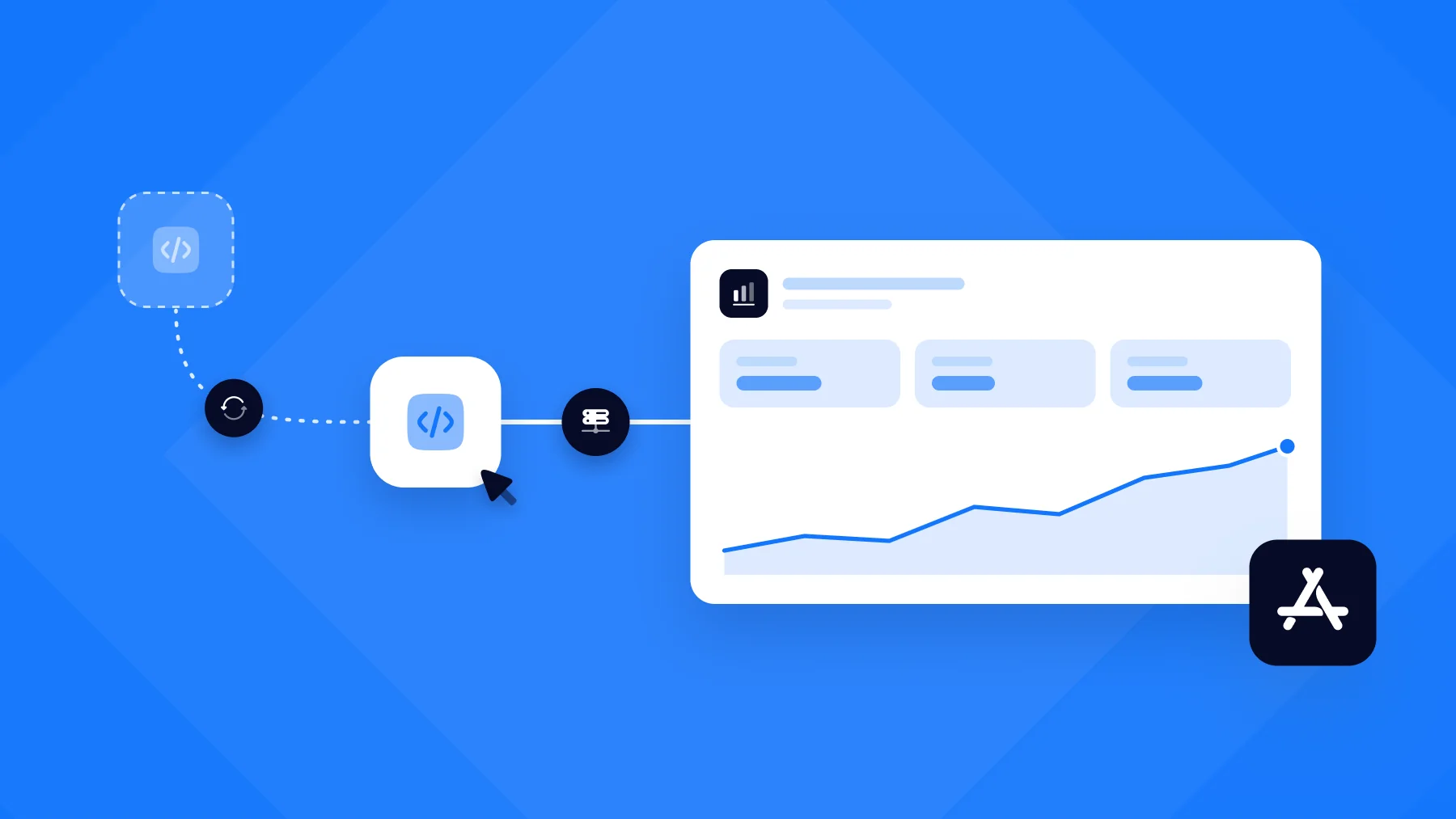
The Apple Ads Platform API succeeds the Campaign Management API, which has powered Apple Ads integrations for years, and manages App Store and Apple Maps campaigns through a single interface.
The Apple Ads Campaign Management API v5 will be retired on January 26, 2027. After that date, anything still depending on it stops working.
If you manage Apple Ads through MobileAction, the migration is done on our side, and you don’t need to take any action. If you also run your own scripts or dashboards against the old API, keep the deadline in mind.
What’s changing
The Platform API restructures everything, but a handful of additions matter to Apple Ads marketers directly:
- Impression Share by ad position: Share of Voice is renamed Impression Share and reported separately for the first ad position and for all ad positions. More on this below, since it is the change you will see first.
- Search Popularity from Apple Ads: A 1 to 100 score for App Store search terms by category and country, straight from Apple Ads, with history back to October 2025.
- Change History: A log of every change to a campaign, ad group, keyword, or ad, including whether a person made it in the interface or an API client made it.
- Suggestions and recommendations: Keyword suggestions, plus budget and Target CPA recommendations, all from Apple Ads.
- Ads on Apple Maps: Businesses can advertise in Maps search results. An ad account is tied to one surface, App Store or Maps, so app campaigns and Maps campaigns live in separate accounts.
Apple Ads is also retiring two settings. Campaigns no longer have a lifetime budget, so the daily budget is what you set. The CPA cap at the ad group level still works for now, but ahead of its deprecation, consider adopting the Maximize Conversions bid strategy for better campaign optimization.
Why Apple Ads made this change
On March 3, 2026, Apple Ads introduced additional placements within search results. Up to two ads can now appear for a single query, and existing search results campaigns were automatically eligible for the new positions without any setup.
Share of Voice was built for a single ad slot. With two positions in play, one number can no longer describe where your ad appeared. An app can hold a strong share across all positions while rarely taking the first one, and those are different situations that call for different bidding decisions. To address this, Apple Ads expanded reporting to measure impression share across individual and total ad positions, providing greater precision for campaign optimization.
What’s renamed and what’s new
Apple Ads Share of Voice becomes Impression Share (First Ad Position), and SOV Rank becomes Impression Share Rank (First Ad Position).
The numbers behind them do not change. A keyword that read 42% last week still reads 42%. Two new metrics report the same two things across all ad positions.
| Before | Now | What it tells you |
| Apple Ads Share of Voice | Impression Share (First Ad Position) | The share of impressions your ads captured in the top ad slot for a keyword or search term. Same data, same numbers as before. |
| New | Impression Share (All Ad Positions) | The share of impressions your ads captured in any ad slot for that keyword or search term. |
| SOV Rank | Impression Share Rank (First Ad Position) | How your app ranks against other advertisers on first-position impression share. |
| New | Impression Share Rank (All Ad Positions) | How your app ranks against other advertisers on impression share across all positions. |
A few details on how the values read:
- Impression Share is shown as an exact percentage from 0 to 90%. Above 90%, Apple Ads reports a range, shown as 91 to 100%.
- Impression Share Rank is now a plain number. SOV Rank used to stop at “greater than 5”; you can now see Rank 8, Rank 14, or wherever you actually stand.
- Both metrics reflect the previous week’s data, regardless of the date range selected in Ads Manager.
- Keywords and search terms with no Apple Ads data show N/A. At the search term level, Apple Ads does not provide Impression Share for low-volume terms.
What changes in MobileAction
A new API and a renamed metric raise the same handful of questions. Here are the answers before the platform-related details.
Do I need to reconnect my Apple Ads account?
No. The move to the Platform API happens on our side, with nothing to reauthorize or set up again.
Does my historical data change?
No. Impression Share (First Ad Position) is the same metric you tracked as Share of Voice, so a chart that spans the rename reads continuously, and week-over-week comparisons still hold.
Do my automations stop working?
No. Conditions built on Apple Ads SOV are renamed to Impression Share (First Ad Position) and continue to run on the same schedule. There is nothing to rebuild.
Does AI Smart Bidding behave differently?
No. Target Impression Share adjusts bids to meet the daily target or range you set, as before. Only the name of the field changed.
Will my scheduled reports arrive broken?
No. They arrive with the new column headers from the next scheduled run, and the values beneath them remain unchanged.
Are my campaigns, bids, or budgets affected?
No. Nothing about campaign structure or spend changes with this update.
Where you’ll notice the new metrics
Ads Manager
At the Keyword and Search Term levels, the Apple Ads Share of Voice column and filter are now Impression Share (First Ad Position). Impression Share (All Ad Positions) is added as a default column, with its own filter and a Daily Impression Share (All Ad Positions) History chart behind the chart icon in each cell.
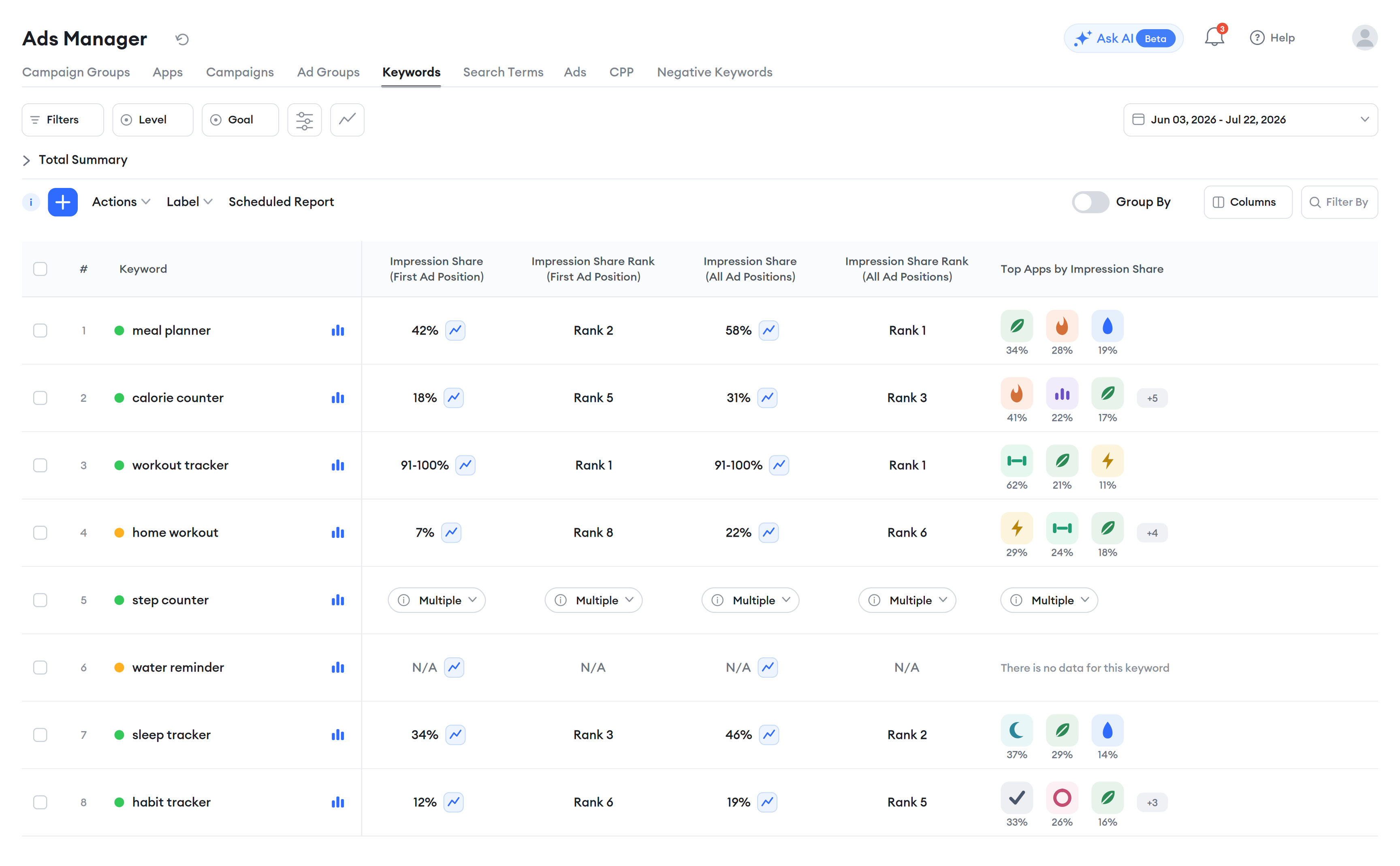
Both Impression Share Rank columns display as Rank 1, Rank 2, and so on, with numeric filters. Top Apps by Apple Ads SOV is now Top Apps by Impression Share. For multi-storefront keywords, a Multiple badge under the value opens a per-storefront breakdown. Impression Share columns are not affected by the Compare option in the date picker, so they show no trend badges or previous values.
Automations
Existing conditions on Apple Ads SOV are renamed to Impression Share (First Ad Position) and keep running. Keyword-level conditions now also include Impression Share (All Ad Positions) and Impression Share Rank for both positions, each on a weekly or daily basis. Daily conditions compare with other daily Impression Share metrics, and weekly with weekly. Rank conditions take a number you enter instead of a value from a preset list.
AI Smart Bidding
The Target Impression Share strategy adjusts each keyword’s last-day Impression Share (First Ad Position) toward the daily target or range you set. The strategy works the same way; the target field now names the metric it optimizes.
Exports and scheduled reports
Column headers will follow the new naming convention starting with the next scheduled run. Any Impression Share or Impression Share Rank column you have added to your table is included in exports. The Campaign Group action is now Download Impression Share Report, with a single dropdown to choose First Ad Position or All Ad Positions at daily or weekly granularity.
Saved filters
Saved filters on Share of Voice or SOV Rank carry over under the new names. Rank filters now take a numeric input.
Search Ads Intelligence
The module is not affected. The impression share estimates you see there for any app, including competitors you don’t manage, are MobileAction’s own data and keep their name and source.
Does this update make ASO matter less?
The short answer is no, and the reasoning is worth spelling out because “two ads above the organic results” makes it seem like the paid layer is crowding out everything else.
In our observation, which ad appears depends on the app’s relevance to the query combined with the bid. Relevance is shaped by the app’s metadata, which includes the title, subtitle, keywords, and the rest of the listing. What we see is that a higher bid alone rarely earns impressions on keywords where an app isn’t relevant. That held with one ad position, and we expect it to hold with two. More positions mean more moments where metadata quality matters, so the work ASO managers do on the listing now supports paid visibility across more placements.
At the same time, organic rank now sits below more paid activity than it used to, and until now the amount of paid pressure on a keyword was hard to quantify. Impression Share (All Ad Positions) is the first direct read on that. A keyword where competitors hold a high share across all positions is one where a number-one organic rank is less likely to be seen, and that is useful information for an ASO manager deciding where to defend and where to move on.
In MobileAction, both readings sit at the keyword level. The Organic Rank Chart lets you plot Impression Share (First Ad Position) against organic rank for the same keyword over time, and Top Apps by Impression Share shows which apps hold the paid layer for that term.
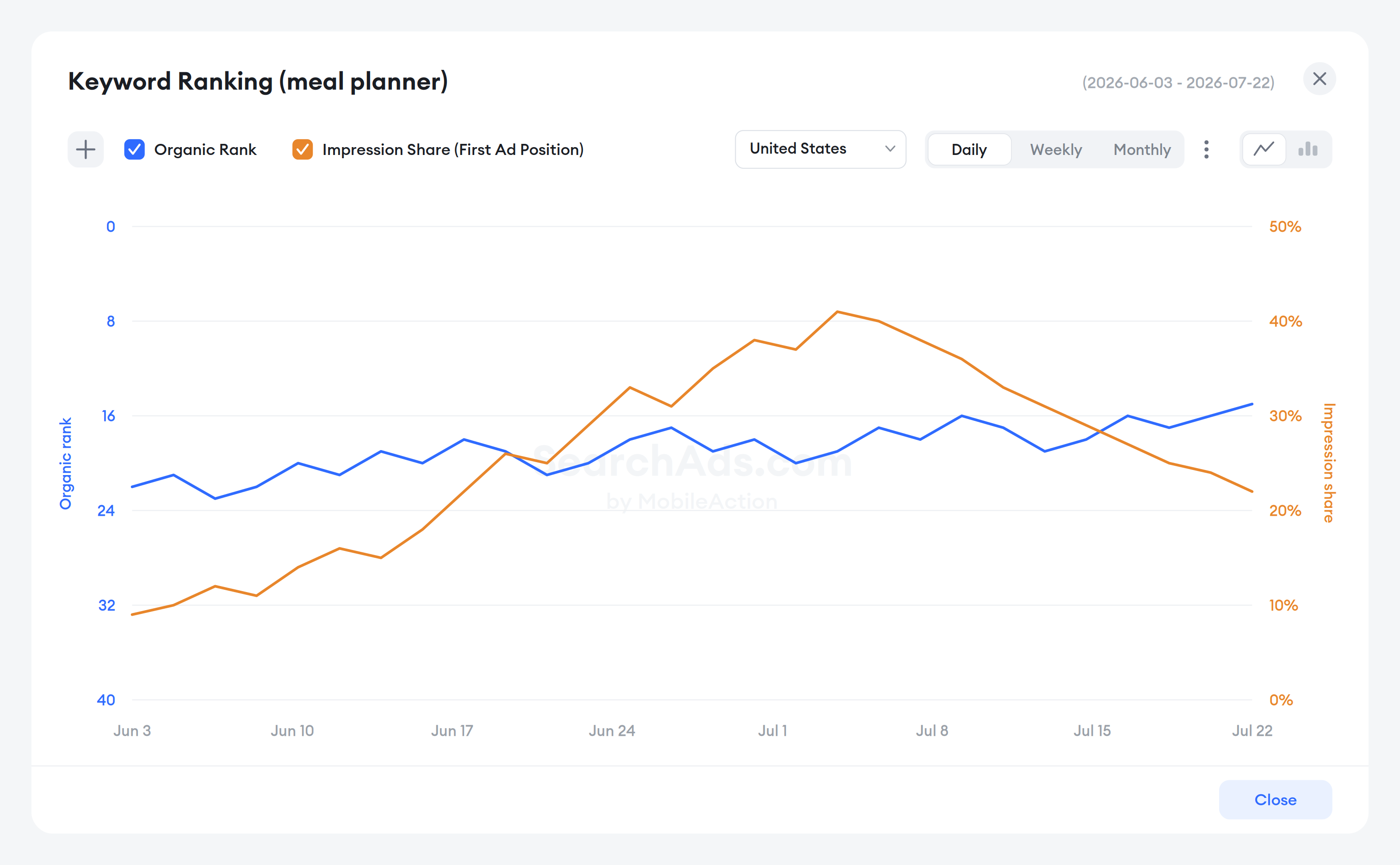
For UA and ASO teams that work from the same keyword list, the paid and organic view of a keyword now reads as one picture.
What to do next
In the MobileAction platform, open the Keywords tab in Ads Manager to see Impression Share (First Ad Position) and Impression Share (All Ad Positions) side by side for your current keyword set, and add the All Ad Positions column to any scheduled report where it belongs.
For a complete reference for each metric, see “Understand metrics in Ads Manager” in the help center. If you have questions about how the update affects a specific automation or report, contact us so your Customer Success Manager can walk you through it.

Content Marketing Manager
Resources that you'll love



Grow your app on the App Store and Google Play Store with our solutions now