










A collection of 30 ready-to-use questions for Apple Ads campaign analysis, covering performance checks, root-cause analysis, keyword opportunities, bids and budgets, visibility, and account audits with MobileAction's AI Assistant.
Read ReportApple Ads best practices focus on campaign structure, keyword relevance, bid control, and performance measurement.
In 2026, advertisers should organize campaigns by search intent, align bids with user value, use custom product pages for relevant keyword groups, and evaluate post-install metrics alongside downloads. ASO data, automation, and competitor insights should also be included in campaign optimization.
Apple Ads best practices and tips
1. Choose the right Apple Ads setup for your growth stage
Apple Ads offers different levels of campaign control. For small teams or early-stage advertisers, a simpler setup may be enough to start testing. But for growth teams, Apple Ads Advanced is usually the better fit because it gives more control over keywords, bids, audiences, placements, reporting, and campaign structure.
For most app marketers, Apple Ads Advanced is the right choice when they need to:
- Separate brand, category, competitor, and discovery campaigns
- Control exact match and broad match differently
- Set different bids by keyword intent
- Use custom product pages and ad variations
- Compare performance across countries or regions
- Measure CPA, ROAS, retention, subscriptions, purchases, or other post-install events
- Use automation or third-party campaign management tools
Apple Ads also now highlights Maximize Conversions, an AI-powered option for search results campaigns. It uses automated bidding and Search Match to help drive downloads at a target CPA set by the advertiser. Apple Ads says this strategy uses real-time signals to set optimal bids for relevant search queries, while still allowing advertisers to switch back to manual keyword bids when they want more control.
2. Build campaigns around intent
The most important Apple Ads best practice is campaign structure. Apple recommends separating search results campaigns by keyword themes: Brand, Category, Competitor, and Discovery. This structure makes performance easier to measure and helps advertisers optimize bids, keywords, and budgets more clearly.
Do not throw all keywords into one campaign. That creates reporting noise. A brand keyword, a broad category keyword, and a competitor keyword do not have the same intent, cost, conversion rate, or business value.
Use this structure instead:
| Campaign type | Purpose | Keyword examples | Recommended match logic | Main KPI |
| Brand | Capture users already searching for your app or company | Your app name, company name, branded misspellings | Exact match | Impression share, CPT, CPA, conversion rate |
| Category | Reach users searching for your app’s function or category | “fitness tracker,” “budget planner,” “photo editor” | Exact match for proven terms; broad match only in separate discovery setup | CPA, conversion rate, ROAS |
| Competitor | Reach users comparing similar apps | Competitor app names, competitor brand terms | Exact match | CPA, tap-through rate, install quality |
| Discovery | Find new search terms and keyword opportunities | Broad versions of core keywords; Search Match ad group | Broad match and Search Match | Search term discovery, new exact keywords, negative keywords |
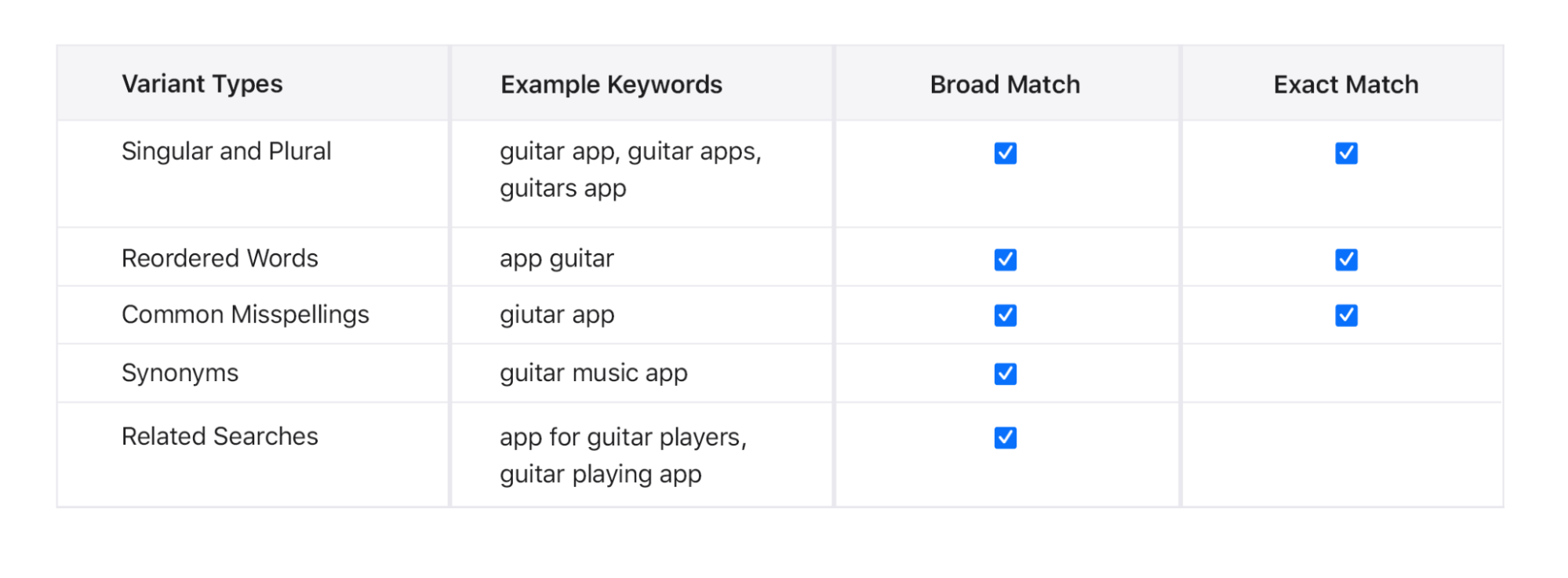
Apple specifically recommends using exact match for Brand, Category, and Competitor campaigns, turning Search Match off for those core campaigns, and applying more aggressive bids to the highest-performing keywords. For Discovery, Apple recommends broad match and Search Match to uncover new search terms, then moving strong performers into the appropriate exact match campaign.
3. Treat keywords as a system
Apple Ads keyword strategy starts with user intent. Apple recommends thinking like your customers and considering the search terms people might use to find an app like yours. These may include your app name, your category, your use cases, secondary needs, and similar brands.
That sounds simple, but many accounts still make the same mistake: they collect a long keyword list and assume more keywords equals more scale.
It does not.
A better approach is to group keywords by intent and decision stage.
| Keyword type | Example | User intent | How to handle it |
| Brand | “calm app” | Already looking for you | Protect aggressively |
| Direct category | “meditation app” | Looking for a solution | Bid based on CPA and value |
| Use case | “sleep sounds” | Looking for a specific problem/feature | Match with relevant CPP |
| Competitor | “headspace” | Comparing options | Use differentiation-focused CPP |
| Broad discovery | “wellness” | Unclear intent | Test carefully |
| Seasonal | “new year fitness plan” | Time-sensitive intent | Use seasonal budget and creative |
The goal is to show up for the right query with the right bid and the right product page.
4. Match bids to business value
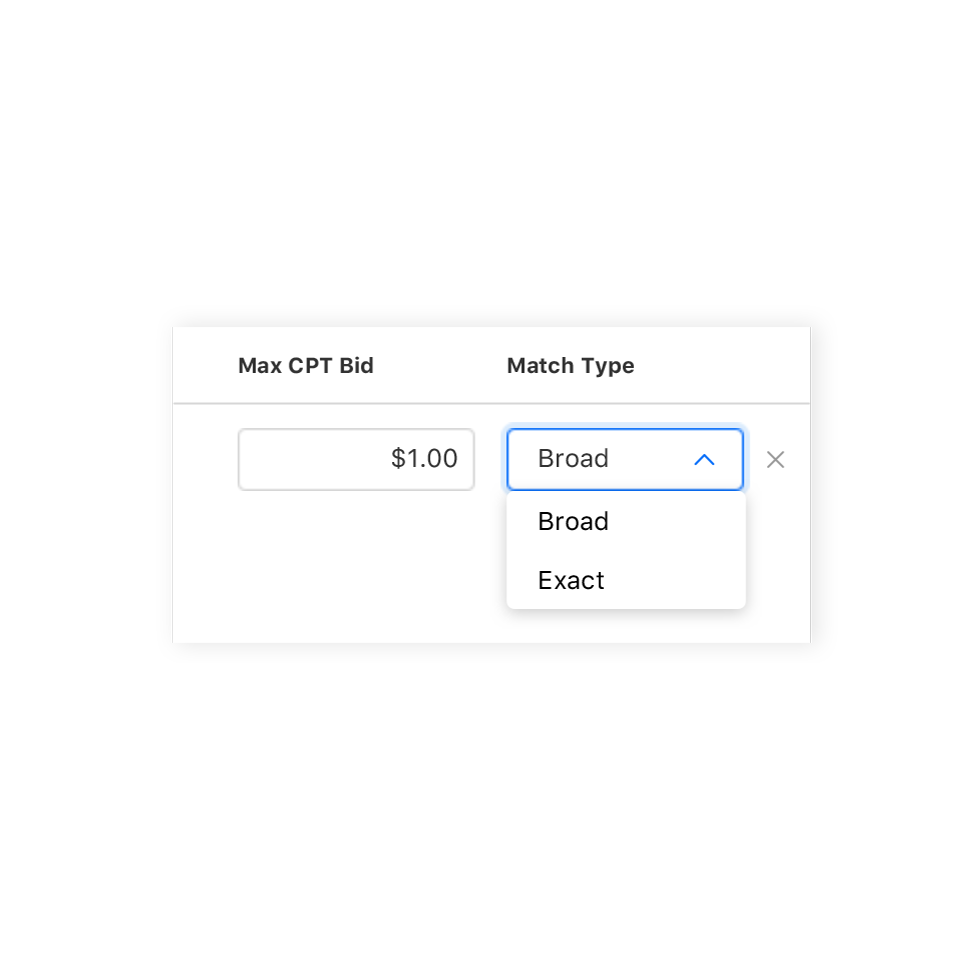
Apple Ads uses cost-per-tap pricing, which means you pay when users tap your ad. Apple explains that your max CPT bid is the highest amount you are willing to pay for a tap, though you may pay less in practice.
The mistake is to set bids based only on traffic volume. A keyword with a high tap volume is not automatically valuable. A keyword is valuable when it brings users who convert, retain, subscribe, purchase, or generate revenue.
Your bid strategy should reflect:
- Search intent
- Conversion rate
- Target CPA
- Expected LTV
- Subscription or purchase behavior
- Storefront value
- Competition level
- Seasonality
- Budget availability
Apple recommends more aggressive bids for exact match keywords because they are usually core performance drivers, while broad match and Search Match should generally use more moderate bids because they are more discovery-oriented. Apple also recommends keeping broad and exact keywords separate so bids can be managed independently.
When to raise bids
Raise bids when:
- A keyword converts below your target CPA.
- A keyword has strong post-install value.
- Impression share is low for a relevant, high-value term.
- You are being outbid on important category or brand terms.
- A Discovery term proves strong enough to promote into exact match.
- Seasonal demand is increasing and the keyword is strategically important.
Apple also recommends considering bid increases when relevant popular keywords are not receiving many impressions, because low impressions may mean competitors are outbidding you.
When to lower bids
Lower or reevaluate bids when:
- A keyword gets taps but does not convert.
- CPA is above target.
- Installs are low quality.
- Post-install events are weak.
- Spend is concentrated in broad terms with unclear value.
- A competitor keyword is expensive but not converting.
Apple specifically notes that advertisers may want to reevaluate max CPT bids when a keyword gets taps but low conversions at an acquisition cost above target.
Do not optimize all keywords with the same CPA target
Not every keyword deserves the same CPA target. Brand campaigns may have lower CPA and higher conversion rates. Competitor campaigns may cost more but still be valuable if they bring high-LTV users. Category campaigns may need different CPA targets by country, keyword cluster, or app monetization model.
A good Apple Ads account should have different expectations for different types of demand.
5. Use Apple Ads recommendations
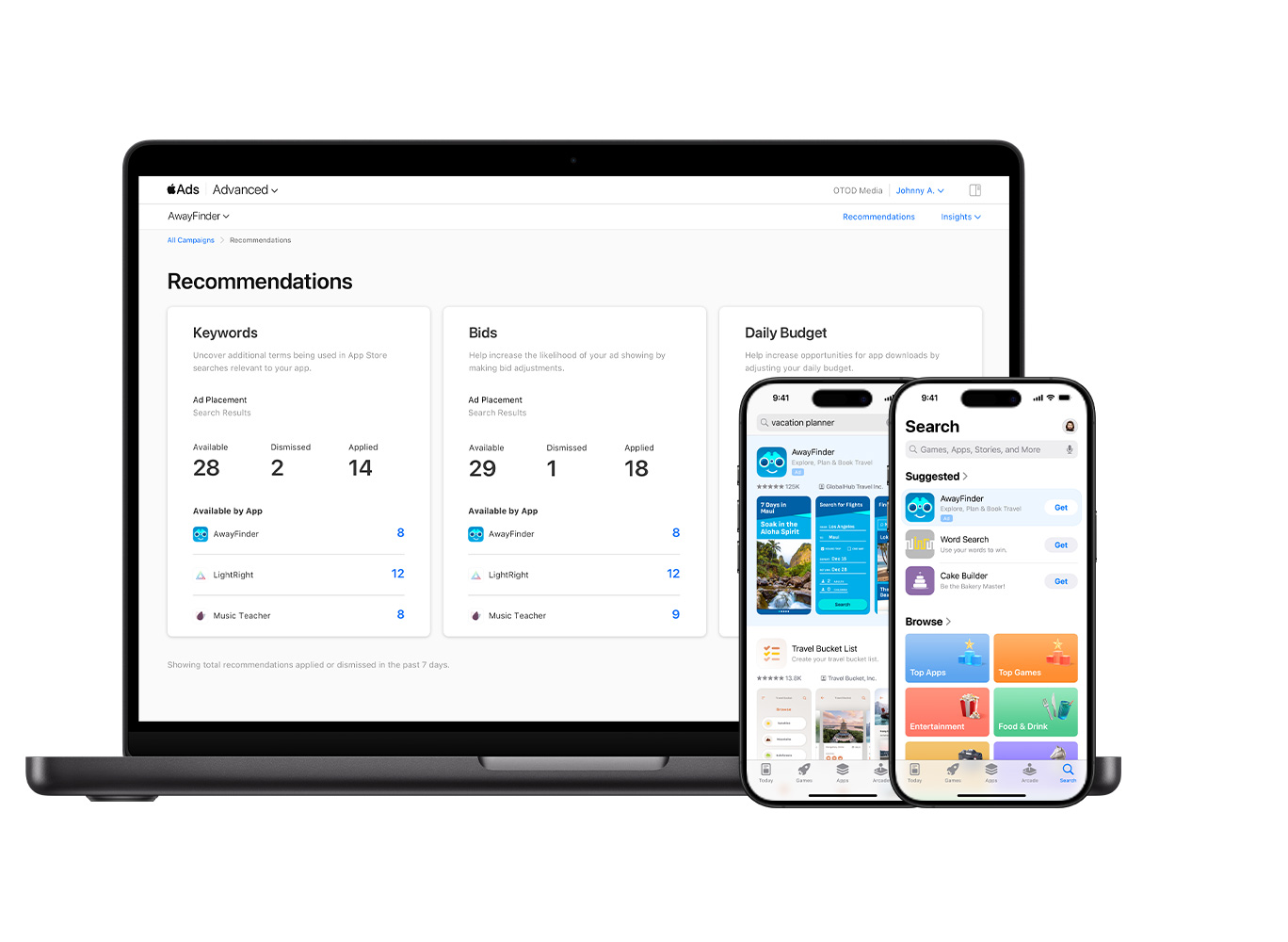
Apple Ads provides keyword, bid, and daily budget recommendations. Apple Ads best-practices hub says recommendations are designed to give advertisers more insight into how to optimize campaigns.
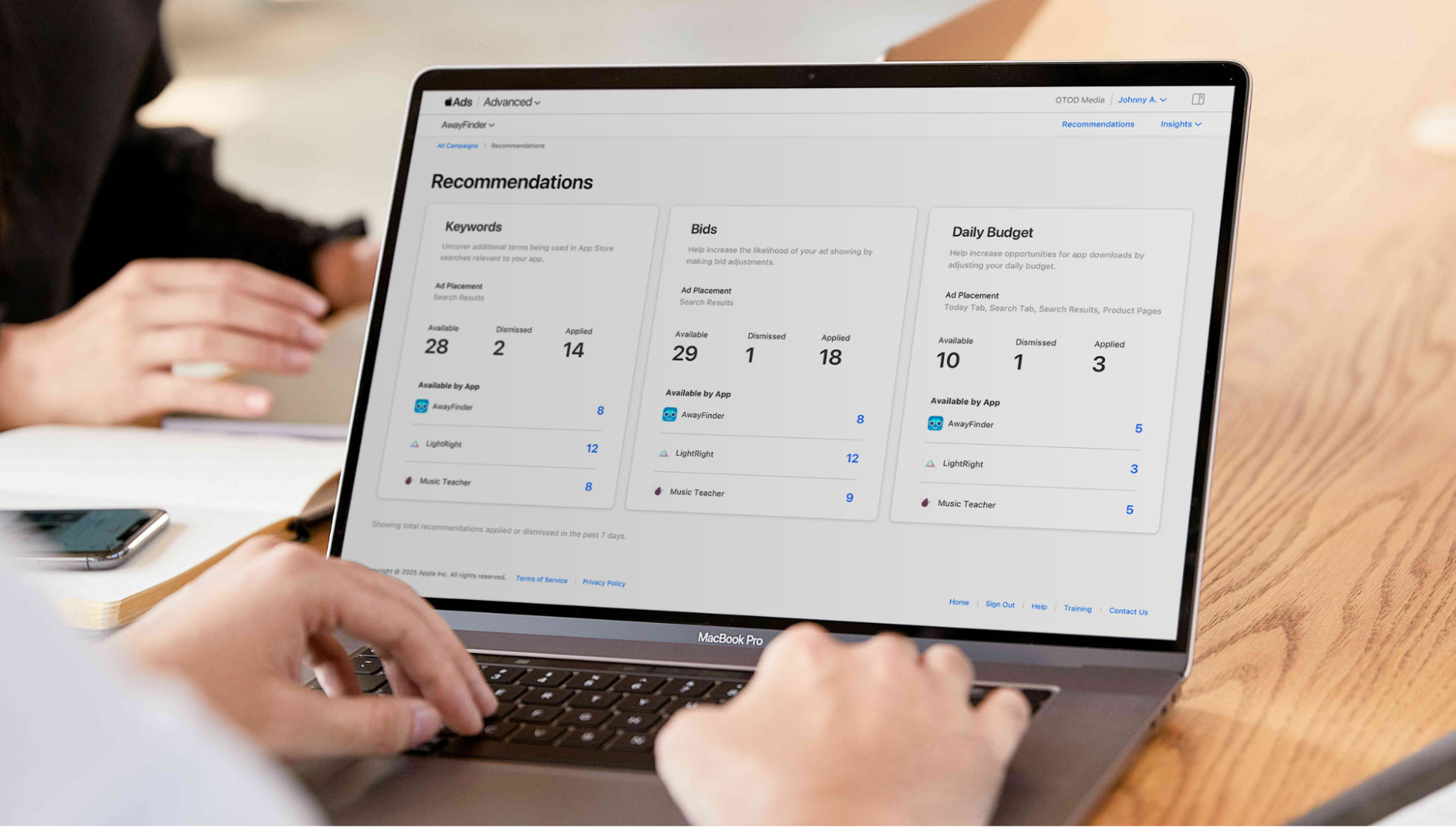
Apple’s manual bidding guidance says bid recommendations may include context such as impression share, rank, search popularity, installs, spend, average CPA, average CPT, impressions, tap-through rate, and estimated installs, spend, and average CPA.
These recommendations can be useful, but they should not replace your own performance logic.
Before applying a recommendation, ask:
- Is this keyword relevant to our app?
- Does this term match our ideal user?
- Is the suggested bid aligned with our CPA or ROAS target?
- Do we have enough budget to support the change?
- Is this keyword already covered in another campaign?
- Do we have a custom product page that matches the intent?
- Does MMP or post-install data confirm quality?
Apple’s recommendations are inputs. Your business goals should make the final decision.
6. Improve relevance with custom product pages and ad variations
Custom product pages are one of the biggest Apple Ads opportunities in 2026.
Apple says developers can publish up to 70 additional versions of their App Store product page for iPhone and iPad. These pages can vary app screenshots, promotional text, and app previews to highlight specific features, content, seasons, or audiences. They can also be used within Apple Ads campaigns.
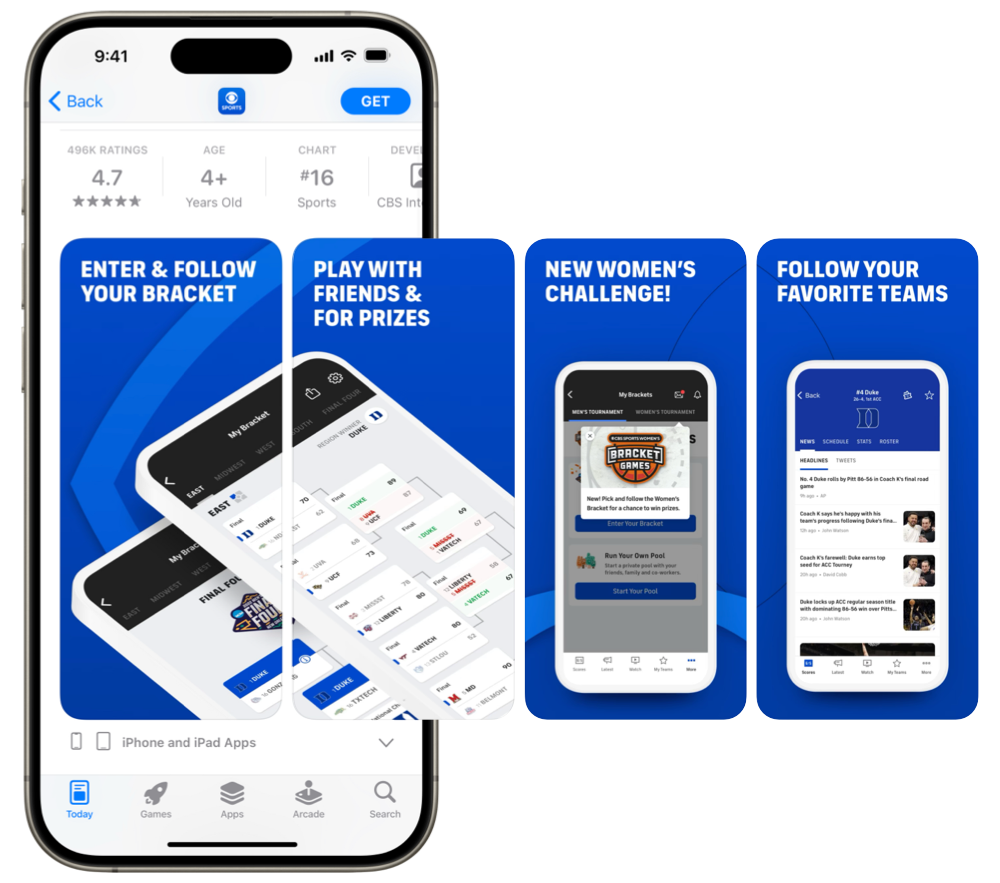
For a deeper understanding, you can check our custom product pages guide.
This matters because Apple Ads performance is not only about the keyword or bid. It is also about what the user sees after they tap.
If someone searches “budget planner app,” they should not land on a generic product page that talks equally about every feature. They should land on a page that immediately reinforces budgeting, expense tracking, savings goals, or whatever matches the query.
High-impact custom product page use cases
Use custom product pages for:
- Category keywords
- Competitor campaigns
- Seasonal campaigns
- Feature-specific campaigns
- Localized storefronts
- Subscription-focused campaigns
- Audience-specific messaging
- Promotional campaigns
- Event-based campaigns
- New feature launches
7. Expand placements strategically
Apple Ads is not limited to search results. Ads can appear across the App Store in the Today tab, Search tab, search results, and product pages. Apple’s App Store advertising overview lists all four placements.
Each placement plays a different role.
| Placement | Best for | User intent | Best-practice approach |
| Search results | Capturing direct demand | High | Start here for performance campaigns |
| Search tab | Reaching users before they search | Medium | Pair with search results for broader discovery |
| Today tab | High-visibility awareness | Lower but broad | Use for launches, seasonal pushes, or brand moments |
| Product pages | Reaching users researching apps | Medium | Use category targeting carefully |
Apple recommends using Search tab and search results campaigns together to reach additional users and increase searches for your brand. Apple also notes that creating a Search tab campaign does not require keywords and uses one bid.
The best placement strategy depends on your growth stage.
Start with search results if performance is the priority
Search results campaigns usually provide the clearest intent signal because the user has typed a specific query. This is where keyword structure, match type, bidding, and custom product pages matter most.
Since March 2026, search results inventory has also expanded. Search results ads are no longer limited only to the top position in App Store search results. They can also appear further down the page, creating additional opportunities to reach users while they are actively searching.
This does not mean advertisers need a separate campaign type or a new placement strategy from scratch. Existing search results campaigns can become eligible for the expanded inventory, while the fundamentals remain the same: keyword relevance, bid strategy, budget pacing, and creative fit still determine how well campaigns perform.
What does change is how teams should read search results performance. A single search results campaign may now capture visibility from different positions on the page. That makes it more important to look beyond total impressions or total impression share and understand where visibility is coming from.
For a deeper breakdown of what changed and how to evaluate search results visibility after this update, read our guide on expanded Apple Ads search results inventory.
Add Search tab when you want broader discovery
Search tab ads can help you appear before users complete a search. This can support brand discovery and incremental reach, especially when paired with search results.
Use Today tab for visibility moments
Today tab ads are more prominent and can support product launches, seasonal moments, brand campaigns, and major promotions. Apple says Today tab ads appear where more than half a billion weekly App Store visitors start their journey.
Use product page ads to reach comparison behavior
Product page ads appear when users are browsing app product pages. These users may be comparing options, researching alternatives, or moving through a decision process. Product page campaigns can be useful, but they need careful category selection and measurement.
Measure placements together, not only in isolation
Apple advises advertisers to consider view-through metrics and total metrics because an install may not be caused only by the last placement a user saw. Apple also recommends letting campaigns run for some time before making changes after allocating budgets and bids across placements.
That is a good reminder: multi-placement strategy needs patience. Do not turn off a placement too quickly before you understand its supporting role. For search results specifically, the March 2026 inventory expansion also means advertisers should be careful not to judge performance only at the aggregate level. Placement-level visibility inside search results can change how impression share, reach, and scale should be interpreted.
8. Measure more than installs
Install volume is useful, but it is not enough.
A campaign can drive many downloads and still fail if users do not open the app, subscribe, purchase, retain, or reach meaningful in-app milestones. In 2026, Apple Ads optimization should connect acquisition metrics with post-install quality.
Apple notes that Apple Ads and MMP reporting may differ because Apple Ads reports App Store-verified downloads following an ad tap or view, while MMPs usually report installs based on first app open. Apple also says Apple Ads has a 30-day attribution window from a tap for downloads and redownloads, while MMP attribution windows can vary.
That means discrepancies are not automatically errors. They often come from different attribution logic.
The best practice is to use Apple Ads data for platform-level campaign delivery and Apple-verified download reporting, while using MMP or internal analytics data to evaluate post-install value.
9. Connect Apple Ads and ASO
Apple Ads and ASO should not be treated as separate channels. They influence each other.
Apple Ads gives you paid search data. ASO gives you organic visibility and conversion context. Together, they help you understand what users search, what messaging converts, and which product page assets perform best.
Use Apple Ads data to improve ASO by asking:
- Which paid keywords convert well?
- Which search terms appear in Discovery campaigns?
- Which category keywords have strong tap-to-install rates?
- Which competitor terms show demand?
- Which CPP messages improve conversion?
- Which storefronts respond to which keyword clusters?
- Which paid terms may be worth targeting organically?
Use ASO data to improve Apple Ads by asking:
- Which organic keywords already rank well?
- Which keywords have high popularity but weak organic visibility?
- Which competitors dominate key search results?
- Which screenshots or messages improve conversion?
- Which localization gaps affect campaign performance?
- Which ratings or reviews may hurt paid conversion?
The strongest teams use Apple Ads as a learning engine for ASO, not just a paid acquisition channel.
10. Localize by country or region
A keyword strategy that works in the U.S. may not work the same way in France, Germany, Japan, Brazil, Turkey, or Saudi Arabia. Search behavior, competition, conversion rates, monetization, and user expectations can vary significantly by market.
Apple’s campaign structure guidance says advertisers can separate campaigns by individual App Store countries or regions when larger markets require dedicated budgets or have distinct goals. Apple also says countries and regions can be grouped when they share similar goals or attributes such as customer value, language, regional sales patterns, or financial centers.
Best practices for country and region expansion:
- Separate major markets with different budgets or targets.
- Group smaller markets only when they behave similarly.
- Localize keywords based on real search behavior, not direct translation.
- Build custom product pages for important local audiences.
- Compare CPA and ROAS by country or region.
- Adjust bids based on local value, competition, and conversion behavior.
- Watch for seasonal, cultural, and language differences.
For a deeper look at how localization affects app growth, keyword strategy, and App Store visibility, you can read our app localization guide.
The strongest Apple Ads accounts treat each important country or region as its own growth environment, with its own search behavior, competitive pressure, creative expectations, and performance benchmarks.
11. Use automation carefully
Automation can make Apple Ads management more efficient, especially when accounts have many campaigns, storefronts, keywords, and performance targets.
Apple’s Maximize Conversions is one example of Apple-native automation. It uses automated bidding and matching to help drive downloads at a target CPA. Apple recommends setting a daily budget that allows for at least five conversions per day for Maximize Conversions campaigns.
Third-party automation can also help teams manage bids, budgets, alerts, and optimization workflows across larger accounts.
Automation is useful for:
- Scaling bid changes across many keywords
- Monitoring performance thresholds
- Reallocating budget
- Pausing inefficient entities
- Increasing bids on high-performing keywords
- Detecting spend anomalies
- Managing CPA, ROAS, or impression share goals
- Reducing manual reporting work
But automation should not replace strategy. It needs clear rules, clean data, and human review.
For example, “increase bids for keywords with CPA below target” is too broad. A better rule would include minimum spend, minimum downloads, conversion rate, current impression share, and maximum bid limits.
MobileAction Apple Ads campaign management platform connects Apple Ads data with MMP data, bidding strategies, rule-based automations, and granular performance monitoring in one workspace. This is valuable because Apple Ads optimization becomes much more effective when acquisition data, post-install data, and automation logic are connected.
12. Build a weekly Apple Ads optimization workflow
Apple Ads performance should be reviewed on a weekly basis. The goal is to identify what is working, what is wasting spend, and where campaigns need structural, bid, budget, or creative adjustments.
During the weekly review, check campaign structure first. Brand, Category, Competitor, and Discovery campaigns should remain clearly separated. Keywords should not overlap across campaigns, strong Discovery terms should be moved into exact match campaigns, and irrelevant or inefficient search terms should be added as negative keywords.
Next, review keyword performance. Identify which exact match keywords are driving efficient scale, which broad match or Search Match terms are producing useful search queries, and which terms are spending without converting. Also check for new keyword trends, competitor terms that are no longer efficient, and keyword groups that may need a more relevant custom product page.
Bids and budgets should be reviewed together. Increase bids where high-value keywords have strong conversion quality but limited impression share. Reduce or pause bids where CPA is above target, conversion quality is weak, or post-install performance does not justify the spend. Budgets should support the campaigns that matter most, including brand protection, proven category demand, and experiments that need enough volume to produce reliable data.
Creative and custom product pages should also be part of the review. Compare how custom product pages perform against the default product page. Check whether important keyword groups, competitor campaigns, seasonal campaigns, or audience-specific campaigns need more relevant screenshots, app previews, or messaging.
Finally, review post-install performance. Apple Ads data should be evaluated alongside MMP or internal analytics data to understand which campaigns drive valuable users. Look beyond downloads and compare first opens, registrations, trials, purchases, subscriptions, revenue, retention, ROAS, or other events that matter to your app.
A weekly optimization workflow should cover campaign structure, keywords, bids, budgets, creative, custom product pages, and post-install performance. The purpose is not to make unnecessary changes every week, but to make consistent decisions based on spend, efficiency, and user quality.
Final thoughts
Apple Ads best practices in 2026 are not about finding one perfect bid, one perfect keyword list, or one perfect campaign setup.
The best results come from a system:
- Structure campaigns by intent.
- Use exact match for control and broad match for discovery.
- Add negative keywords regularly.
- Bid based on business value, not just traffic.
- Use custom product pages to improve relevance.
- Expand placements with a clear role for each one.
- Measure beyond installs.
- Connect Apple Ads with ASO and post-install data.
- Use automation carefully, with human strategy behind it.
Apple Ads gives app marketers access to some of the highest-intent users in mobile. But winning that intent requires clarity. The advertisers who scale efficiently are the ones who know what each campaign is meant to do, what each keyword is worth, what each product page should communicate, and which users are valuable after the download.
That is the real best practice: build an Apple Ads system that learns, improves, and scales over time.
Frequently asked questions
What are the best Apple Ads practices in 2026?
The most important Apple Ads best practices are to structure campaigns by intent, separate Brand, Category, Competitor, and Discovery campaigns, use exact match for proven keywords, use broad match and Search Match for discovery, add negative keywords regularly, align custom product pages with keyword intent, and measure post-install value instead of only installs.
How should I structure Apple Ads campaigns?
Apple recommends structuring search results campaigns around four keyword themes: Brand, Category, Competitor, and Discovery. Brand, Category, and Competitor campaigns should focus on exact match keywords, while Discovery campaigns can use broad match and Search Match to find new search terms.
Should I use broad match or exact match in Apple Ads?
Use both, but for different purposes. Exact match is better for proven, high-intent keywords that need bid control. Broad match is better for discovery, trend coverage, and finding new search terms. Keep them in separate campaigns or ad groups so you can manage bids and performance clearly.
How do custom product pages improve Apple Ads performance?
Custom product pages help you match the post-tap experience to the user’s search intent. Apple allows up to 70 additional product page versions, and these pages can vary screenshots, promotional text, and app previews. They can also be used in Apple Ads campaigns and search results ad variations.
Which Apple Ads metrics should I track?
Track impressions, taps, tap-through rate, downloads, redownloads, conversion rate, average CPT, spend, average CPA, impression share, and rank. For better optimization, also track post-install metrics such as first opens, registrations, subscriptions, purchases, revenue, ROAS, retention, and LTV.
Why do Apple Ads and MMP numbers differ?
Apple Ads reports App Store-verified downloads after an ad tap or view, while MMPs usually report installs based on first app open. Attribution windows and redownload logic can also differ, so some reporting differences are expected.

Your mobile app growth partner with intelligence, automation and expertise.
Resources that you'll love





Grow your app on the App Store and Google Play Store with our solutions now